AI SpreadsheetAI Documents AssistantAI Analytics Assistant
Users of this tool
Data ScientistsBusiness AnalystsResearchersStudentsData Enthusiasts
PricingType
Free
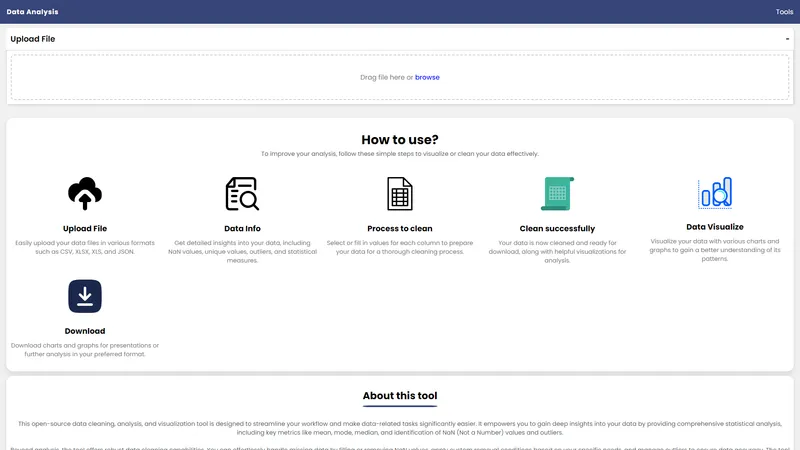
The Online Data Analysis Tool is a powerful, open-source web-based application designed to simplify the process of cleaning, analyzing, and visualizing data. It supports various file formats, including CSV, XLSX, XLS, and JSON, making it a versatile solution for data professionals and enthusiasts alike. The tool operates entirely within your browser, ensuring that your data remains secure and private, as it is never uploaded to external servers. With features like detailed statistical analysis, robust data cleaning capabilities, and comprehensive visualization options, this tool empowers users to gain deep insights into their data. Whether you're dealing with missing values, outliers, or simply need to visualize data patterns, this tool provides a seamless and efficient workflow. Its offline functionality further enhances its usability, allowing users to work without an internet connection once the page is loaded. The tool is completely free to use, with no limitations on file size or the number of uploads, making it an invaluable resource for anyone working with data.
Top Features
Upload data files in CSV, XLSX, XLS, and JSON formats
Detailed statistical analysis including mean, mode, median, NaN values, and outliers
Robust data cleaning capabilities with options to fill or remove NaN values
Custom removal conditions for specific data cleaning needs
Comparison of data before and after cleaning
Comprehensive data visualization with various charts and graphs
Local data processing for enhanced privacy and security
Offline functionality once the web page is loaded
No limitations on file size or the number of uploads
Free and open-source with no installation required
Simple Definition of Usecases
A data scientist uploads a CSV file containing sales data to identify trends and outliers, using the tool's statistical analysis and visualization features to create a detailed report.
A business analyst uses the tool to clean a dataset with missing values, filling in NaN values and removing outliers to prepare the data for a quarterly business review.
A researcher uploads an XLSX file with experimental data, using the tool's visualization capabilities to create graphs that highlight key findings for a research paper.
A student working on a data analysis project uses the tool to clean and visualize survey data, downloading the cleaned dataset and charts for their final presentation.
A data enthusiast explores a JSON dataset, using the tool's cleaning and visualization features to gain insights and share their findings with an online community.
User Reviews
Aarav Patel
Data Scientist
★★★★★
"This tool has been a game-changer for my data analysis projects. The ability to clean and visualize data directly in the browser without any installation is incredibly convenient. The detailed statistical analysis and visualization options have helped me uncover insights that I would have missed otherwise. Highly recommend it to anyone working with data!"
Aarav Patel
Data Scientist
★★★★★
"This tool has been a game-changer for my data analysis projects. The ability to clean and visualize data directly in the browser without any installation is incredibly convenient. The detailed statistical analysis and visualization options have helped me uncover insights that I would have missed otherwise. Highly recommend it to anyone working with data!"
Sofia Martinez
Business Analyst
★★★★
"I love how easy it is to use this tool. Uploading my data and getting detailed insights is a breeze. The data cleaning features are particularly useful, and I appreciate the ability to compare data before and after cleaning. The only thing I wish for is more advanced visualization options, but overall, it's a fantastic tool."
Liam O'Connor
Researcher
★★★★★
"As a researcher, I often deal with large datasets that need cleaning and analysis. This tool has made my workflow so much more efficient. The offline functionality is a huge plus, allowing me to work on my data even when I don't have an internet connection. The fact that it's free and open-source is just the cherry on top!"
Emma Zhang
Student
★★★★
"This tool has been incredibly helpful for my data analysis class. The step-by-step process for cleaning and visualizing data is easy to follow, and the results are impressive. I especially appreciate the ability to download the cleaned data and charts for my presentations. It's a must-have for any student working with data."
Noah Kim
Data Enthusiast
★★★★★
"I'm not a data professional, but I love exploring datasets in my free time. This tool has made it so much easier for me to clean and visualize data. The local processing ensures my data is secure, and the offline functionality is a great feature. I've learned so much using this tool, and I highly recommend it to anyone interested in data analysis."
Frequently Asked Questions
Q:
What is this data cleaner & analyzer tool?
A:
This is an open-source web-based tool designed to simplify data cleaning, analysis, and visualization. It helps you gain insights into your data, clean it effectively, and visualize the results.
Q:
What does this tool do?
A:
The tool allows you to upload data files, perform detailed statistical analysis, clean data by handling missing values and outliers, and visualize data with various charts and graphs.
Q:
What to do if my data is not in a supported format?
A:
You can convert your data to one of the supported formats (CSV, XLSX, XLS, or JSON) using other tools or software and then upload it to this tool.
Q:
How to use this tool offline?
A:
Once the web page is loaded, the tool works offline, allowing you to analyze and clean data even without an internet connection.
Q:
Is my data secure when using this tool?
A:
Yes, all data processing happens locally within your browser. Your data is never uploaded to any external servers, ensuring complete privacy and security.
Q:
What file formats are supported?
A:
The tool currently supports tabular data formats, including CSV, XLSX, XLS, and JSON.
Q:
Are there any limitations on file size or the number of uploads?
A:
No, there are no limits on file size or the number of times you can use the tool.
Q:
Do I need to install anything to use this tool?
A:
No, as a web-based tool, it runs directly in your web browser. No installation is required.
Q:
Is this tool free to use?
A:
Yes, this tool is open-source and free to use.
Q:
Can I download the cleaned data and visualizations?
A:
Yes, you can download the cleaned data and visualizations in your preferred format for further analysis or presentations.
Browser Use is a cutting-edge platform designed to make websites accessible for AI agents by extracting all interactive elements. This allows AI agents to focus on enhancing user experiences and optimizing workflows. With state-of-the-art performance, Browser Use combines advanced AI capabilities with robust browser automation to ensure seamless web interactions. Whether you're an individual developer or a large enterprise, Browser Use offers a range of plans to fit your needs, from open source to enterprise solutions. The platform supports any LangChain LLM, including GPT-4, Claude 3, and Llama 2, making it a versatile tool for AI-driven browser automation.
Monkt is a cutting-edge document processing platform designed to transform various document formats into AI-ready Markdown or structured JSON. Whether you're dealing with PDFs, Word documents, Excel spreadsheets, PowerPoint presentations, or even raw HTML, Monkt simplifies the conversion process, ensuring your data is optimized for AI and LLM systems. With features like universal format support, clean markdown export, custom JSON schema, image understanding, LLM optimization, and batch processing, Monkt is built to handle document transformation at scale. The platform offers an intuitive interface, real-time preview, and secure processing, making it a go-to solution for professionals and organizations looking to streamline their AI workflows. Choose from flexible pricing plans, including Start, Pro, and Enterprise, to meet your specific needs. Monkt also provides a comprehensive API for seamless integration into your existing systems, along with detailed documentation and support. Whether you're preparing documents for AI training, content management, or LLM integration, Monkt ensures your data is clean, structured, and ready for advanced processing.
AI Facefy is a cutting-edge platform that offers free and secure online face swapping services. Utilizing advanced artificial intelligence, AI Facefy enables users to seamlessly swap faces in photos and videos, creating realistic and entertaining content. Whether you're looking to create fun memes, engage in cosplay, or enhance your social media presence, AI Facefy provides a user-friendly interface and quick processing times. The platform ensures privacy by deleting uploaded photos within 24 hours and offers high-quality output with natural facial expressions. With features like seamless face replacement, creative possibilities, and support for various media formats, AI Facefy is a versatile tool for both casual users and content creators. Discover the endless creative opportunities and transform your images and videos with AI Facefy today.
Yevideo is an all-in-one AI video and AI image creation platform that aggregates multiple state-of-the-art generative AI models into a single, cohesive studio. Designed for creatives, marketers, and developers, the platform provides a streamlined and intuitive workflow for transforming text prompts, images, and reference videos into high-quality visual content. Yevideo distinguishes itself by not just exposing raw AI models, but by curating them with clear use-case recommendations, estimated credit costs, and an integrated workspace that simplifies the creative process. The platform supports an extensive range of tasks including text-to-image, image-to-image, text-to-video, image-to-video, video-to-video, and AI video editing. Users can generate content using models like Google's Veo 3.1 and Gemini Omni Video, ByteDance's Seedance 2.0, Kuaishou's Kling 3.0, and image models like Google's Nano Banana Pro and OpenAI's GPT Image 2. The introduction of a 'Gemini Omni Video' model, which leverages Gemini's world knowledge and physics reasoning, underscores Yevideo's commitment to integrating the most advanced capabilities. A key feature for new users is the welcome bonus of free credits, allowing them to test the platform without immediate financial commitment. For professional users, Yevideo offers a practical and efficient alternative to using multiple, disparate AI tools, centralizing project management, credit tracking, and output history. The platform's pricing operates on a credit-based system, where each generation (image or video) consumes a specific amount of credits based on the complexity and model chosen. This credits system provides a pay-per-use feel, ensuring users only pay for what they generate. Yevideo also explicitly grants commercial usage rights to paid subscribers, making it a viable tool for businesses creating marketing assets, social media content, and product visuals. The platform's user interface is designed to be intuitive, with clear model cards that outline each model's strengths, such as 'Best for motion imitation' or 'Best for text rendering in images'. This guided approach helps users select the right tool for their specific task, reducing the learning curve typically associated with advanced AI generation. Furthermore, Yevideo includes a 'daily check-in' feature and feedback rewards, encouraging community engagement and providing ongoing value to its user base. The platform actively seeks user feedback to refine its offerings and has a visible roadmap for future features like an invite program. By aggregating diverse AI models under one roof and providing a seamless, integrated user experience, Yevideo positions itself as the definitive solution for anyone looking to harness the power of AI for visual content creation.
Editaimg is a powerful, intuitive AI image editor designed to streamline your photo editing workflow. Whether you need to remove backgrounds, clean up unwanted objects, upscale resolution, or apply creative style transformations, this tool makes it easy and fast. With a simple drag-and-drop interface and a prompt-based editing system, you can achieve professional results without any prior photo editing skills. The platform is lightweight and offers a seamless experience, from importing your image to downloading the final result. It is designed for both casual users and professionals who need an efficient, practical solution for everyday image tasks. By integrating advanced AI, Editaimg simplifies complex edits, helping you reduce time spent on manual adjustments. The tool is perfect for e-commerce product photography, social media content creation, and personal photo enhancement. With no subscription required and a credit-based pricing model, it offers flexibility and value. The AI handles everything from object replacement to text editing, making it a versatile tool for anyone looking to optimize their visual content.
Ayapo - Social Browser is a revolutionary mobile browser designed to transform the way you experience the internet. Unlike traditional browsers, Ayapo integrates social features that allow users to interact with each other, share insights, and make informed decisions about the websites they visit. This browser is not just a tool for loading websites; it’s a platform for discovering new corners of the web, engaging with a community, and ensuring a safer, more transparent browsing experience. With features like commenting, voting, and real-time trust scores, Ayapo empowers users to navigate the web with confidence. Whether you’re looking to explore trending websites, save your favorite pages, or contribute to a community-driven internet, Ayapo is your gateway to a smarter, more connected web. Download Ayapo today and join a growing network of users committed to improving the online experience for everyone.
Open WebUI is an extensible, self-hosted AI interface that adapts to your workflow, all while operating entirely offline. It provides a ready to use platform for integrating AI models into your daily tasks, making it more efficient and convenient. With a focus on practical applications, Open WebUI offers a lightweight and automated solution for users seeking to optimize their productivity. Whether you're a developer, researcher, or hobbyist, Open WebUI's intuitive design and seamless integration with various AI models make it the essential tool for enhancing your workflow. The platform is currently undergoing a major revamp to improve user experience and performance, ensuring it remains the most efficient choice for AI-driven tasks.
AI Server is an open-source AI server that provides a unified API for integrating various AI models and services, including LLM APIs, Ollama, ComfyUI, and FFmpeg. It offers a self-hosted private gateway to manage access to multiple AI APIs, making it an ideal solution for organizations looking to centralize their AI integrations. With native typed integrations for popular programming languages, live monitoring and analytics, and built-in UIs for various AI features, AI Server simplifies the process of incorporating AI into your applications. Whether you're a developer looking to integrate AI into your system apps or an admin managing AI providers, AI Server provides the tools and flexibility you need.
AI Developer Tools
Free
Frequently Asked Questions
What is MaoMaoYu Top4 AI Tools Directory?
Top 4 AI — '4' means 'For', MaoMaoYu Top For AI Tools Directory - top4ai.com is building an ai tools directory that helps you get your favorite ai tools, free ai tools list. It can get best ai writing tools, best free ai tools for writing articles, content at scale ai detector, best ai email marketing tools, ai paraphrasing tools, best ai seo tools, ai study tools, 'pearson' and 'ai' and 'study tools', ai generator tools, ai hashtags generator tools, best ai tools for research, ai art tools, ai music tools, ai video editing tools, ai pair coding tools, ai photo tools, ai tools for detecting photoshopped imagers, best ai tools for start up companies who are researching their market and more here.
How to found your ai tools in MaoMaoYu Top4 AI tools directory?
1. Open top4ai.com.
2. Explore the ai tools in the MaoMaoYu Top4 AI tools directory.
3. Click the ai tools that you need to get the detail and visit it.
What are the main features of MaoMaoYu Top4 AI Tools Directory?
1. Explore a simple definition of AI tools and discover how to fast find the perfect one for your needs. Streamline your workflow with the right AI solution.
2. Intelligent Search Engine: Thinking of what you think, saving you time, saving you trouble
Is it free to submit ai tools to MaoMaoYu Top4 AI Tools Directory?
Yes, it's free currently.
What's the categories list of AI Tools that MaoMaoYu Top4 AI Tools Directory support?
We will support all kinds of AI Tools later. Please wait for a few days.
What's the frequency for the up of AI tools in MaoMaoYu Top4 AI Directory?
The list of AI tools will be updated daily.
Is it support QuillBot, GPT-4o or Sora AI here?
You can get the QuillBot, GPT-4o or Sora AI tool here. Here is the introduction of GPT-4o and Sora video, and you can visit the website of the tools.
Troubleshooting
If the content aren't appearing, try a different browser, clear your cache. If issues persist, contact us at support@top4ai.com | support@maomaoyu.coffee.
What are the usage rights of the AI tools?
MaoMaoYu Top4 AI Tools Directory is just the AI Directory for AI tools. The usage rights of the AI tools are based on the AI tools' website.
