Links
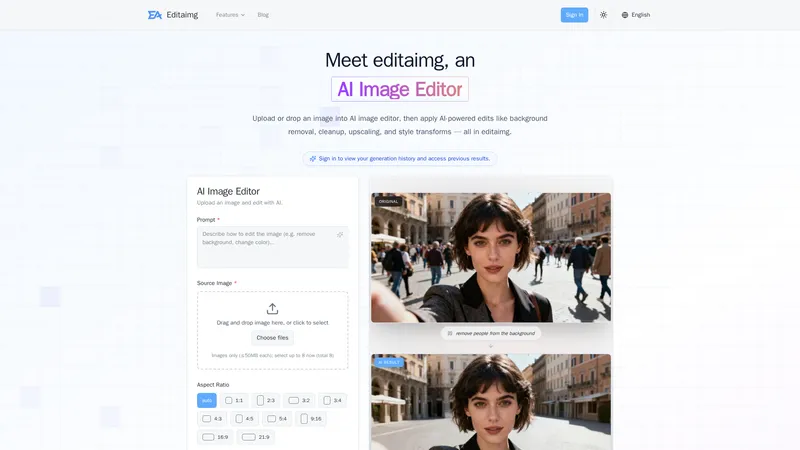
Editaimg is a powerful, intuitive AI image editor designed to streamline your photo editing workflow. Whether you need to remove backgrounds, clean up unwanted objects, upscale resolution, or apply creative style transformations, this tool makes it easy and fast. With a simple drag-and-drop interface and a prompt-based editing system, you can achieve professional results without any prior photo editing skills. The platform is lightweight and offers a seamless experience, from importing your image to downloading the final result. It is designed for both casual users and professionals who need an efficient, practical solution for everyday image tasks. By integrating advanced AI, Editaimg simplifies complex edits, helping you reduce time spent on manual adjustments. The tool is perfect for e-commerce product photography, social media content creation, and personal photo enhancement. With no subscription required and a credit-based pricing model, it offers flexibility and value. The AI handles everything from object replacement to text editing, making it a versatile tool for anyone looking to optimize their visual content.
Top Features
- AI-powered background removal and replacement with precision edge detection.
- Object removal and inpainting that intelligently reconstructs the background.
- Image upscaling to improve resolution without losing detail.
- Style transforms and artistic filters for creative visual effects.
- Text editing capabilities including adding, modifying, or removing text from images.
- AI image translator supporting over 130 languages while preserving original style.
- Add someone to photo with natural blending for seamless composites.
- AI Kiss Generator for creating romantic or cinematic kiss images from two photos.
- Gemini Watermark Remover for clean, privacy-first exports.
- AI Snow effect for adding realistic seasonal atmosphere.
Simple Definition of Usecases
- E-commerce product photography: A seller uploads a photo of a soap dispenser on a white background, uses the prompt 'Place this bottle on the kitchen sink' to generate a realistic product shot for their online store, saving time and studio costs.
- Travel photo cleanup: A user uploads a vacation photo with a stranger in the background, uses 'remove people from the background' to clean up the image, making it ready for social media sharing.
- Graphic design mockup: A designer needs to replace a coffee cup with a teacup in a poster. They upload the image, describe the change, and the AI seamlessly swaps the objects, allowing for quick design iterations.
- Personal photo enhancement: A user wants to add a romantic effect to a couple's photo. They use the AI Kiss Generator with two separate portraits, and the tool merges them into a realistic kiss image for a special occasion.
- Multilingual content adaptation: A marketer has an image with English text and needs to adapt it for a Spanish campaign. They use the AI Image Translator to convert the text while maintaining the original design, ready for global distribution.
User Reviews
Edgar Voss
Small Business Owner
"I've been using Editaimg for about two months now, and I am genuinely impressed with how practical it is. As a small business owner, I don't have the budget for professional photo editors, but I also can't afford to have low-quality images on my product listings. This AI image editor has completely changed that. The object removal feature is incredibly accurate. I had a product photo with a distracting reflection, and I just used the prompt 'remove the reflection' and it was gone. The interface is also very efficient. I can upload an image, describe my edit, and download the result in less than a minute. The credit system is a bonus because I don't feel locked into a monthly subscription. I bought the Standard pack a few weeks back, and I still have plenty of credits left. It's a great balance between cost and capability. For anyone who wants to streamline their visual content creation, this is a must-try."
Edgar Voss
Small Business Owner
"I've been using Editaimg for about two months now, and I am genuinely impressed with how practical it is. As a small business owner, I don't have the budget for professional photo editors, but I also can't afford to have low-quality images on my product listings. This AI image editor has completely changed that. The object removal feature is incredibly accurate. I had a product photo with a distracting reflection, and I just used the prompt 'remove the reflection' and it was gone. The interface is also very efficient. I can upload an image, describe my edit, and download the result in less than a minute. The credit system is a bonus because I don't feel locked into a monthly subscription. I bought the Standard pack a few weeks back, and I still have plenty of credits left. It's a great balance between cost and capability. For anyone who wants to streamline their visual content creation, this is a must-try."
Lena Kowalski
Social Media Manager
"I'm a freelance social media manager, and keeping up with content demands is challenging. Editaimg has become a lifesaver for quick edits. The background removal is extremely fast and handles complex edges like hair and fur surprisingly well. What I love most is the AI image translator because I manage pages in different languages. I had a promotional graphic with English text, and within seconds, I had a Spanish version that looked completely natural. The only reason I'm not giving it 5 stars is that I sometimes wish the prompt-based editing was a bit more consistent. For example, when I tried to change the color of a specific object, it occasionally altered the surrounding area too. But for the price and the convenience, it's unbeatable. It really helps reduce time spent on repetitive tasks. I recommend it to other content creators who need a lightweight tool for their workflow."
Ryu Takashi
Digital Artist
"As a digital artist, I was initially skeptical about using an AI image editor. I thought it might limit my creative control. But Editaimg proved me wrong. I use it for creating quick concept art and manipulating reference photos. The style transforms feature is fantastic. I can take a simple photograph and give it a painterly look or a cinematic color grade in seconds. This helps me experiment with different moods before I start a digital painting. The upscaling tool is also excellent for bringing old, low-res reference images back to life. It's very convenient to have all these features in one place without needing to switch between multiple software programs. The one-time credit purchase is also very fair. I bought the Pro pack, and it feels like a good investment for my work. It integrates seamlessly into my creative process. Highly recommended for any artist looking for a quick and effective way to enhance their visuals."
Priya Nair
E-commerce Entrepreneur
"I run a small online boutique, and product photography is one of the most tedious parts of my job. Editaimg has simplified the entire process. The 'Add Someone to Photo' feature is brilliant for creating lifestyle shots. I can take a simple photo of a dress and seamlessly add a model to it, which is much cheaper than a full photoshoot. The AI also does a great job with lighting and shadows, so the composite looks realistic. I've also used the object replacement feature to swap out props in my product images for different themes. The tool is very efficient, and the instructions are clear. The only minor issue I have is that I wish it could process multiple images at once in a batch, but for individual edits, it's perfect. The credits don't expire, which is great because I only edit sporadically. It's a very practical tool for any small e-commerce business."
Marco Bellini
Photography Enthusiast
"I am a photography enthusiast, and I take a lot of travel photos. One of my biggest pet peeves is having unwanted people or objects in my shots. Editaimg's object removal is incredibly powerful. I had a beautiful photo of a sunset at the beach, but there was a trash can in the foreground. I uploaded it, typed 'remove trash can,' and the AI perfectly reconstructed the sand and water behind it. It was like magic. The interface is so easy to use that I can do it on my iPad without any hassle. I also really appreciate the 'AI Snow' feature for adding a wintery feel to summer photos just for fun. It's a handy tool that delivers excellent results. The fact that it's a one-time payment with no subscription makes it even better. I've recommended it to my photography club. It's a top-notch, efficient solution for anyone who loves to edit their photos without learning complex software."
Frequently Asked Questions
What is Editaimg?
Editaimg is an AI-powered image editor that allows you to edit, enhance, and transform photos using simple prompts. It can remove backgrounds, clean up unwanted objects, upscale resolution, apply style transforms, and much more, all without requiring any prior editing experience.
What does the AI Image Editor do?
The AI Image Editor offers a wide range of functions including background removal and replacement, object erasure and inpainting, image upscaling, style and artistic transformations, text editing, and image translation. It uses AI to understand your prompts and apply the edits automatically.
What to expect in terms of image quality?
Editaimg delivers high-quality results that are suitable for both web and print use. The AI is designed to preserve image details and blend edits naturally. For upscaling, it increases resolution while maintaining sharpness. However, results can vary depending on the complexity of the edit and the quality of the original image.
How to use Editaimg to remove a background?
To remove a background, simply upload your image to the AI image editor. In the prompt box, type a command like 'remove background' or 'make background transparent'. The AI will process the image and provide a result with the background removed. You can then download the image with a transparent background.
How to enhance a photo fast?
To enhance a photo quickly, upload it to Editaimg and use a general prompt like 'enhance photo' or 'improve quality'. For specific improvements, you can use prompts like 'upscale resolution', 'remove noise', or 'adjust lighting'. The AI processes your request in seconds, providing an efficient way to improve your images.
Do I need photo editing skills to use it?
No, you do not need any photo editing skills. Editaimg is designed to be intuitive and simple. You just upload an image and describe what you want to do using natural language prompts. The AI handles all the complex editing tasks automatically.
What kind of edits can I make?
You can make a wide variety of edits, including background removal, object removal, replacing objects, adding people to photos, upscaling images, applying artistic styles, changing colors, translating text, removing watermarks, and adding effects like snow. The platform is versatile and covers most common editing needs.
How long does it take to see results?
Most edits are processed within seconds. The AI works quickly to generate results, and you can instantly preview the edited image. Complex edits or higher resolution images might take a few seconds longer, but the process is generally very fast.
Why using AI Image Editor?
Using an AI Image Editor like Editaimg saves time and effort. It eliminates the need for manual editing skills and complex software. It is efficient, practical, and provides professional-quality results with just a few clicks or a simple prompt. It is perfect for quick edits, batch creativity, and consistent outputs.
Can I customize the edits?
Yes, you can customize edits by providing detailed prompts. You can specify colors, styles, positions, and other details. While the AI does the heavy lifting, you have control over the creative direction. The tool also offers settings like aspect ratio and file format for further customization.
Can I use AI Image Editor to remove bg or create a white background?
Absolutely. You can use a prompt like 'remove background' or 'make background white' to achieve a clean, white background perfect for e-commerce product photos. The AI handles edge detection with precision, resulting in a professional look.
Does AI Image Editor work as an object remover or watermark remover?
Yes, it does. The AI is excellent at removing unwanted objects, people, and text from images. It can also remove watermarks, including the Gemini watermark, by intelligently inpainting the area with surrounding image data. This makes it a practical tool for cleaning up visuals.
Can I upscale image resolution with this AI picture editor?
Yes, you can upscale image resolution using Editaimg. Simply upload your image and use a prompt like 'upscale image' or 'increase resolution'. The AI will enhance the image, making it larger while preserving sharpness and details. It is an effective way to improve low-resolution photos.
Related AI Tools

Frequently Asked Questions
What is MaoMaoYu Top4 AI Tools Directory?
Top 4 AI — '4' means 'For', MaoMaoYu Top For AI Tools Directory - top4ai.com is building an ai tools directory that helps you get your favorite ai tools, free ai tools list. It can get best ai writing tools, best free ai tools for writing articles, content at scale ai detector, best ai email marketing tools, ai paraphrasing tools, best ai seo tools, ai study tools, 'pearson' and 'ai' and 'study tools', ai generator tools, ai hashtags generator tools, best ai tools for research, ai art tools, ai music tools, ai video editing tools, ai pair coding tools, ai photo tools, ai tools for detecting photoshopped imagers, best ai tools for start up companies who are researching their market and more here.
How to found your ai tools in MaoMaoYu Top4 AI tools directory?
1. Open top4ai.com.
2. Explore the ai tools in the MaoMaoYu Top4 AI tools directory.
3. Click the ai tools that you need to get the detail and visit it.
What are the main features of MaoMaoYu Top4 AI Tools Directory?
1. Explore a simple definition of AI tools and discover how to fast find the perfect one for your needs. Streamline your workflow with the right AI solution.
2. Intelligent Search Engine: Thinking of what you think, saving you time, saving you trouble
Is it free to submit ai tools to MaoMaoYu Top4 AI Tools Directory?
Yes, it's free currently.
What's the categories list of AI Tools that MaoMaoYu Top4 AI Tools Directory support?
We will support all kinds of AI Tools later. Please wait for a few days.
What's the frequency for the up of AI tools in MaoMaoYu Top4 AI Directory?
The list of AI tools will be updated daily.
Is it support QuillBot, GPT-4o or Sora AI here?
You can get the QuillBot, GPT-4o or Sora AI tool here. Here is the introduction of GPT-4o and Sora video, and you can visit the website of the tools.
Troubleshooting
If the content aren't appearing, try a different browser, clear your cache. If issues persist, contact us at support@top4ai.com | support@maomaoyu.coffee.
What are the usage rights of the AI tools?
MaoMaoYu Top4 AI Tools Directory is just the AI Directory for AI tools. The usage rights of the AI tools are based on the AI tools' website.