2025-03-17 08:19:16
MIDI: Multi-Instance Diffusion for Single Image to 3D Scene Generation - Transform single images into 3D scenes with MIDI
Categories
Image to 3D ModelText to 3DAI 3D Model Generator
Users of this tool
3D ArtistsGame DevelopersArchitectsVirtual Reality DevelopersResearchers in Computer Vision
PricingType
Free

Links

  1. Documentation: https://github.com/VAST-AI-Research/MIDI-3D

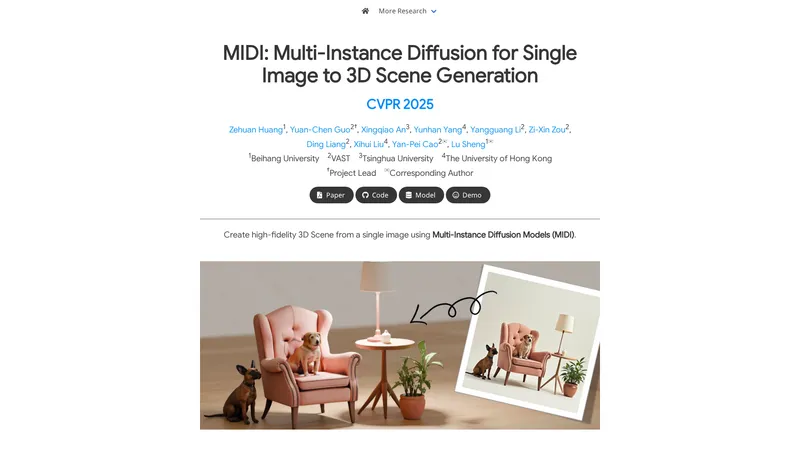
MIDI introduces a novel paradigm for generating high-fidelity 3D scenes from a single image using Multi-Instance Diffusion Models (MIDI). This method extends pre-trained image-to-3D object generation models to multi-instance diffusion models, enabling the simultaneous generation of multiple 3D instances with accurate spatial relationships and high generalizability. MIDI incorporates a novel multi-instance attention mechanism that captures inter-object interactions and spatial coherence directly within the generation process, eliminating the need for complex multi-step processes. The method utilizes partial object images and global scene context as inputs, directly modeling object completion during 3D generation. MIDI demonstrates state-of-the-art performance in image-to-scene generation, validated through evaluations on synthetic data, real-world scene data, and stylized scene images generated by text-to-image diffusion models. This makes MIDI a ready to use, more efficient, and intuitive solution for 3D scene generation.

Top Features

  1. Multi-Instance Diffusion Models
  2. Simultaneous Generation of Multiple 3D Instances
  3. Accurate Spatial Relationships
  4. High Generalizability
  5. Novel Multi-Instance Attention Mechanism
  6. Direct Modeling of Object Completion
  7. State-of-the-Art Performance
  8. Fast Processing Time (as little as 40 seconds)

Simple Definition of Usecases

  1. Creating 3D scenes for video games from concept art.
  2. Generating architectural visualizations from single images.
  3. Developing virtual reality environments from photographs.
  4. Enhancing 3D modeling workflows with automated scene generation.
  5. Researching advanced techniques in computer vision and 3D generation.

User Reviews

Evelyn Cartwright

Game Developer

"MIDI has revolutionized our workflow in game development. The ability to generate multiple 3D instances from a single image is a game-changer. The spatial relationships are accurate, and the processing time is incredibly fast. This tool is a must-have for any 3D artist or game developer."

Frequently Asked Questions

Q:

What is MIDI?

A:

MIDI is a novel paradigm for generating high-fidelity 3D scenes from a single image using Multi-Instance Diffusion Models (MIDI).

Q:

What does MIDI do?

A:

MIDI extends pre-trained image-to-3D object generation models to multi-instance diffusion models, enabling the simultaneous generation of multiple 3D instances with accurate spatial relationships and high generalizability.

Q:

How to use MIDI?

A:

Given an input image of a scene, MIDI segments it into multiple parts and uses a multi-instance diffusion model conditioned on those images to generate compositional 3D instances of the scene.

Q:

How to fast process with MIDI?

A:

MIDI can process and generate 3D scenes in as little as 40 seconds, making it a fast and efficient solution for 3D scene generation.

Q:

What are the key features of MIDI?

A:

The key features of MIDI include Multi-Instance Diffusion Models, simultaneous generation of multiple 3D instances, accurate spatial relationships, high generalizability, a novel multi-instance attention mechanism, direct modeling of object completion, state-of-the-art performance, and fast processing time.

Related AI Tools

Yevideo AI - Perfect AI Video & Image Studio, Ready to Use | Top 4 AI Tool loading
Yevideo is an all-in-one AI video and AI image creation platform that aggregates multiple state-of-the-art generative AI models into a single, cohesive studio. Designed for creatives, marketers, and developers, the platform provides a streamlined and intuitive workflow for transforming text prompts, images, and reference videos into high-quality visual content. Yevideo distinguishes itself by not just exposing raw AI models, but by curating them with clear use-case recommendations, estimated credit costs, and an integrated workspace that simplifies the creative process. The platform supports an extensive range of tasks including text-to-image, image-to-image, text-to-video, image-to-video, video-to-video, and AI video editing. Users can generate content using models like Google's Veo 3.1 and Gemini Omni Video, ByteDance's Seedance 2.0, Kuaishou's Kling 3.0, and image models like Google's Nano Banana Pro and OpenAI's GPT Image 2. The introduction of a 'Gemini Omni Video' model, which leverages Gemini's world knowledge and physics reasoning, underscores Yevideo's commitment to integrating the most advanced capabilities. A key feature for new users is the welcome bonus of free credits, allowing them to test the platform without immediate financial commitment. For professional users, Yevideo offers a practical and efficient alternative to using multiple, disparate AI tools, centralizing project management, credit tracking, and output history. The platform's pricing operates on a credit-based system, where each generation (image or video) consumes a specific amount of credits based on the complexity and model chosen. This credits system provides a pay-per-use feel, ensuring users only pay for what they generate. Yevideo also explicitly grants commercial usage rights to paid subscribers, making it a viable tool for businesses creating marketing assets, social media content, and product visuals. The platform's user interface is designed to be intuitive, with clear model cards that outline each model's strengths, such as 'Best for motion imitation' or 'Best for text rendering in images'. This guided approach helps users select the right tool for their specific task, reducing the learning curve typically associated with advanced AI generation. Furthermore, Yevideo includes a 'daily check-in' feature and feedback rewards, encouraging community engagement and providing ongoing value to its user base. The platform actively seeks user feedback to refine its offerings and has a visible roadmap for future features like an invite program. By aggregating diverse AI models under one roof and providing a seamless, integrated user experience, Yevideo positions itself as the definitive solution for anyone looking to harness the power of AI for visual content creation.
AI Video Generator
Freemium
Image to Prompt - Transform images into perfect AI prompts | Top 4 AI Tool loading
Image to Prompt is an advanced AI-powered tool designed to help users generate optimized prompts for AI image models. By converting any reference image into detailed prompts, it enables users to create visuals that closely resemble their original photos. The tool supports multiple AI models, including General (GPT-Image), Stable Diffusion, and Flux, making it versatile for various creative needs. With features like detailed image analysis, aspect ratio detection, and one-click generation, Image to Prompt simplifies the process of creating high-quality AI-generated images. Whether you're a digital artist, photographer, or content creator, this tool offers a seamless and efficient way to enhance your creative workflow.
Prompt
One-time purchase
Image to Prompt Generator - Generate detailed AI art prompts from any image. | Top 4 AI Tool loading
The Image to Prompt Generator is a free, ready-to-use AI tool designed to make AI art creation more efficient and streamlined. It provides a simple, intuitive solution for artists, designers, and creators by analyzing any uploaded image and generating comprehensive, high-quality text prompts. These detailed prompts are compatible with leading AI art models like Stable Diffusion, Midjourney, and DALL-E, enabling users to recreate styles, generate variations, or gain insights into AI image interpretation. The tool is completely free with no usage limits, requires no registration, and prioritizes user privacy by deleting all uploaded images immediately after processing. Its multi-language support and seamless integration make it a practical and essential asset for anyone looking to optimize their creative workflow with AI.
Image to Image
Free
AI Art Generator: Photo, Draw - Turn your ideas into stunning AI-generated art in seconds! | Top 4 AI Tool loading
AI Art Generator: Photo, Draw is a cutting-edge mobile application designed to unleash your creativity by transforming your ideas and photos into stunning AI-generated artworks. Whether you're looking to design a unique logo, create a personalized avatar, or turn your photos into masterpieces, this app offers a wide range of features to cater to your artistic needs. With advanced AI technology, you can generate art in various styles, including 3D rendering, anime, sketching, and realism. The app also includes AI face swap and avatar creation tools, allowing you to explore endless creative possibilities. AI Art Generator is perfect for artists, designers, social media enthusiasts, and anyone looking to add a touch of creativity to their digital content. The app is free to download, with optional in-app purchases for premium features and subscriptions.
AI Avatar Generator
Freemium
3D AI Studio - Generate 3D Models from Image or Text in Seconds | Top 4 AI Tool loading
3D AI Studio is a cutting-edge platform that transforms your creative ideas into 3D models with unparalleled speed and efficiency. Whether you're a game developer, animator, or designer, our tools are designed to streamline your workflow, reduce costs, and enhance productivity. With features like Text to 3D, Image to 3D, and AI Texturing, you can create high-quality 3D assets in seconds. Our platform is intuitive, automated, and optimized for professionals who need ready-to-use solutions. Join our community of creators and experience the future of 3D modeling today.
Image to 3D Model
Subscription
ChatGPT Image Generator | Top 4 AI Tool loading
ChatGPT Image Generator is an innovative platform that uses artificial intelligence to transform textual descriptions into visual images. This tool is ideal for beginners and creatives who want to explore new forms of artistic expression without the need for advanced technical skills. The platform offers step-by-step tutorials, tips for boosting efficiency, and a guide to earning money, making it a comprehensive resource for anyone looking to learn, create, and grow. With a wide range of styles available, from photorealistic scenes to whimsical cartoons, ChatGPT Image Generator allows users to customize images to fit their needs. Additionally, the platform offers a generous free plan to allow users to experience the magic of AI without any upfront cost. With an active community and a series of helpful resources, ChatGPT Image Generator is the ideal choice for anyone looking to maximize their creative potential.
Text to Image
Freemium
3D AI Maker - Turn Text or Images into 3D Models in Seconds | Top 4 AI Tool loading
3D AI Maker is a **Ready to use**, **Automated**, and **Convenient** platform that transforms text prompts or 2D images into fully textured 3D models using cutting-edge AI. With no signup or hidden costs, users can generate STL/GLB files instantly, making it perfect for game developers, 3D printing hobbyists, and animation professionals. The platform offers seamless integration with Blender, allowing users to generate models directly within the software. Whether you're creating custom 3D characters for games or converting JPG to STL for 3D printing, 3D AI Maker provides a **Simplified** and **Intuitive** experience, making 3D model creation accessible to everyone.
Image to 3D Model
Free
Editaimg - AI Image Editor: Edit, Enhance, and Transform Photos Instantly | Top 4 AI Tool loading
Editaimg is a powerful, intuitive AI image editor designed to streamline your photo editing workflow. Whether you need to remove backgrounds, clean up unwanted objects, upscale resolution, or apply creative style transformations, this tool makes it easy and fast. With a simple drag-and-drop interface and a prompt-based editing system, you can achieve professional results without any prior photo editing skills. The platform is lightweight and offers a seamless experience, from importing your image to downloading the final result. It is designed for both casual users and professionals who need an efficient, practical solution for everyday image tasks. By integrating advanced AI, Editaimg simplifies complex edits, helping you reduce time spent on manual adjustments. The tool is perfect for e-commerce product photography, social media content creation, and personal photo enhancement. With no subscription required and a credit-based pricing model, it offers flexibility and value. The AI handles everything from object replacement to text editing, making it a versatile tool for anyone looking to optimize their visual content.
Photo & Image Editor
One-time purchase

Frequently Asked Questions

What is MaoMaoYu Top4 AI Tools Directory?

Top 4 AI — '4' means 'For', MaoMaoYu Top For AI Tools Directory - top4ai.com is building an ai tools directory that helps you get your favorite ai tools, free ai tools list. It can get best ai writing tools, best free ai tools for writing articles, content at scale ai detector, best ai email marketing tools, ai paraphrasing tools, best ai seo tools, ai study tools, 'pearson' and 'ai' and 'study tools', ai generator tools, ai hashtags generator tools, best ai tools for research, ai art tools, ai music tools, ai video editing tools, ai pair coding tools, ai photo tools, ai tools for detecting photoshopped imagers, best ai tools for start up companies who are researching their market and more here.

How to found your ai tools in MaoMaoYu Top4 AI tools directory?

1. Open top4ai.com.

2. Explore the ai tools in the MaoMaoYu Top4 AI tools directory.

3. Click the ai tools that you need to get the detail and visit it.

What are the main features of MaoMaoYu Top4 AI Tools Directory?

1. Explore a simple definition of AI tools and discover how to fast find the perfect one for your needs. Streamline your workflow with the right AI solution.

2. Intelligent Search Engine: Thinking of what you think, saving you time, saving you trouble

Is it free to submit ai tools to MaoMaoYu Top4 AI Tools Directory?

Yes, it's free currently.

What's the categories list of AI Tools that MaoMaoYu Top4 AI Tools Directory support?

We will support all kinds of AI Tools later. Please wait for a few days.

What's the frequency for the up of AI tools in MaoMaoYu Top4 AI Directory?

The list of AI tools will be updated daily.

Is it support QuillBot, GPT-4o or Sora AI here?

You can get the QuillBot, GPT-4o or Sora AI tool here. Here is the introduction of GPT-4o and Sora video, and you can visit the website of the tools.

Troubleshooting

If the content aren't appearing, try a different browser, clear your cache. If issues persist, contact us at support@top4ai.com | support@maomaoyu.coffee.

What are the usage rights of the AI tools?

MaoMaoYu Top4 AI Tools Directory is just the AI Directory for AI tools. The usage rights of the AI tools are based on the AI tools' website.