2025-01-16 03:07:36
Immersive Translate - Break language barriers with seamless bilingual translation.
Categories
Translate
Users of this tool
Students reading foreign academic papersProfessionals working with multilingual documentsLanguage learners practicing bilingual readingResearchers accessing global knowledgeCasual users watching foreign language videos
PricingType
Freemium

Links

  1. Login: https://immersivetranslate.com/profile
  2. Register: https://immersivetranslate.com/profile
  3. Documentation: https://immersivetranslate.com/docs/usage/
  4. Pricing: https://immersivetranslate.com/pricing/

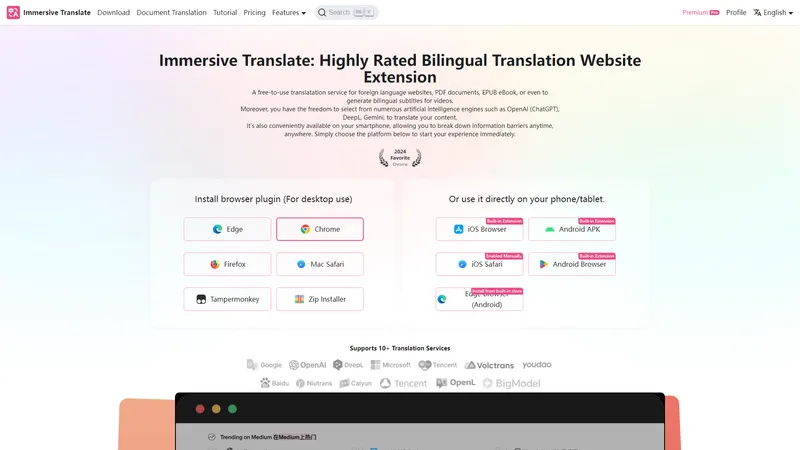
Immersive Translate is a highly rated bilingual translation extension designed to make foreign language content accessible to everyone. Whether you're browsing websites, reading PDFs, or watching videos, Immersive Translate offers a seamless and efficient way to translate content into your preferred language. With support for over 10 translation engines, including OpenAI (ChatGPT), DeepL, and Google Translate, this tool ensures accurate and professional translations. The extension is available on multiple platforms, including desktop browsers and mobile devices, making it a versatile solution for breaking down language barriers. Immersive Translate also features innovative tools like mouse hover translation and input box translation, enhancing the user experience by providing instant translations without disrupting your workflow. Whether you're a student, professional, or casual user, Immersive Translate is your go-to tool for bilingual reading and learning.

Top Features

  1. Bilingual webpage translation
  2. Video subtitle translation
  3. PDF and EPUB document translation
  4. Mouse hover translation
  5. Input box translation
  6. Support for multiple translation engines
  7. Cross-platform availability
  8. Customizable translation styles
  9. AI-powered PDF parsing
  10. Bilingual content sharing

Simple Definition of Usecases

  1. A student uses Immersive Translate to read and understand foreign academic papers, enabling efficient research and learning.
  2. A professional translates multilingual business contracts using the PDF translation feature, ensuring accurate and professional results.
  3. A language learner watches foreign language videos with bilingual subtitles, enhancing listening and comprehension skills.
  4. A researcher accesses global knowledge by translating foreign language websites, breaking down language barriers.
  5. A casual user translates social media posts and comments using the input box translation feature, enabling seamless communication.

User Reviews

Bo Y.

Chrome User

"I have been looking for a Chrome extension to show both original and translated languages on the same page for dual language education purpose. I used Saladict for a few years but the versatility this extension provides is much more powerful. Thanks for making this!"

Frequently Asked Questions

Q:

What is Immersive Translate?

A:

Immersive Translate is a bilingual translation extension that allows users to translate web pages, PDFs, EPUBs, and video subtitles into their preferred language, supporting multiple translation engines.

Q:

How to use Immersive Translate for PDF translation?

A:

Simply upload your PDF document to the Immersive Translate extension, select your target language, and the tool will provide a bilingual or translated-only version of the document.

Q:

What translation engines does Immersive Translate support?

A:

Immersive Translate supports over 10 translation engines, including OpenAI (ChatGPT), DeepL, Google Translate, and more.

Q:

How to fast translate text using Immersive Translate?

A:

Use the input box translation feature by typing text into any input box on a webpage and pressing the space bar three times to instantly translate the text.

Q:

What are the benefits of using Immersive Translate for language learning?

A:

Immersive Translate enhances language learning by providing bilingual translations, allowing users to compare original and translated texts, and offering tools like mouse hover translation for instant understanding.

Related AI Tools

Yevideo AI - Perfect AI Video & Image Studio, Ready to Use | Top 4 AI Tool loading
Yevideo is an all-in-one AI video and AI image creation platform that aggregates multiple state-of-the-art generative AI models into a single, cohesive studio. Designed for creatives, marketers, and developers, the platform provides a streamlined and intuitive workflow for transforming text prompts, images, and reference videos into high-quality visual content. Yevideo distinguishes itself by not just exposing raw AI models, but by curating them with clear use-case recommendations, estimated credit costs, and an integrated workspace that simplifies the creative process. The platform supports an extensive range of tasks including text-to-image, image-to-image, text-to-video, image-to-video, video-to-video, and AI video editing. Users can generate content using models like Google's Veo 3.1 and Gemini Omni Video, ByteDance's Seedance 2.0, Kuaishou's Kling 3.0, and image models like Google's Nano Banana Pro and OpenAI's GPT Image 2. The introduction of a 'Gemini Omni Video' model, which leverages Gemini's world knowledge and physics reasoning, underscores Yevideo's commitment to integrating the most advanced capabilities. A key feature for new users is the welcome bonus of free credits, allowing them to test the platform without immediate financial commitment. For professional users, Yevideo offers a practical and efficient alternative to using multiple, disparate AI tools, centralizing project management, credit tracking, and output history. The platform's pricing operates on a credit-based system, where each generation (image or video) consumes a specific amount of credits based on the complexity and model chosen. This credits system provides a pay-per-use feel, ensuring users only pay for what they generate. Yevideo also explicitly grants commercial usage rights to paid subscribers, making it a viable tool for businesses creating marketing assets, social media content, and product visuals. The platform's user interface is designed to be intuitive, with clear model cards that outline each model's strengths, such as 'Best for motion imitation' or 'Best for text rendering in images'. This guided approach helps users select the right tool for their specific task, reducing the learning curve typically associated with advanced AI generation. Furthermore, Yevideo includes a 'daily check-in' feature and feedback rewards, encouraging community engagement and providing ongoing value to its user base. The platform actively seeks user feedback to refine its offerings and has a visible roadmap for future features like an invite program. By aggregating diverse AI models under one roof and providing a seamless, integrated user experience, Yevideo positions itself as the definitive solution for anyone looking to harness the power of AI for visual content creation.
AI Video Generator
Freemium
Google Drive Video Editor - Edit videos directly on Google Drive | Top 4 AI Tool loading
Google Drive Video Editor is a ready to use Chrome extension that allows users to edit videos directly on Google Drive. This tool is designed to be more efficient, offering a range of features such as brightness and contrast adjustment, cropping, zooming, rotating, flipping, speed control, and metadata removal. With its intuitive interface, users can streamline their video editing process, making it easy and convenient to enhance their content without the need for additional software. The extension supports multiple video formats and ensures privacy by not collecting any Google Drive data. Whether you are a social media marketer, freelance video editor, or a reposter, this tool provides practical solutions to optimize your video editing workflow.
AI Video Editor
Subscription
Simple Video Tools - Simple, Fast, and Free Video Editing Tools | Top 4 AI Tool loading
Simple Video Tools is a user-friendly online platform designed to provide quick and efficient video editing solutions. Whether you're a content creator, marketer, or casual user, our tools are tailored to meet your needs without the hassle of complex software. With features like frame extraction, clip creation, format conversion, audio extraction, audio removal, speed adjustment, and size compression, Simple Video Tools empowers you to edit videos effortlessly. Our platform ensures that none of your files are stored, guaranteeing privacy and security. The maximum file size supported is 150MB, making it ideal for quick edits on the go. Available for download on the App Store, Simple Video Tools is your go-to solution for all your video editing needs.
AI Video Editor
Freemium
AI Facefy | Top 4 AI Tool loading
AI Facefy is a cutting-edge platform that offers free and secure online face swapping services. Utilizing advanced artificial intelligence, AI Facefy enables users to seamlessly swap faces in photos and videos, creating realistic and entertaining content. Whether you're looking to create fun memes, engage in cosplay, or enhance your social media presence, AI Facefy provides a user-friendly interface and quick processing times. The platform ensures privacy by deleting uploaded photos within 24 hours and offers high-quality output with natural facial expressions. With features like seamless face replacement, creative possibilities, and support for various media formats, AI Facefy is a versatile tool for both casual users and content creators. Discover the endless creative opportunities and transform your images and videos with AI Facefy today.
AI Face Swap Generator
Freemium
Transmonkey | Top 4 AI Tool loading
Transmonkey is an AI-powered translation platform that covers all your translation needs, with real-time delivery in any language — in a matter of clicks. We offer a wide range of translation tools, including document, image, and video translators, designed to maintain the original formatting and content integrity. Our translation technology is powered by advanced language models like ChatGPT, Gemini, and Claude, ensuring accurate and contextually relevant translations. Additionally, we integrate our tools with Google Chrome, Google Workplace, and YouTube extensions, providing a seamless translation experience wherever you work. With over 130 languages supported and the ability to handle a variety of file formats, Transmonkey is the ultimate solution for anyone needing reliable and high-quality translations. Our platform also prioritizes user privacy, ensuring your data is stored securely and deleted after processing.
Translate
Freemium
JustDance - Make Anything Dance with AI in Minutes | Top 4 AI Tool loading
JustDance is the leading AI dance video generator that empowers anyone to transform a simple photo, text prompt, or existing video into a captivating dance clip. Powered by ByteDance's Seedance 2 and MiniMax-Hailuo AI, this tool delivers professional-quality, realistic dance animations with over 50 styles and 4K export capabilities. Designed for both beginners and seasoned creators, JustDance eliminates the need for video editing skills, offering a streamlined 3-step process: upload, select a style, and generate. With over 10,000 AI dance videos created and 5,000 active creators, it's the most efficient way to produce viral-ready content for TikTok, Instagram, and YouTube. The platform's core features include image-to-video, text-to-video, and video-to-video transformation, each optimized for accurate pose detection, natural motion, and cinematic aesthetics. Whether you're a social media influencer looking to stand out, a marketing team seeking cost-effective content, or a pet owner wanting a fun dance clip, JustDance provides a practical, intuitive, and lightweight solution that saves time and boosts creativity. Its user experience is seamless, with a clean interface that guides you through each step, and technical features like 4K resolution, monthly style updates, and privacy protection ensure high-quality results. JustDance is not just a tool; it's a gateway to effortless creativity, making dance content accessible to everyone.
AI Music Video Generator
Freemium
AI Video Online - Professional photo and video editing powered by AI | Top 4 AI Tool loading
AI Video Online offers a comprehensive suite of AI-powered editing tools designed to transform your photos and videos with professional-grade results. Our platform is ready to use, providing an intuitive and seamless editing experience directly in your browser. With no downloads required, you can access our advanced AI algorithms to enhance your media efficiently. Whether you're looking to remove backgrounds, retouch portraits, or enhance low-light images, our one-click solutions make complex editing tasks simple and convenient. Join thousands of users who are already creating stunning content with our tools, and experience the difference of AI-powered editing today.
AI Video Editor
Freemium
Google Maps Extended Routes Extension | Boost your routes planning | Top 4 AI Tool loading
Google Maps Extended Routes Extension is a powerful tool designed to enhance your route planning experience on Google Maps. Whether you're a cyclist, motorbiker, or anyone needing to plan complex routes, this extension offers a range of features to make your journey smoother and more efficient. From extending routes beyond the standard 10 points limit to optimizing multi-stop routes for shorter travel, this extension is perfect for those who need more control and flexibility in their route planning. Additionally, it allows you to export routes to popular services like Apple Maps, TomTom Planner, Bing, and Yandex Maps, and download routes as GPX or KML files for offline use. With features like appending route segments, splitting long routes, and reversing any route, this extension is a must-have for anyone who frequently plans routes on Google Maps.
AI Trip Planner
Freemium

Frequently Asked Questions

What is MaoMaoYu Top4 AI Tools Directory?

Top 4 AI — '4' means 'For', MaoMaoYu Top For AI Tools Directory - top4ai.com is building an ai tools directory that helps you get your favorite ai tools, free ai tools list. It can get best ai writing tools, best free ai tools for writing articles, content at scale ai detector, best ai email marketing tools, ai paraphrasing tools, best ai seo tools, ai study tools, 'pearson' and 'ai' and 'study tools', ai generator tools, ai hashtags generator tools, best ai tools for research, ai art tools, ai music tools, ai video editing tools, ai pair coding tools, ai photo tools, ai tools for detecting photoshopped imagers, best ai tools for start up companies who are researching their market and more here.

How to found your ai tools in MaoMaoYu Top4 AI tools directory?

1. Open top4ai.com.

2. Explore the ai tools in the MaoMaoYu Top4 AI tools directory.

3. Click the ai tools that you need to get the detail and visit it.

What are the main features of MaoMaoYu Top4 AI Tools Directory?

1. Explore a simple definition of AI tools and discover how to fast find the perfect one for your needs. Streamline your workflow with the right AI solution.

2. Intelligent Search Engine: Thinking of what you think, saving you time, saving you trouble

Is it free to submit ai tools to MaoMaoYu Top4 AI Tools Directory?

Yes, it's free currently.

What's the categories list of AI Tools that MaoMaoYu Top4 AI Tools Directory support?

We will support all kinds of AI Tools later. Please wait for a few days.

What's the frequency for the up of AI tools in MaoMaoYu Top4 AI Directory?

The list of AI tools will be updated daily.

Is it support QuillBot, GPT-4o or Sora AI here?

You can get the QuillBot, GPT-4o or Sora AI tool here. Here is the introduction of GPT-4o and Sora video, and you can visit the website of the tools.

Troubleshooting

If the content aren't appearing, try a different browser, clear your cache. If issues persist, contact us at support@top4ai.com | support@maomaoyu.coffee.

What are the usage rights of the AI tools?

MaoMaoYu Top4 AI Tools Directory is just the AI Directory for AI tools. The usage rights of the AI tools are based on the AI tools' website.