2024-12-31 14:27:31
Nicky.codes - Record once, Explain everywhere
Categories
TranslateVideo to Video
Users of this tool
EducatorsContent CreatorsBusiness ProfessionalsMultilingual CommunicatorsTech Enthusiasts
PricingType
Freemium

Links

  1. Documentation: https://nicky.codes/howitworks.html

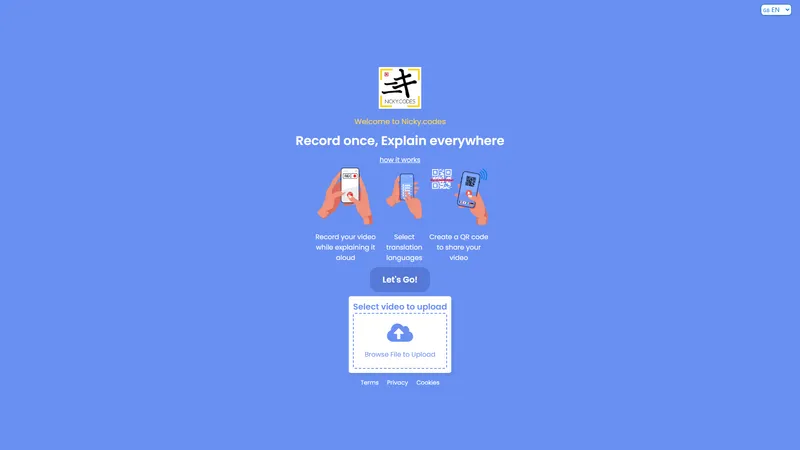
Nicky.codes is an innovative platform designed to simplify the process of creating and sharing explanatory videos. With the tagline 'Record once, Explain everywhere,' Nicky.codes empowers users to record a single video and then translate and share it across multiple languages effortlessly. This platform is ideal for educators, content creators, and businesses looking to communicate complex ideas in a clear and accessible manner. The core functionality of Nicky.codes revolves around three simple steps: recording a video while explaining a concept, selecting translation languages, and generating a QR code for easy sharing. This streamlined process ensures that users can reach a global audience without the need for multiple recordings or extensive editing. Nicky.codes also prioritizes user privacy and security, with dedicated pages for terms, privacy, and cookies, ensuring that users can trust the platform with their content. Whether you're a teacher looking to create multilingual lessons, a business professional aiming to explain a product feature, or a content creator wanting to expand your reach, Nicky.codes provides the tools you need to record once and explain everywhere.

Top Features

  1. Record explanatory videos
  2. Select multiple translation languages
  3. Generate QR codes for easy sharing
  4. User-friendly interface
  5. Privacy and security focused

Simple Definition of Usecases

  1. An educator records a lesson on a complex topic and translates it into multiple languages to cater to a diverse classroom.
  2. A content creator records a tutorial on a new software feature and shares it with a global audience using QR codes.
  3. A business professional explains a new product feature in a video and translates it into the languages of their target markets.
  4. A tech enthusiast records a walkthrough of a new gadget and shares it with friends and followers in their preferred languages.
  5. A multilingual communicator records a public service announcement and distributes it across different regions using translated versions.

User Reviews

Elena Martinez

Educator

★★★★★

"Nicky.codes has been a game-changer for my teaching career. I can now create lessons in English and have them automatically translated into Spanish and French for my diverse student body. The QR code feature makes it easy for students to access the videos from their devices. The platform is intuitive and user-friendly, and I appreciate the focus on privacy and security. Highly recommend it to any educator looking to expand their reach."

Frequently Asked Questions

Q:

What is Nicky.codes?

A:

Nicky.codes is a platform that allows users to record explanatory videos and translate them into multiple languages for easy sharing.

Q:

What does Nicky.codes do?

A:

Nicky.codes enables users to record a video once and then translate and share it across multiple languages using QR codes.

Q:

What to use Nicky.codes for?

A:

Nicky.codes can be used for creating multilingual lessons, tutorials, product explanations, public service announcements, and more.

Q:

How to use Nicky.codes?

A:

To use Nicky.codes, record a video while explaining a concept, select translation languages, and generate a QR code to share the video.

Q:

Is Nicky.codes free to use?

A:

The pricing model for Nicky.codes is not explicitly mentioned on the website, so it's best to check the pricing page for details.

Q:

Can I customize the videos on Nicky.codes?

A:

The website does not mention customization options for videos, so it's likely that the platform focuses on straightforward recording and translation.

Q:

How accurate are the translations on Nicky.codes?

A:

The accuracy of translations on Nicky.codes is not specified, but users have noted that the feature could be improved.

Q:

Is Nicky.codes secure?

A:

Yes, Nicky.codes prioritizes user privacy and security, with dedicated pages for terms, privacy, and cookies.

Q:

Can I share videos on social media using Nicky.codes?

A:

Yes, you can share videos on social media by generating a QR code and distributing it to your audience.

Q:

What languages does Nicky.codes support?

A:

The website does not specify the languages supported, but users can select multiple translation languages for their videos.

Related AI Tools

VidRush AI - All-in-one AI studio for cinematic videos, images, and music | Top 4 AI Tool loading
VidRush AI is an all-in-one generative AI creation platform built for modern creators who need video, image, and music production tools without the overhead of managing five different subscriptions. The platform combines some of the world's most advanced foundation models, including Google Veo 3.1, Seedance 2.5, Kling 3.0, Wan 2.6, Nano Banana Pro, Seedream 5.0, GPT Image 2, and Suno AI, inside a single streamlined workspace. It is designed for both independent storytellers and professional production teams who want to transform text prompts, still photos, existing footage, or simple musical ideas into finished creative assets in minutes. Website Positioning VidRush AI positions itself as the definitive all-in-one alternative to fragmented creative AI workflows. In a market where powerful video tools are often separated from image tools, and music generation remains a separate platform, VidRush AI brings the entire production chain into one place. The site emphasizes broad accessibility: beginners can describe an idea in natural language, while professionals can fine-tune outputs with model selection, resolution, aspect ratio, camera motion, and multi-reference controls. The value proposition is straightforward: instead of learning many different interfaces, users can switch between cinematic text-to-video generation, photo animation, image editing, and AI music creation without leaving the workspace. Target Audience The platform is especially relevant for creators in the United States and other major media markets who want outputs that are ready to use for commercial publishing. YouTube creators and vloggers can build complete videos using Veo 3.1 footage, Nano Banana thumbnails, and Suno background music inside one dashboard. Social media marketers serving TikTok, Instagram Reels, and YouTube Shorts need fast turnaround for vertical ad formats, and VidRush AI responds with 9:16 aspect ratio support, native audio, and commercial licensing clarity. E-commerce brands can animate product photos into lifestyle videos and produce professional product shots from text descriptions. Independent filmmakers, video editors, and digital studios rely on the integrated model suite for previsualization, style transfer, and scene extension. Game developers use image generation for concept art, video-to-video for cinematic in-engine capture, and AI music for original soundtracks without expensive licensing fees. Musicians and audio producers can also create full vocal tracks, instrumental beds, and dynamic song variations from simple lyric prompts. Core Features VidRush AI provides six main creative modes: Text to Video, Image to Video, Video to Video, Text to Image, Image to Image, and AI Music Generation. The Text to Video mode lets users turn narrative scripts into cinematic clips with realistic physics, complex camera movement, and synchronized native audio. Image to Video is optimized for animating photographs, artwork, and product images while preserving identity and minimizing the character drift that often appears in earlier AI tools. Video to Video offers style transformation, motion replication, and footage extension based on user-provided reference clips. The Text to Image tool creates photorealistic portraits, commercial product visuals, concept art, and illustrations from descriptive words, while Image to Image supports remixing, restyling, and upscaling with identity retention. The AI Music Generator, powered by Suno 5.5 and previous Suno versions, turns text prompts and lyrics into complete songs with natural vocals, expressive instrumentation, and full dynamic range. Foundation AI Model Integration A major technical advantage offered by VidRush AI is its direct access to multiple state-of-the-art models. For video creation, users can choose Google Veo 3.1 for its impressive native audio and physics, Seedance 2.5 for multi-modal referencing and character consistency, Kling 3.0 for lifelike human motion, or Wan 2.6 for cinematic camera movement. For image generation, the platform includes Nano Banana Pro for photorealistic skin tones and lighting, Seedream 5.0 for high-resolution artistic texture, GPT Image 2 for complex typography and visual reasoning, and Flux 2 for rapid texture synthesis. Music generation is handled through Suno 5.5, 5.0, and 4.5, giving users access to the latest developments in AI vocal synthesis and arrangement. By offering a menu of excellent models rather than a single proprietary engine, VidRush AI lets users select the right tool for each specific job. User Experience and Workflow VidRush AI turns complex production tasks into a direct four-step process. First, users choose a media type and preferred model. Second, they write a prompt in natural language or upload reference assets such as start and end frames, existing images, or audio clips. Third, they configure output parameters such as aspect ratio, duration, camera behavior, lyrics, and instrumental preferences. Fourth, they generate, preview, iterate, and export high-resolution files ready for publishing. This workflow removes the friction commonly associated with installing open-source models, managing GPU hardware, or jumping between multiple web apps. For creators who have struggled with technical setup, the platform offers a convenient, simplified path forward. Even with no prior machine learning experience, users can produce compelling results because the interface highlights intuitive presets and model guidance. Content Quality and Media Capabilities VidRush AI supports a broad range of content creation needs. Text-to-video results can include cinematic sci-fi cityscapes, product-focused luxury advertising, documentary-style nature footage, and narrative action scenes. Image-to-video examples demonstrate animated character sequences, clothing physics, hair motion, and environmental effects that match the photographic source. Image generation covers futuristic portraits, commercial packaging, e-commerce product images, and stylized digital art. Music tracks are suitable for YouTube backgrounds, social media ads, game audio, podcasts, and full streaming releases. This breadth makes VidRush AI unusually practical for creators who produce in multiple formats. The same team can generate a product hero image, turn it into an engaging animation, and add an original soundtrack before publishing a coordinated campaign from one workspace. Commercial Rights and Licensing For many creators, especially those operating in the United States, commercial rights are among the most important considerations when selecting an AI tool. VidRush AI states that content created under active paid subscription plans or purchased credit packages includes full commercial licensing rights. Users can monetize videos on YouTube and TikTok, run client advertising campaigns, publish game assets, sell generated images, distribute music through streaming platforms, and deliver content for commercial television or film projects. This removes the uncertainty and legal friction that often come with open-source weights or free-tier restrictions. For agencies and small studios, that licensing clarity is a major reason to move beyond fragmented free tools and centralize production on a platform with transparent terms. Performance and Technical Infrastructure VidRush AI uses distributed, high-throughput GPU clusters to accelerate rendering. According to the platform's published workflow information, images typically render in 5 to 15 seconds, full-length or cinematic video clips complete in one to three minutes, and song generation typically produces two variations in one to two minutes. This speed matters enormously for content teams working on tight deadlines. In addition to speed, the technical backend supports up to 4K upscaling and flexible aspect ratios including 16:9 widescreen, 9:16 vertical shorts, and 1:1 square content. The platform's architecture is designed to balance high-volume user demand and priority processing through different tier plans. Optimization and Community Resources The site includes a community and showcase area where creators can examine authentic video and image outputs, including cinematic science fiction scenes, stylized anime-inspired visuals, e-commerce animations, and realistic wildlife footage. These examples serve as creative references and offer practical tips and tricks for users who are still learning prompt design or model selection. The showcase also helps users understand the stylistic differences between models such as Veo 3.1, Seedance, Kling, and Nano Banana. By seeing how different models handle color, motion, lighting, and character consistency, users can make more informed choices before spending credits. This educational layer makes the platform more accessible to newcomers and helps experienced users optimize their workflows. Productivity and Business Value For a production team, the ability to handle video, image, and music in one tool is a major cost saver. A creator who previously paid separately for a text-to-video service, an image model subscription, a background music license, and a standalone image animation platform can replace these fragmented tools with one subscription. This consolidation lowers monthly expenses, reduces time spent copying files between platforms, and simplifies account administration. The integrated environment allows creators to keep their entire content pipeline in one place, which is especially important for teams that produce daily content. Workflows become more efficient when creators are not forced to leave their editing context to generate a thumbnail or a music bed. The Essential Creative Controls Although VidRush AI is designed to be simple enough for beginners, it also delivers the essential creative controls required by advanced users. Model choice gives users control over aesthetic style and motion handles. The multi-reference feature allows image inputs to guide character appearance, composition, and product detail, which is extremely useful for branded content. Output controls include resolution, aspect ratio, duration, camera motion, and lyric inputs for music generation. Advanced users can enter the same visual prompt into different models, compare results, and choose the most effective output. This makes the platform a serious tool for art directors and production designers who need predictable visual outcomes rather than random generations. Getting Started and Pricing Flexibility VidRush AI invites new users to start with free starter credits, meaning individuals can test video, image, and music generation without immediately making a financial commitment. After testing, users can choose between monthly subscription plans for recurring creation needs or on-demand credit packs for occasional bursts of work. The credit system is based on model complexity, output length, and resolution, giving fair and transparent usage expectations. The platform also runs promotional discounts, including limited-time offers such as 20% off, which add additional value for early adopters. Because free credits, subscriptions, and pay-as-you-go packs are all available, VidRush AI can suit hobbyists, professional creators, and large production companies at different stages of growth. Conclusion VidRush AI is much more than a simple text-to-video generator. It is a serious unified creative studio that responds to the real production needs of a generation of creators working across YouTube, social media, e-commerce, film, games, and music. By integrating powerful models, prioritizing commercial usability, emphasizing fast rendering, and providing flexible pricing, it gives modern creators the most efficient route from an idea to a polished asset. For those who want professional output without the overwhelming complexity of running separate AI tools, VidRush AI offers a ready to use creative environment that feels both familiar and groundbreaking. It respects the craft of content creation while removing unnecessary technical barriers, making it one of the most compelling all-in-one AI platforms for the United States market and beyond.
AI Music Generator
Freemium
Perchance AI Image Generator - Free multi-model text-to-image generator in your browser. No sign-up. No paywall. | Top 4 AI Tool loading
Perchance AI Image Generator is a free, browser-based text-to-image workspace that turns natural-language prompts into downloadable images without accounts, subscriptions, or paywalls. The full product lives on the homepage, making it ready to use from the first visit. There is no app to install, no demo page that merely teases the product, and no paid tier hiding the best features. You land on perchanceaiimagegenerator.app, choose a model, write a prompt, click generate, watch the result appear, and then download the file. The workflow is simple, direct, and built for people who value speed and convenience over complex setup. Website Positioning: This service is positioned as a multi-model AI image generator for a broad U.S. audience. It deliberately avoids the sign-up wall that most AI tools place between users and the product. The homepage is the workspace; the workspace is the homepage. That makes it an ideal destination for quick visual exploration, professional concept art, casual creative play, and practical marketing assets. Because the tool supports multiple model families, including FLUX, Stable Diffusion, Z Image Turbo, and Qwen Image, it can also serve users who like to compare models without installing software or maintaining local GPU setups. Target Audience: The design of Perchance AI Image Generator appeals to several distinct groups. Freelance illustrators can use it for rapid character and setting concepts. Social media managers can create backgrounds, headers, and campaign mood boards. Students and educators can produce engaging visuals for slides and posters. Indie game developers can explore art directions and creature designs. Product teams can prototype mock scenarios. The service's zero-cost, zero-account approach is particularly useful for students and freelancers who need capable tools without licensing burdens. Core Features: The central element is a text-to-image workspace. Users enter prompts in natural English, select from common aspect ratios such as 1:1, 16:9, and 9:16, and, when supported by the model, adjust advanced settings like steps, guidance, seed, and negative prompt. The multi-model dropdown is the standout feature. By default, Z Image Turbo offers fast generation, while FLUX.1 [dev] and FLUX.1 [Schnell] provide a strong balance of quality and speed. Stable Diffusion 3 and 3.5 offer flexible diffusion output, and Qwen Image plus realism LoRAs provide a different aesthetic direction. This variety means users are not locked into a single interpretation of their prompt. Content Features: The site includes a few valuable content aids. The prompt input area offers sample starts such as a golden retriever running, a neon cyberpunk alley, a watercolor Japanese garden, a product shot of earbuds, and an astronaut riding a horse on Mars. These chips are more than decoration; they teach first-time users how to structure a useful prompt. The tutorial section explains the workspace in four short steps: open, pick a model, write a clear prompt, and generate. The FAQ answers common questions about limits, model availability, NSFW policy, and direct access. This built-in guidance reduces the learning curve. User Experience: The experience is clean and concise, but not feature-bloated. Everything happens on one page, which eliminates confusion. A busy user can open the link from a bookmark, generate several images, download the best ones, and move on. Downloading is one click. The result panel is simple, and the advanced controls are optional, so beginners are not overwhelmed. For people who want tighter control, the negative prompt field is especially useful. The site also avoids intrusive marketing. The only external placement we see is a link to Pollo AI, an all-in-one AI image and video generator, which is clearly labeled as a sponsored resource and is not required for use. The tone of the copy is direct and transparent, especially about host-based limits. Technical Features: Behind the interface, Perchance AI Image Generator works by packaging the user's prompt and settings and sending them to free public model hosts. Those hosts return the generated image. This distributed architecture is why the service can remain free and why users can rotate through multiple models. It does mean that generation speed and availability can vary; queues, cold starts, and rate limits are real constraints. The FAQ is honest about this: there is no fixed daily quota, but each host has practical capacity. The recommended workaround for any hiccup is switching models, which is an integrated part of the main workflow. Why It Is more efficient: For people who need quick visual thinking, the tool shines because it is lightweight and doesn't require background downloads. The entire workflow is browser-based. Compared to a full digital art suite, it is dramatically more efficient for early-stage ideation. You can generate a grid of ideas in minutes, download them, and share them in a chat thread. Since no account is tied to the workspace, it is also easy to use across different computers; the only thing you need to remember is the prompt that produced a good result. This stripped-down approach is the essential formula for a tool that should get out of your way and let you create. Tips and Tricks: To get the most out of Perchance AI Image Generator, start with a specific prompt. Mention the subject, setting, art style, lighting, and mood. Use the sample chips as starting points if you are not sure how to phrase an idea. When a model supports negative prompts, describe what you want to exclude, such as blurry edges, extra fingers, or text artifacts. Use the seed field to reproduce a promising composition and then vary small details as needed. If one model returns disappointing results or sits in a long queue, switch to another family. The multi-model design exists precisely to keep creative momentum going. Also, be aware that public hosts can behave differently, so experimenting with different models is part of the process rather than a bug. Pricing Model and Value: There are no paid plans. This is not freemium with locked Pro features; it is simply free. There are no credits to buy, no feature tiers, no watermark requirement, and no pay-to-remove-artifact upgrade. The site supports itself through clearly labeled referrals and directory listings. For U.S. users tired of free-trial-then-paywall products, this business model is refreshing. The tradeoff is host dependency. When one GPU host is busy, the user may wait or switch to another model. The interface does not artificially throttle usage with a daily counter, though third-party hosts can still rate-limit heavy users. For the vast majority of casual and professional tasks, the free access remains the headline. Practical Use Cases in Detail: A freelance illustrator can use the workspace to build an early visual library for a comic series, generating character expressions and background studies in one session. A social media manager can prepare 9:16 story backgrounds and 1:1 feed images by simply changing the aspect ratio and reusing a proven prompt. An educator can generate clean illustrations for a lecture deck, using negative prompts to avoid distracting artifacts. An indie game designer can explore dozens of creature silhouettes in minutes, switching models when one aesthetic feels too generic. A marketing team can produce mood boards before a photoshoot, saving time and money on early creative direction. These scenarios share one pattern: low-friction generation leads to more ideas, faster iteration, and better final decisions. Comparison with Alternatives: Perchance AI Image Generator sits between subscription commercial tools and local diffusion setups. Subscription tools often offer polished UI and fast GPUs, but they ask for monthly payments and can impose strict content rules. Local tools such as Stable Diffusion give users total control, but they require a powerful computer, technical setup, and regular model updates. This browser workspace offers a middle path. You get a ready-to-use interface, multiple model choices, and no installation. The tradeoff is host availability. For a user who wants speed without setup, this is often the best option; for a user who needs guaranteed uptime or complete privacy, a paid service or local install may be better. The website is clear about this tradeoff, and the FAQ explains how to use multi-model switching to work around common bottlenecks. Privacy and Security: Because the service does not require an account, there is less personal data collected at the generation layer. The site does have a Privacy Policy and a Cookie Policy, and users should review them for details. Prompts are sent to third-party model hosts in order to generate images, so users should avoid entering confidential information into the prompt field. For business users handling sensitive data, this is an important consideration. For everyday creative exploration, the no-account design is both convenient and privacy-friendly. The legal pages also cover terms of service and acceptable use, giving users a transparent view of what is permitted. Realistic Expectations: No free AI image generator can promise perfect results every time. Prompt understanding varies by model; some prompts yield stunning compositions, while others need to be rewritten. The site's value lies in its iterative workflow and model diversity. Instead of paying for credits, a user can try a prompt on several models and select the best image. This is a smarter way to work than waiting for one proprietary model to improve. The service is particularly powerful when used as an idea engine. Final art may still require editing in Photoshop, GIMP, or another image editor, but the time saved in early exploration is enormous. Users who invest a little time in prompt writing and model selection will consistently get better results. Honest Constraints and Policy: The site does not promise a magic uncensored switch. Each model host applies its own safety filters. The Terms of Service prohibit illegal content, harm to minors, and non-consensual intimate imagery, and local laws always apply. Users should keep this in mind when experimenting. Despite these constraints, the free access and open-ended prompt field make it suitable for a wide range of legitimate creative projects. Conclusion: Perchance AI Image Generator is a practical, free, no-sign-up image generator built for modern browsing habits. Its website positioning is clear: a multi-model workspace that works the moment you open it. Its target audience spans artists, marketers, students, and hobbyists. Its core features center on prompt-to-image generation, model switching, aspect ratio controls, negative prompts, and one-click download. The content features include prompt inspiration chips, a concise tutorial, and an honest FAQ. The user experience is simple and transparent, and the technical design is distributed enough to remain cost-free. In a sea of AI tools that demand accounts and payments, this service stands out for being ready to use, more efficient, and remarkably practical. Whether you are sketching an idea for a client, creating social media visuals, or just exploring what AI can draw, this generator is a reliable starting point. Bookmark the workspace, write a prompt, generate, download, and let your imagination do the rest.
Text to Image
Free
LogoAI - AI-powered logos in seconds: professional, customizable, print-ready brand identities. | Top 4 AI Tool loading
In a crowded digital landscape, a memorable brand identity is no longer a luxury but a necessity. LogoAI, available at brandlogoai.com, is a ready to use AI-powered logo design platform built for modern businesses that need professional branding without the traditional time, cost, or learning curve. By combining intelligent design automation with a clean, browser-based interface, LogoAI enables anyone to generate, customize, and download a complete visual identity in minutes. The platform is designed to make brand creation more efficient, replacing hours of manual design work with an automated process that delivers consistent, high-quality results every time. Website positioning is clear: LogoAI calls itself the most advanced AI logo generator for modern businesses. It is not merely a template-based tool but an intelligent online logo maker that uses a Smart Logo Architect to analyze brand details and produce tailored logo concepts. The service positions itself at the intersection of artificial intelligence and practical design, offering a solution that is both accessible to non-designers and useful to professionals who need fast, reliable outputs. LogoAI focuses on speed, quality, and scalability, ensuring that every generated logo is print-ready, vector-based, and adaptable across business cards, websites, social media, and large-format printing. The target audience is broad but well defined. Small business owners and startup founders are the primary users, especially those who need a professional logo immediately for launch, funding pitches, or local marketing. Freelance designers and agencies use LogoAI to streamline client concepting, quickly producing multiple directions before investing deeper design time. E-commerce sellers depend on it for storefront images, product packaging, and brand consistency across marketplaces. Marketing and social media managers leverage the tool to create campaign-specific branding assets without waiting on design queues. Nonprofit organizations, event planners, bloggers, podcasters, and content creators also benefit from the platform's straightforward workflow and professional output. In each case, LogoAI solves the same core problem: the need for a high-quality, customizable logo without advanced design skills or expensive software. The core features of LogoAI center on AI-powered design and complete brand asset generation. The AI Logo Generator analyzes the user's brand name, industry, and design preferences, then creates six unique concepts in under 60 seconds. This automated approach removes the blank-canvas anxiety and gives users immediate, relevant options. The Complete Brand Kit extends the logo into a broader identity system with a Logo Font Generator, Brand Color Palette AI, and Typography Designer, helping users maintain visual consistency beyond the logo itself. Instant Downloads provide multiple formats including SVG Logo Export, transparent PNG, and high-resolution vector files, ensuring the logo works everywhere from favicon to billboard. The platform is fully customizable: colors, fonts, icons, and layout can all be edited using the built-in AI Image Editor, so the final result feels personal rather than generic. Professional quality is guaranteed through industry-standard vector output, making the logos suitable for commercial printing and digital use alike. The user experience is intentionally intuitive and streamlined. LogoAI follows a three-step process that is easy to understand even for first-time users. Step one asks the user to enter brand details such as name, industry, and style preferences. Step two presents six generated concepts for selection, with the chosen design becoming the foundation for further refinement. Step three allows the user to customize and download the final logo in multiple formats. There is no software installation, no account setup barrier for basic generation, and no design jargon. The interface uses clear labels, visual prompts, and a logical flow that keeps every action focused on moving toward a finished logo. This ease of use makes the tool feel effortless while still delivering professional results. Content features enrich the platform beyond the generator itself. The Style Inspiration section showcases curated logo styles including Minimalist, Tech, Luxury, Retro, Abstract, and Geometric. Each style is presented with a short descriptor, helping users articulate the mood they want before generating concepts. A detailed FAQ section answers common questions about pricing, design skills, vector formats, speed, and editing after download, reducing hesitation and clarifying the value proposition. The How It Works section breaks the process into simple, actionable steps. Together, these content resources serve as a lightweight, built-in guide that educates users and supports confident decision-making, further demonstrating the practical nature of the platform. Technical features emphasize scalability and compatibility. All logos are generated as vector graphics, meaning they can be resized infinitely without loss of quality. SVG Logo Export delivers clean, editable source files for professional design software, while transparent PNG files are ready to use for web and social media. The platform's automated branding engine runs in the browser, providing instant results without downloads or installations. The Smart Logo Architect applies design principles such as balance, contrast, and typography hierarchy to each output, ensuring that the generated logos are not just random marks but thoughtfully composed brand identities. High-resolution output meets print standards, so users can confidently use their logos for physical products, signage, and promotional materials. LogoAI operates on a freemium pricing model. Basic logo generation is completely free, allowing users to create and download high-quality logos with no upfront cost. Premium upgrades unlock additional features such as advanced editing tools and complete brand kit downloads. This pricing structure lowers the barrier to entry and allows users to test the platform before committing financially. The free tier delivers real value, not just a watermarked preview, while the premium tier provides expanded capabilities for users who need deeper customization and full brand assets. This model aligns well with the needs of cost-conscious small businesses and startups. The overall benefit of LogoAI is its ability to reduce the time, cost, and complexity of brand creation. Instead of spending days or weeks on logo design, users can go from idea to finished asset in minutes. The automated generator removes the need for back-and-forth with designers, while the customizable editor preserves creative control. This makes brand building more efficient for solo entrepreneurs, lean teams, and anyone who needs a professional logo fast. The platform's intuitive interface, combined with its powerful AI and vector-ready output, creates a seamless experience from start to finish. For modern businesses that demand speed without sacrificing quality, LogoAI is a practical, reliable, and immediately actionable tool. In summary, LogoAI is a ready to use online logo maker that makes professional brand identity accessible to everyone. Its automated AI design engine, complete brand kit, and high-quality downloads streamline the entire branding process. The platform is more efficient than traditional design methods, more intuitive than complex design software, and more affordable than hiring a professional agency. Whether you are launching a startup, refreshing an existing brand, or creating client assets, LogoAI delivers the essential tools and outputs needed to build a cohesive, professional identity in seconds.
AI Design Generator
Freemium
Video2Jpg - Convert videos to JPG, PNG, and WebP frames in your browser. | Top 4 AI Tool loading
Video2Jpg is a ready to use, free online video-to-image converter that turns video content into high-resolution JPG, PNG, or WebP stills directly in the browser. It is built for people who need reliable frame extraction without uploading sensitive media to a remote server. In a world where convenience often comes at the cost of privacy, Video2Jpg offers a refreshingly simple model: your video stays on your device, the conversion happens locally, and the result is a downloadable image or a full ZIP archive of frames. This makes it more efficient than traditional cloud converters because there is no waiting for uploads, no file size limits imposed by a server, and no need to trust a third party with your content. Website Positioning: Video2Jpg positions itself as the essential tool for converting video into image formats. It is neither a heavyweight desktop application nor a cloud service with hidden limits. Instead, it occupies a practical niche: a fast, browser-native utility that works on both desktop and mobile devices. The design focuses on a single job done exceptionally well. The interface strips away unnecessary complexity and guides users from file selection to frame extraction in three steps. This positioning is especially valuable for users who need a dependable solution for tasks such as generating video thumbnails, extracting stills from product demos, creating PNG sequences for VFX work, or building WebP assets for performance optimized websites. Target Audience: The audience for Video2Jpg is wide. Content creators and YouTubers need custom thumbnails and highlight frames. Social media managers repurpose video content into static posts and ads. Video editors, animators, and VFX artists need pixel-perfect PNG sequences for compositing, rotoscoping, and reference material. Educators and e-learning developers extract slides from recorded lectures to include in handouts and study guides. Web developers and designers use WebP output to optimize images for faster page loads. Photographers may need to grab still frames from client video sessions or convert motion clips to printable images. Journalists and archivists may need to preserve important moments from news footage. Because the tool is free and requires no account, it is also ideal for students, hobbyists, and small business owners who need occasional conversions without downloading software. Core Features: The core feature set is focused on format flexibility and batch extraction. Users can choose JPG for fast, compact snapshots; PNG for lossless quality; and WebP for modern web graphics. The JPG mode allows users to balance compression and quality, producing lightweight images that are easy to share, upload, and store. PNG mode is ideal for projects where compression artifacts are unacceptable, such as VFX plates, transparent graphics, or high-quality prints. WebP mode provides a modern alternative that can help reduce image file sizes while maintaining visual fidelity. The tool supports common video containers including MP4, WebM, MOV, AVI, and MKV. There is no arbitrary file size limit because the video is never uploaded. Users can extract a single frame by seeking to a precise timestamp, or they can set an interval to automatically capture a sequence of frames across the video. Multiple frames are compiled into a single downloadable ZIP file, simplifying storage and transfer. Content Features: The website’s content is organized to answer the most common user questions immediately. The homepage clearly explains the conversion capabilities, showing the three output formats and their ideal use cases. A three-step “How to Convert” section breaks the process into Upload Video, Set Format & Timing, and Download Frames. This structure reduces friction for first-time users. The FAQ section addresses practical concerns about privacy, mobile use, PNG sequences, and online conversion. The site also includes dedicated service pages for popular conversions such as MP4 to JPG, WebM to JPG, AVI to JPG, video to frames, and video to GIF. These pages help target search traffic from users who are looking for format-specific solutions. The language is clear, direct, and benefit-oriented, speaking to users who want to solve a problem quickly without reading lengthy manuals. User Experience: User experience is at the heart of Video2Jpg. The drag-and-drop area invites immediate interaction, and the browse button offers a familiar alternate path. Once a video is loaded, the user can select the output format, seek to a specific moment, or define a frame interval. This simple interaction model ensures that even users with no technical background can achieve professional results. The tool is optimized for mobile browsers as well. On an iPhone, for instance, users can open the site in Safari, tap Browse Files, select a clip from the photo library, choose JPG, and export full-resolution frames to the camera roll. This mobile workflow is particularly useful for creators who shoot video on their phones and need quick stills for social media. The interface avoids clutter, and the process gives immediate visual feedback. The lack of login, payment, or watermark requirements further enhances the experience. Users can move from start to finish in seconds. Technical Features: From a technical standpoint, Video2Jpg demonstrates the power of modern browser APIs. Everything runs client-side using local resources. Video data is decoded in the browser, frames are rendered through canvas-based imaging pipelines, and files are generated without leaving the device. This architecture provides strong privacy guarantees: no uploads, no intermediate servers, no privacy policy gray areas. It also means file size is limited only by the user’s device and browser capabilities, not by the website’s server. The native full-resolution extraction ensures stills retain the original pixel dimensions of the source video. The ability to create WebP assets leverages compression standards that benefit web performance. Because no infrastructure is needed to store or transfer video files, the service can remain free for all users. This technical approach is both scalable and sustainable. It also makes the tool extremely reliable for professionals who handle confidential client footage and cannot risk exposing it to third-party services. Workflow Benefits and Practical Applications: For video editors, one of the most efficient ways to review a sequence is to pull a contact sheet of frames. Video2Jpg allows that with a few clicks, converting a long clip into a storyboard-like grid of stills that can be quickly reviewed. Social media teams can build suites of branded stills from a single product video, using the interval feature to capture multiple angles in one pass. E-learning designers can transform a recorded webinar into slide images and reference screenshots, enhancing course materials. Web teams can generate WebP stills from a demonstration video and use those images for lazy-loaded hero sections, product cards, and documentation. Because the tool runs in the browser, it is also an excellent option for computers with restricted software installation policies. Many enterprise users cannot install third-party tools, but they can use a browser-based converter without administrative rights. Privacy and Security: Privacy is not an afterthought for Video2Jpg; it is a central design principle. The phrase “100% in-browser” is not a marketing exaggeration. By keeping the file on the local device, the tool eliminates a whole category of security risks associated with uploading videos to unknown servers. This is essential for lawyers, journalists, medical professionals, and creative teams working with non-public material. The website also includes clear links to Privacy Policy, Cookie Policy, and Terms of Service, offering additional transparency. SEO and Discoverability: The website is well-aligned with user intent. It offers service pages such as MP4 to JPG, WebM to JPG, AVI to JPG, Video to Frames, and Video to GIF. Each page is designed to capture high-intent search queries from users who already know exactly what conversion they need. The homepage also targets broader queries such as “free online video to image converter” and “video to jpg converter high quality.” By combining a concise interface with explainer content, the site serves both new users and returning professionals. This content structure helps the tool rank for a wide range of keywords while maintaining a clear user journey. Competitive Advantages: Compared to heavyweight software like Photoshop, Premiere Pro, or After Effects, Video2Jpg offers an immediate, lightweight solution without installation or licensing costs. Compared to cloud converters, it offers stronger privacy and faster turnaround because there is no upload. Compared to mobile apps, it works cross-platform without app store installation and offers more flexible batch extraction. These advantages make Video2Jpg particularly valuable to modern remote teams, freelance creators, and enterprise users who need a dependable conversion method in a browser. Customer Support and Documentation: Although Video2Jpg is intentionally simple, it still provides a clear path for users who need help. The site includes a direct contact email, support@video2jpg.com. Users can ask questions, report issues, or suggest improvements. The FAQ section acts as lightweight documentation for the most common workflows. The “How to Convert” steps provide a concise tutorial that covers the entire conversion process. This combination of minimal documentation and direct contact options is appropriate for a utility service with a low learning curve. Overall Value: Video2Jpg is a model of focused software design. It does one thing exceptionally well: converting videos into images. It is free, private, and fast. It works on a wide range of devices and formats. It generates outputs in JPG, PNG, and WebP, three formats that cover nearly every use case from casual sharing to professional production. For anyone tired of uploading sensitive videos to random websites or installing bloated software just to capture a frame, Video2Jpg is a practical, intuitive answer. It streamlines the conversion process, reduces friction, and saves time. In short, it is an essential free tool for the modern creator.
AI Thumbnail Maker
Free
Kirkify - Turn any face into Charlie Kirk in seconds | Top 4 AI Tool loading
Kirkify is a web-based AI face swap platform that has rapidly become the definitive tool for creating Charlie Kirk-themed memes. The service allows anyone to upload a photo and transform every face into the instantly recognizable likeness of Charlie Kirk, a process known as Kirkification. Built on Replicate-hosted face-swap models, Kirkify delivers consistent, share-ready results in typically under 30 seconds. The platform is designed to be ready to use from the moment a visitor lands on the homepage: no account creation, no credit card, and no desktop software are required for the first free Kirkification. This low-friction approach has helped Kirkify ride the viral wave on TikTok, X, Reddit, and Threads, where the Kirkification trend has generated millions of impressions. Website Positioning Kirkify positions itself as the most accessible and focused Charlie Kirk face swap tool on the internet. Unlike general-purpose face swap apps that require complex settings or manual masking, Kirkify does one thing exceptionally well: it detects all faces in an uploaded image and applies a single consistent Charlie Kirk reference look. This focus makes Kirkify more efficient for meme creators who need instantly recognizable results without learning a full editing suite. The site emphasizes speed, simplicity, and virality. Headlines such as Free to try, no sign-up required and Join millions creating viral Kirkified memes underline its ambition to be the default choice for anyone participating in the Kirkification trend. The brand voice is playful, direct, and tailored to internet culture, which resonates with its core audience of social media users. Target Audience Kirkify's primary audience includes meme creators, TikTok and X influencers, political satire enthusiasts, and everyday users who want to prank friends. The tool also appeals to content marketers looking to jump on viral trends, small social media teams, and bloggers who need quick visual gags. Because Kirkify requires no technical skill, its audience ranges from teenagers sharing group chat jokes to professional content creators producing daily posts. The free first credit and free queue option lower the barrier for casual users, while the credit-based paid model supports power users who need faster processing and batch output. The site's blog and how-to guides further serve beginners who are discovering the Kirkification trend for the first time. Students, office workers, and meme page administrators all find Kirkify accessible because it strips away the complexity of traditional photo editing. Core Features Kirkify's feature set is deliberately streamlined but effective. The main workspace is a drag-and-drop upload area that accepts JPG, PNG, and WEBP files up to 8MB. Once an image is uploaded, the automated AI detects every face, regardless of whether the user selects single face or multiple faces mode. GIF support is listed as coming soon, which would extend the tool to animated memes. The face swap engine uses facial landmark mapping and style transfer to impose a consistent Charlie Kirk look. Most jobs complete in under 30 seconds, and the output is delivered as a downloadable PNG or shareable link. The platform also offers a free queue option that processes images without consuming credits, albeit at a slower pace. A built-in showcase gallery displays community-created Kirkified images, providing inspiration and demonstrating the tool's capabilities. An AI Video generator is linked as a secondary tool for creating videos from text or images, extending the brand's utility. The consistency of the output is a key technical advantage. Kirkify uses one reference image for all renders, which ensures that every Kirkified face looks exactly the same across selfies, group shots, and different lighting conditions. This single-source policy is what makes Kirkify memes instantly recognizable and highly shareable. The platform's dependence on Replicate-hosted models means that processing is handled on robust cloud infrastructure, allowing users to get results without installing anything. The site maintains transparency by linking to Replicate's documentation, signaling a commitment to technical reliability. Content Features Beyond the core face swap tool, Kirkify offers a growing content ecosystem. The Showcase page is a gallery of user-generated Kirkified images that serves as social proof and inspiration. The Blog contains articles, tips and tricks, and step-by-step tutorials on how to make the most of Kirkification. Topics likely include best practices for choosing source photos, optimizing memes for different platforms, and staying within satire and fair use boundaries. The site also provides dedicated landing pages for related tools, such as Kirkify AI Free, Kirkify AI Online, and Kirkify AI Generator, each targeting specific search intents. The footer includes a link to an About page, Contact, Pricing, Privacy Policy, Terms of Service, Refund Policy, and Refund Application, indicating a commitment to transparency and user trust. This content depth helps Kirkify rank in search engines and establishes it as an authoritative resource for the Kirkification trend. The existence of a How to Kirkify tutorial page and multiple guides demonstrates the platform's investment in user education. User Experience Kirkify's user experience is intentionally intuitive and frictionless. The homepage immediately presents the workspace with a clear call to action: Start Kirkifying Free. Users can drag and drop an image without creating an account, which is rare among AI tools. The interface uses simple language, large buttons, and visual cues to guide users through the three-step process: upload, AI transformation, download and share. The free first credit is prominently advertised, and the free queue option ensures that even users who run out of credits can still use the service. The automated nature of the face swap means users never need to manually select facial landmarks or adjust settings. This level of simplicity makes Kirkify accessible to non-technical users while still delivering professional-quality memes. The inclusion of a 2 Credits indicator for signed-in users suggests a lightweight dashboard for tracking usage, though the full account features are not detailed in the homepage content. The overall user experience is designed for speed. From landing on the page to downloading a finished meme, the entire workflow can take under a minute. This aligns with the needs of social media users who want to post timely reactions to news events or trending topics. The absence of a mandatory signup eliminates a major drop-off point, and the promise of no credit card required reduces risk perception. For users who do create an account, the credit system likely provides a history of generated images and faster access to premium features. Kirkify's seamless transition from upload to result makes it a favorite among users who value convenience over complexity. Technical Features Technically, Kirkify leverages Replicate's face-swap model, which is a hosted machine learning API. This architecture allows the site to offload GPU-intensive processing to Replicate's servers, ensuring consistent performance regardless of the user's device. The model is specifically tuned to replace all faces in an image with a single Charlie Kirk reference look. The output format is PNG, which supports high-quality downloads suitable for sharing on social platforms. The input size limit of 8MB covers most smartphone photos and web images, and the supported formats (JPG, PNG, WEBP) align with common web standards. The automated face detection uses facial landmark mapping, a technique that identifies key points on each face to ensure accurate alignment and blending. This results in natural-looking swaps that preserve the original photo's lighting and proportions, which is essential for the meme to be both recognizable and funny. The site's technical implementation also includes a queue system. Free users can either spend a credit for rapid processing or join a free queue that processes images when server capacity allows. This dual-track system enables Kirkify to offer free access while incentivizing paid credits for priority processing. The Replicate integration likely includes webhook callbacks or polling to update users when their image is ready, as indicated by the Queue status updates show progress feature. This transparent feedback loop keeps users informed and reduces frustration. The API model codeplugtech/face-swap is mentioned openly, giving technically inclined users confidence in the underlying technology. Pricing and Accessibility Kirkify uses a freemium pricing model. New users receive one free Kirkification credit with no credit card required, which serves as a trial. Additional swaps can be obtained either by waiting in the free queue or by purchasing credit packs. The exact pricing tiers are available on the Pricing page, but the homepage emphasizes the free entry point and the optional paid credits for faster processing. This model is well-suited to a viral tool because it allows massive adoption without upfront cost while monetizing power users who need volume or speed. The 2 Credits indicator suggests that signed-in users can see their balance, and the presence of a Refund Policy and Refund Application page indicates a mature billing system. For casual users, the free queue is a practical option that keeps the tool accessible even after the initial free credit is spent. The intuitive credit system is easy to understand and aligns with the pay-per-use expectations of internet users. Value Proposition Kirkify's value proposition is straightforward: it offers the simplest and fastest way to create Charlie Kirk face swaps for social media. Compared to general-purpose image editors or other face swap tools, Kirkify saves time, removes technical barriers, and produces consistent results that are optimized for virality. The ready to use nature of the platform means users can create a meme in seconds, not minutes. The automated face detection eliminates manual work, making it more efficient than manual Photoshop alternatives. The intuitive interface ensures that even first-time visitors can succeed, while the tips and tricks on the blog help users refine their meme-making skills. The seamless integration with Replicate's cloud infrastructure guarantees reliable processing on any device, and the single reference image policy ensures that every Kirkified face is instantly recognizable. For content creators, marketers, and casual pranksters alike, Kirkify delivers a unique combination of speed, consistency, and fun. It is not merely a face swap tool; it is a social media trend enabler that turns ordinary photos into shareable cultural moments. Conclusion In summary, Kirkify is a focused, ready to use AI face swap tool that has captured the viral Kirkification trend. Its automated, intuitive, and seamless workflow transforms any photo into a Charlie Kirk meme in under 30 seconds, with no signup required for the first use. The freemium model, free queue, and credit-based paid options make it accessible to casual users and power users alike. The site's content ecosystem, including showcase gallery, blog, and dedicated guides, provides added value and SEO strength. With robust technical underpinnings from Replicate and a clear understanding of internet culture, Kirkify is poised to remain the definitive platform for Charlie Kirk transformations. Whether you are a meme creator, a marketer, or just someone who wants to prank friends, Kirkify offers a practical, efficient, and genuinely entertaining way to join the trend.
Photo & Image Editor
Freemium
Meme Picture - Put your face in classic memes free, no login. | Top 4 AI Tool loading
Meme Picture is a free, ready to use AI face meme generator that turns a selfie, a friend's photo, or a pet picture into a classic meme template in seconds. The site requires no login for its free tier, offers three generations per day, and delivers two to four candidates per run. This makes it one of the most efficient ways to join meme culture without learning Photoshop, GIMP, or any layered design software. The core workflow is simple: upload a photo, pick a Meme Picture template, add an optional caption, choose a visual style, and generate. About thirty seconds later, you can download a share-ready PNG optimized for WhatsApp, iMessage, Discord, Telegram, or WeChat. Website positioning. Meme Picture positions itself as a no-login, free face meme generator. The homepage immediately presents the value proposition with the heading Free Face Meme Generator Put Your Face in Memes. It emphasizes free access, classic templates, AI-generated candidates, and a fast workflow. Unlike general-purpose image editors, Meme Picture is focused on one job: placing your face or pet into recognizable meme formats. This narrow focus allows the tool to be more efficient than manual editing while remaining approachable for people who have never made a meme before. Target audience. The primary audience includes social media users, group chat participants, Discord and Reddit community members, pet owners, students, and content creators. These users often need quick, relatable visual reactions for conversations and posts. They may not have design experience, may be on mobile devices, and may not want to create an account just to make one image. Meme Picture addresses this by offering a lightweight, automated workflow that works in a browser without registration. Secondary audiences include small business social media managers and streamers who want branded or personalized meme content without hiring a designer. Core features. The generator includes fifteen hand-picked classic templates, including Distracted Boyfriend, Woman Yelling at Cat, Drake Hotline Bling, Surprised Pikachu, This Is Fine, Change My Mind, One Does Not Simply, Success Kid, Hide the Pain Harold, Stonks, Expanding Brain, Two Buttons, Unsettled Tom, Doge, and Grumpy Cat. Users can select from four visual styles: Cartoon, Pixel Art, Hand-drawn, and Realistic. The AI handles face placement and stylization automatically, so no manual cutting or color matching is needed. Each run produces two to four candidates, allowing users to choose the funniest result. The free plan includes three generations per day and two candidates per request. Pro plans increase this to thirty generations per day and four candidates per request, with no watermark, GIF memes, HD export, and cloud history. One-time packs of ten or thirty permanent generations are also available for users who want extra runs after the daily quota is used. Content features. The site includes a dedicated Templates page with links to individual template pages. Each template page provides captions, history, and FAQ for that specific format. The homepage also contains a picture-to-meme guide, a how-to section, and a comparison with Imgflip and Canva. This content is practical and focused on helping users understand how to get the best results. The site answers common questions such as whether the tool is free, whether an account is required, what photos work best, and how long generation takes. Because the content is organized around clear user tasks, it acts as a practical tutorial without requiring a separate manual. Detailed template guidance. The homepage lists eight template links and a full catalog. Distracted Boyfriend is ideal for showing divided attention. Woman Yelling at Cat works for arguments or callouts. Drake Hotline Bling is perfect for comparing two options. Surprised Pikachu expresses shock at predictable outcomes. This Is Fine suits moments when everything is falling apart but you pretend otherwise. Change My Mind invites debate. One Does Not Simply adds dramatic flair. Success Kid celebrates small victories. Hide the Pain Harold is for forced smiles. Stonks represents absurd financial or logical reasoning. Expanding Brain shows escalating ideas. Two Buttons presents a difficult choice. Unsettled Tom captures discomfort. Doge and Grumpy Cat add animal humor. Each template remains recognizable, which is essential for meme communication. User experience. The interface is intuitive and streamlined. The hero section includes two clear calls to action: Create from your photo and Browse Templates. Below that, the page shows a three-step process: upload photo, pick template, download and share. The generator section includes a file upload area that accepts JPEG, PNG, or WebP files up to 4 MB, with automatic compression for large photos. Users can also try a sample portrait or sample pet photo. The template picker is organized into All, Reaction, Comparison, Animals, and Classic categories. The style selector, caption field, and optional extra instructions are all on the same page, so users do not need to navigate between steps. Results appear on the same page after generation. This single-page design creates a seamless experience from upload to download. Technical features. Meme Picture is powered by GPT Image 2 and operates as an independent product, not affiliated with OpenAI. The site's browser-based workflow supports both phone and desktop uploads. Original photos are deleted right after generation, and signed-in users only keep finished meme images. The site states that it does not train on or sell user photos, which is a strong privacy commitment. PNG export is optimized for instant sharing, and Pro users gain access to HD export and GIF generation. The service uses an automated pipeline for face swapping and style transfer, reducing the need for manual intervention. Accessibility and mobile. Because Meme Picture is browser-based, it requires no installation. The upload control works with drag and drop on desktop and file selection on phones. Large photos are automatically compressed to fit the 4 MB limit, which keeps mobile data usage reasonable. The interface scales to small screens, and the single-page workflow avoids confusing multi-step navigation. This makes the tool accessible to users who only have a phone and want to create memes during a conversation. The automatic compression also ensures that uploads do not fail on slower connections. Privacy and trust. The site's privacy-first approach is a differentiator. Many free tools monetize user uploads or require account creation, but Meme Picture deletes original photos immediately after generation. This matters for people who want to use personal selfies or pet photos without worrying about data retention. The homepage clearly states this policy in the why people love section and in the FAQ. The lack of mandatory login lowers the barrier to entry and reduces friction for first-time visitors. The site also maintains standard pages for Privacy, Terms, Refund Policy, About, and Guides, which builds credibility. Community and cultural relevance. Internet memes are a shared language, and communities such as Know Your Meme have documented these formats for years. Meme Picture builds on that familiarity by keeping iconic layouts intact. When a user sees a Distracted Boyfriend image with a friend's face, the joke is immediate because the format is already understood. This cultural relevance is part of the product's effectiveness. The tool does not attempt to invent new formats; it personalizes existing ones. This approach reduces the learning curve and makes the output instantly useful in groups. How to get the most out of Meme Picture. To achieve the best results, users should upload a clear, well-lit selfie or pet photo. The site recommends trying sample photos if you do not have a suitable image. Choosing the right template for the intended joke matters: Distracted Boyfriend works for distractions, Woman Yelling at Cat for arguments, Drake Hotline Bling for comparisons, Surprised Pikachu for predictable surprises, This Is Fine for chaotic acceptance, and Change My Mind for bold opinions. Adding a caption or selecting an example joke improves the meme. Users can also use the Extra instructions field to request specific expressions or framing. Because the generator produces two to four candidates, users should review all outputs and pick the funniest one. For multiple memes, the Pro plan's higher quota and no watermark are useful. Comparison with alternatives. Imgflip and Canva are strong tools for text overlays on stock templates, but Meme Picture specializes in face-insertion memes. In Photoshop, placing a face into a meme can take twenty to forty-five minutes of layer work, masking, and color adjustment. Meme Picture reduces that to roughly thirty seconds per run. The free daily quota makes it easy to try without commitment, and the one-time packs offer a pay-per-use supplement for occasional bursts of activity. This makes the tool both more efficient and more accessible than traditional editing. Potential use cases. The tool suits reaction memes for Discord, funny pet images for family groups, custom visuals for social posts, student humor for group projects, and streamer engagement content. Because the output is a PNG, it can be dropped into almost any chat app or social platform. The picture-to-meme page provides a dedicated workflow for users who already have an image in mind. This flexibility supports both spontaneous and planned meme creation. SEO and discoverability. Meme Picture targets keywords around free face meme generator, put my face in a meme, no login meme maker, AI face swap, and classic meme templates. The site's template pages create additional entry points for specific formats such as Distracted Boyfriend or Woman Yelling at Cat. The homepage includes internal links to these template pages, which helps visitors explore the catalog and improves search visibility. Conclusion. Meme Picture is a focused, automated, and intuitive tool for creating personalized memes. Its ready to use interface, free daily tier, and privacy-first upload policy make it an attractive option for casual users. The Pro and one-time pack pricing offer flexible upgrades for power users. By removing the complexity of traditional editing and delivering share-ready results in seconds, Meme Picture delivers a seamless experience from photo to meme. Whether you need a single reaction image for a group chat or a daily stream of custom memes, the service provides a practical, lightweight solution that respects your time and privacy.
AI Face Swap Generator
Freemium
PiTarot - Free AI tarot reading, instant mystical guidance, and daily clarity. | Top 4 AI Tool loading
PiTarot is a free AI-powered tarot reading platform that combines the ancient symbolism of tarot with modern artificial intelligence. It is designed for anyone who wants instant, personalized guidance without the cost, scheduling, or intimidation of traditional tarot consultations. The platform offers several reading modes: an advanced AI Reader with six-card spreads for love, career, and truth; a Yes/No Tarot for fast binary answers; a Daily Tarot for daily intention setting; and a Card Generator for exploratory single-card pulls. Visitors also have access to a comprehensive tarot card meanings library and tarot spreads guide, plus a blog with tips and tricks for deepening practice. The website positions itself at the intersection of spirituality and technology. It targets spiritual seekers who do not have regular access to a tarot reader, busy professionals who want quick but meaningful clarity, students of tarot who want a ready-to-use reference tool, and curious users who want to test AI interpretations. Because the service is completely free and instant, it removes barriers that often keep people away from tarot: cost, time, and privacy concerns. Users can start a reading without creating an account, which makes it more efficient than traditional websites that require signup before the first card appears. Core features are built around simplicity and accessibility. The AI Reader is the flagship tool, offering six-card spreads that are specialized for love, career, and truth. Each reading uses carefully constructed prompts and symbolism, then generates a human-like interpretation. The Yes/No Tarot answers binary questions with one or three cards, giving users a simple yes, no, or nuanced answer. Daily Tarot provides a one-card pull intended to set the tone for the day. The Card Generator creates a single random card for contemplation. In addition to readings, the site hosts educational resources such as card meanings, common spreads, and a blog with rituals, reflection prompts, and practical guidance. Content is organized with concise copy and clear calls to action. The homepage presents three main reading options, each with a short benefit statement. A dedicated Learn Tarot section helps beginners move from casual curiosity to structured study. The card meanings database allows users to look up each card individually and understand the core meaning, reversed meaning, love meaning, and career meaning. Tarot spread guides explain layouts ranging from one-card pulls to complex Celtic Crosses. Blog posts are designed to offer actionable wisdom and useful tips and tricks for integrating tarot into everyday life. User experience is minimal and intuitive. Bright, mystical colors, clean layout, and direct navigation make the site easy to use for visitors with no prior tarot knowledge. Readings load quickly, which is essential for people who want an answer during a stressful moment. There is no login requirement, so every reading is just a few clicks away. This frictionless design encourages repeated use and makes the website an integrated part of a user's daily routine. On mobile devices, the interface remains responsive and readable, offering a seamless experience from desktop to smartphone. Technical features include a lightweight architecture that supports fast page loads. The AI engine behind the readings has been trained to follow traditional tarot interpretations while producing language that feels natural and supportive. The site also includes an automated card generator for random draws, and structured data for each tarot card to enable easy indexing by search engines. Although the service is free, it is not chaotic; the platform is carefully organized with categories for readings, resources, and legal information. The footer contains links to privacy policy, terms of service, and contact email, which helps establish trust. PiTarot also encourages learning by doing. Its Daily Tarot function is especially useful for people who want to build a reflective habit but do not know where to begin. A user can open the site every morning, click Daily Tarot, and receive a card that acts as a guiding theme. Over time, repetition helps users understand the cards and their recurring patterns. The Yes/No tool is helpful for tough decisions, such as whether to send a message or how to approach a job interview. The AI Reader goes deeper and is better suited for complex emotional situations. The website also appeals to content creators and writers. A novelist, for example, can use the Card Generator to create prompts for a character's inner journey. A content marketer can use the AI Reader to brainstorm themes for posts. Such practitioners find the tool convenient because it is always available and produces fresh combinations of archetypes. The card meanings database serves as a quick reference when they need symbolic details. On a broader level, PiTarot is an example of how AI can be applied to personal growth. It does not claim to predict the future with absolute certainty. Instead, it presents the user with an external framework that can stimulate reflection. This honesty makes it distinct from many fortune-telling sites that promise unrealistic outcomes. The FAQ reinforces this by explaining that online tarot can be as accurate as in-person readings because the symbolism stays consistent, but it also encourages users to approach readings with intention and an open mind. For those who want to improve their tarot understanding, the platform provides the essential vocabulary and layout knowledge. It is also designed for users who are skeptical of AI but curious enough to experiment. Because there are no charges or time limits, experimentation is easy. Users can compare a daily reading for two weeks, test the same question in different modes, or cross-reference the card meanings to assess consistency. This makes the platform a valuable testing ground for both spiritual development and AI literacy. Another advantage of PiTarot is its privacy-friendly approach. Users do not need to enter personal details to receive a reading. This is especially important for people who ask sensitive questions about relationships, career moves, or personal anxieties. By minimizing data collection, the website makes it possible to explore difficult subjects without fear of exposure. The privacy policy and cookie policy are linked directly in the footer, which further reinforces transparency. The free model is also significant. Many tarot websites charge per reading or require a subscription. PiTarot offers its full range of features at no cost. This makes it an excellent starting point for students, low-income users, or anyone who is not ready to invest money in an unproven tool. The phrase "free, instant, and mystical" appears on the homepage, and it accurately describes the core promise. Users receive immediate insight, zero charges, and a sense of wonder that remains part of the tarot tradition. People sometimes wonder whether a machine can truly perform a tarot reading. PiTarot addresses this by blending probabilistic card selection with carefully written interpretive text. While a human reader brings intuition and empathy, AI brings consistency, speed, and an enormous vocabulary of symbolic associations. The result is not identical to a human session, but it is coherent, thoughtful, and often surprisingly resonant. Users who treat the reading as a mirror for their own thoughts tend to get the most value from it. The website is also useful as a teaching aid. Beginners can use the card meanings database to memorize each card. More advanced users can study spreads and compare how different layouts influence interpretation. Blog articles provide additional context on themes such as shadow work, manifesting, and daily reflection. This combination of features makes PiTarot feel like a mini online course in addition to a tool for direct answers. In terms of user experience, every element has been simplified. The navigation menu is short and logical. There are no popups demanding email sign-up, no paywalls, and no confusing upsells. The homepage clearly presents the main actions: AI Reader, Yes or No Tarot, Daily Reading, Card Meanings, and Tarot Spreads. Users can move from one tool to another without losing context. This is particularly helpful for someone who starts with a daily card and then wants to explore the meaning of that card in the database. PiTarot is also optimized for repeated use. Because the reading options are fewer than on a full commercial tarot site, users do not feel overwhelmed. The focused format creates a clutter-free environment. It is easy to build a morning ritual without wading through dozens of paid extras. The the most efficient way to use the site is to bookmark the Daily Tarot page and visit it as part of a daily check-in. Ultimately, PiTarot is not just a simple tarot website. It is a complete digital toolkit for reflection, learning, and decision making. Its free, instant, and AI-enhanced approach makes tarot accessible to a global English-speaking audience. Whether someone is looking for a morning ritual, a yes/no answer to an urgent question, a six-card deep dive into a relationship, or a structured course of study, PiTarot offers a path that is ready to use, straightforward, and surprisingly accurate. The combination of spiritual tradition and AI technology is now a practical companion for modern life.
Religion
Free
Pixal3D - Generate pixel-perfect 3D assets in seconds with production-ready PBR textures. | Top 4 AI Tool loading
Pixal3D is a state-of-the-art image-to-3D generation platform developed by researchers at Tsinghua University and TencentARC. It transforms ordinary 2D images into high-fidelity, production-ready 3D assets in seconds. The platform was designed to solve one of the most frustrating problems in modern AI content creation: the loss of design detail. Most 3D-native generators approximate a shape in a generic canonical pose and use loose attention mechanisms, which often produces warped silhouettes, hallucinations, and blurry faces. Pixal3D rejects that approach. Instead, it explicitly lifts multi-scale image features into a 3D feature volume through pixel back-projection. This method establishes direct pixel-to-3D correspondence, meaning the output is aligned exactly to the source image. For 3D artists, game developers, spatial computing creators, and AI researchers, this is a significant shift. The generated objects are not just vaguely similar; they are reconstruction-level faithful. The work is grounded in rigorous academic research and accepted to SIGGRAPH 2026, making it one of the most credible systems in the field. These assets are ready to use in modern engines, with clean geometry, PBR textures, and standard GLB export. Web positioning: Pixal3D is positioned as the next evolution in image-to-3D generation. It is neither a toy demo nor a slow offline solver; it is a professional tool that sits between generative AI and photorealistic 3D reconstruction. The platform combines the speed and convenience of generative models with the visual precision of reconstruction. It is aimed at people who need real assets, not inspiration. Accepted to SIGGRAPH 2026, the project establishes academic credibility and signals that it is built on a reproducible, peer-reviewed foundation. The public website is structured to communicate this positioning clearly. The homepage speaks to concept artists who are tired of seeing their main view transformed by AI, technical artists who need usable mesh topology, and developers who want open-source access to the pipeline. The tagline captures the core promise: pixel-level accuracy, fast output, and production convenience. The platform does not market itself as a generic 3D generator; it positions itself as a precision tool for those who require visual faithfulness above all else. Target audience is broad but focused. The first and most obvious users are 3D artists and modelers. They benefit from a tool that can turn concept art into a base mesh in minutes, allowing them to focus on higher-level creative decisions. The second group is game developers and technical artists, who need game-ready models with PBR materials. They no longer need to model every prop from scratch or spend days on UV mapping and texture baking. The third group is indie developers and solo creators, who often lack the time and budget to hire a full art team. For them, Pixal3D provides an accessible way to populate games, VR worlds, and portfolio pieces. The fourth group is AI researchers and students. Because the code is open source and hosted on GitHub, they can reproduce the results, study the back-projection mechanism, and build new systems based on the Trellis.2 backbone. The fifth group is XR and VRChat creators, who need avatars, props, and environments that match their original illustrated designs. Finally, product designers and e-commerce teams can use the platform to create 3D product views from regular photos. This diversity makes Pixal3D useful for small independent projects and large production pipelines alike. Core features distinguish Pixal3D from older tools. The primary feature is pixel back-projection, which takes multi-scale 2D features and projects them into a 3D feature volume. This creates a direct correspondence that is absent from canonical-space generators. With this method, the visible side of the model matches the input image with one-to-one spatial accuracy. The system also supports multi-view aggregation. If a user supplies a character turnaround or multiple camera angles, Pixal3D combines the back-projected volumes and greatly improves 360-degree consistency. The Trellis.2 backbone powers the generation, providing optimized inference speed and high-quality feature extraction. The output uses standard GLB format with PBR maps for base color, normal, and roughness. This combination means the exported file can be dropped directly into Unity, Unreal, Blender, or web-based viewers. The system also supports modular scene synthesis, which can parse a complex 2D scene into object-separated 3D assets. That is useful for rapid environment prototyping and set dressing. Finally, the entire tool is accessible as an open-source research project. Users can try the Gradio demo on Hugging Face, run the code locally, or integrate the pipeline into custom tools. Content features are designed for both beginners and experts. The landing page explains the workflow in four simple stages: upload a reference image, perform pixel back-projection, generate geometry and textures, and download the GLB asset. Each step is supported by concise copy that describes the technical benefit. The site also includes a FAQ section that answers common questions about file formats, hardware requirements, multi-image support, and the research origin. The resources section includes model pages for Trellis.2, Hunyuan3D, Hi3DGen, Direct3D-S2, Sparc3D, InstantMesh, and Stable Fast 3D. This helps users understand the broader ecosystem and compare techniques. The GitHub repository contains documentation and inference scripts, which is essential for developers who want to run Pixal3D in a local environment. The Hugging Face demo gives immediate, browser-based access for people who do not have a powerful GPU. The site also includes testimonials from professionals in different roles: a senior tech artist, an indie developer, and an AI researcher. These testimonials reinforce the message that Pixal3D is not just a research experiment; it is a day-to-day production tool. The user experience is intentionally low friction. A user starts at the homepage, clicks Start For Free, and goes directly to the Playground. There is no registration wall, no email verification, and no complicated setup. The Playground allows the user to upload a single image or multiple views and receive a generated model quickly. This design is crucial for professional workflows where time is limited. Instead of spending hours learning a new tool, a creator can get a usable asset in minutes. The browser-based version is ideal for quick testing and concept validation. For users who need more control, local execution through the GitHub repository provides access to the full pipeline. The code examples, inference scripts, and open model weights make it easy to integrate Pixal3D into automated build processes. The overall user experience emphasizes speed, clarity, and results. The UI does not overwhelm users with technical jargon, even though the underlying method is sophisticated. Clear visual hierarchy, simple labels, and direct calls to action guide the user from image to 3D asset. On the technical side, Pixal3D is built around a fundamentally different architecture from the typical image-to-3D model. Traditional generators output shapes in a canonical space, which requires the network to learn an implicit correspondence between the image and a generic pose. This often produces incorrect depth, warped textures, and poor front-view fidelity. Pixal3D instead uses explicit back-projection, lifting image features into a 3D volume before synthesizing the final mesh. The Trellis.2 backbone is highly scalable and optimized for fast inference, making the system practical for real-world use. The output mesh is high-resolution and clean enough for immediate deployment. The PBR material generation adds standard maps that behave correctly under dynamic lighting. Multi-view aggregation allows the system to merge feature volumes from different angles, improving topological accuracy and filling in occluded areas. The system can handle a single rough sketch or a complete multi-view character sheet. Rendered from any angle, the result is more consistent than what canonical generators produce. Because the project is open source, the technical details are transparent, and researchers can verify, extend, and improve the method. This makes it a practical tool and a meaningful scientific contribution. Interoperability is one of the strongest aspects of Pixal3D. Many AI 3D generators produce OBJ files with only vertex colors or unoptimized geometry that still requires hours of cleanup. Pixal3D creates GLB files with standard PBR maps, so the asset can be used immediately in game engines, digital content creation tools, and web platforms. Game developers can import the model into Unity or Unreal without converting formats. Blender artists can retain the PBR material setup and start editing immediately. Web developers can drop the GLB into Three.js or React Three Fiber. Spatial computing developers can use the models in VRChat, Unity XR, and other immersive projects. The open-source nature of the project further improves interoperability. Developers can write custom scripts that call the inference pipeline, batch-generate assets, or connect the tool to internal production software. This flexibility reduces the friction between concept art and final implementation. It also supports more efficient asset pipelines because one artist can generate an entire prop library from simple concept sketches, freeing the rest of the team to focus on animation, gameplay, and composition. Pricing and accessibility are major advantages. Pixal3D is free to use in its current form. The browser playground is free, the Hugging Face Gradio demo is free, and the GitHub source code is freely available. This makes the tool inclusive for students, hobbyists, and small studios who cannot justify the cost of expensive 3D software or paid AI generation services. The open model weights and inference scripts allow users to run the tool on their own hardware, which is particularly important for companies with strict data privacy requirements. This accessibility does not compromise quality. The same technology that powers the public demo can be used in a private production environment. Users can avoid per-image fees and subscription plans, and they retain control over their assets. Open-source access also encourages community-driven improvements, so the system evolves faster than a closed proprietary tool likely would. For many teams, the most compelling value proposition is the combination of professional output and zero acquisition cost. Real-world use cases are numerous. In game development, a technical artist can upload a character concept, generate a base mesh with correct front-facing details, then import it into ZBrush or Blender for further sculpting. In virtual production, an art director can use multiple concept camera angles to generate a consistent 3D hero prop. In e-commerce, a product photographer can upload a single studio photo and create an interactive 3D product view for a web store. In VRChat and social VR, a creator can upload an illustrated avatar concept and receive a usable GLB with PBR textures. In education, a teacher can make 3D models from historical images or archaeological illustrations. In architecture, a designer can turn a hand-drawn perspective into a rough volumetric massing model. In robotics and simulation, researchers can generate synthetic assets from real photographs to train AI systems. In all of these examples, the central benefit remains the same: visual fidelity. The generated asset looks like the input image, not an AI's invented interpretation. Comparison with traditional pipelines makes the value clear. Manual modeling can take days, especially for complex props or stylized characters. Photogrammetry requires controlled lighting, multiple camera angles, and heavy cleanup. Older image-to-3D AI generators may produce impressive silhouettes but often fail under close inspection; the front view may be blurred, the eyes may be misaligned, or the texture may wrap around the model incorrectly. Pixal3D addresses these failure modes directly. The pixel-aligned generation ensures the front face of the model matches the source image with high accuracy. The PBR maps provide realistic material response, eliminating the need to spend hours repainting textures. The GLB export removes compatibility barriers, reducing the time between generation and deployment. The ability to accept one or multiple images makes the tool flexible. For users who need only a simple concept blockout, a single image is enough. For users who need a production-quality hero asset, multi-view input can dramatically improve the 360-degree result. This adaptability means Pixal3D can support a wide range of fidelity requirements. In summary, Pixal3D is a powerful new standard for image-to-3D generation. It combines the best of generative AI and 3D reconstruction, producing assets that are ready to use in professional pipelines. The platform is supported by serious academic research, open-source code, and an accessible browser demo. It is more efficient than manual modeling or older AI generators because it preserves the original design's pixel-level, practical details. It outputs lightweight GLB files with standard PBR maps, making it a practical addition to game engines, XR platforms, and web rendering stacks. For artists, developers, and researchers, Pixal3D offers a rare combination: state-of-the-art technology, production-ready results, and free access. Whether the task is a single character prop, a full multi-view hero asset, or a modular scene, Pixal3D turns a 2D image into a faithful 3D reality. This is the future of content creation, where the gap between artwork and engine-ready model finally disappears.
Image to 3D Model
Free

Frequently Asked Questions

What is MaoMaoYu Top4 AI Tools Directory?

Top 4 AI — '4' means 'For', MaoMaoYu Top For AI Tools Directory - top4ai.com is building an ai tools directory that helps you get your favorite ai tools, free ai tools list. It can get best ai writing tools, best free ai tools for writing articles, content at scale ai detector, best ai email marketing tools, ai paraphrasing tools, best ai seo tools, ai study tools, 'pearson' and 'ai' and 'study tools', ai generator tools, ai hashtags generator tools, best ai tools for research, ai art tools, ai music tools, ai video editing tools, ai pair coding tools, ai photo tools, ai tools for detecting photoshopped imagers, best ai tools for start up companies who are researching their market and more here.

How to found your ai tools in MaoMaoYu Top4 AI tools directory?

1. Open top4ai.com.

2. Explore the ai tools in the MaoMaoYu Top4 AI tools directory.

3. Click the ai tools that you need to get the detail and visit it.

What are the main features of MaoMaoYu Top4 AI Tools Directory?

1. Explore a simple definition of AI tools and discover how to fast find the perfect one for your needs. Streamline your workflow with the right AI solution.

2. Intelligent Search Engine: Thinking of what you think, saving you time, saving you trouble

Is it free to submit ai tools to MaoMaoYu Top4 AI Tools Directory?

Yes, it's free currently.

What's the categories list of AI Tools that MaoMaoYu Top4 AI Tools Directory support?

We will support all kinds of AI Tools later. Please wait for a few days.

What's the frequency for the up of AI tools in MaoMaoYu Top4 AI Directory?

The list of AI tools will be updated daily.

Is it support QuillBot, GPT-4o or Sora AI here?

You can get the QuillBot, GPT-4o or Sora AI tool here. Here is the introduction of GPT-4o and Sora video, and you can visit the website of the tools.

Troubleshooting

If the content aren't appearing, try a different browser, clear your cache. If issues persist, contact us at support@top4ai.com | support@maomaoyu.coffee.

What are the usage rights of the AI tools?

MaoMaoYu Top4 AI Tools Directory is just the AI Directory for AI tools. The usage rights of the AI tools are based on the AI tools' website.