Links
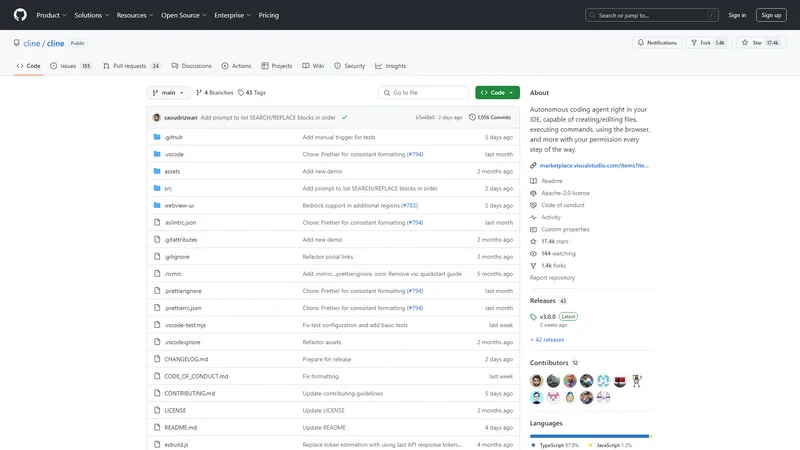
Cline is an advanced AI assistant designed to integrate seamlessly into your development environment, offering a suite of tools to enhance productivity and streamline complex software development tasks. Leveraging the capabilities of Claude 3.5 Sonnet, Cline can perform a variety of functions, from creating and editing files to executing terminal commands and using the browser for interactive debugging. This extension is particularly valuable for developers working on large, complex projects, as it can analyze file structures, source code ASTs, and run regex searches to get up to speed quickly. Cline's ability to monitor linter/compiler errors and react to dev server issues in real-time ensures that your code remains clean and functional. Additionally, Cline supports a wide range of API providers, including OpenRouter, Anthropic, OpenAI, Google Gemini, AWS Bedrock, Azure, and GCP Vertex, allowing you to use the latest models and tools. The extension also provides detailed tracking of API usage costs, keeping you informed of your spend every step of the way. With features like the Model Context Protocol (MCP), Cline can extend its capabilities through custom tools tailored to your specific workflow, making it a versatile and indispensable tool for modern software development.
Top Features
- Create and edit files
- Execute terminal commands
- Use the browser for interactive debugging
- Monitor linter/compiler errors
- Support for multiple API providers
- Model Context Protocol (MCP) for custom tools
- Detailed API usage cost tracking
- Integration with VSCode shell
- File timeline for tracking changes
- Community and custom tool support
Simple Definition of Usecases
- A software developer uses Cline to automate the creation of new files and monitor linter errors in real-time, ensuring clean code without manual intervention.
- A web developer leverages Cline to execute terminal commands for deploying applications and managing databases, streamlining the deployment process.
- A DevOps engineer utilizes Cline to extend its capabilities with custom tools for managing AWS EC2 instances, automating server scaling based on metrics.
- A data scientist employs Cline to fetch and analyze data from various APIs, using the browser for interactive debugging and visualization.
- An AI researcher uses Cline to integrate the latest models from OpenRouter and Anthropic, experimenting with new AI capabilities in their development environment.
User Reviews
Evelyn Hart
Software Developer
"Cline has revolutionized the way I approach software development. Its ability to create and edit files while monitoring linter errors has saved me countless hours. The integration with VSCode is seamless, and the detailed API usage tracking keeps me informed of my spend. I highly recommend Cline to any developer looking to enhance their productivity."
Evelyn Hart
Software Developer
"Cline has revolutionized the way I approach software development. Its ability to create and edit files while monitoring linter errors has saved me countless hours. The integration with VSCode is seamless, and the detailed API usage tracking keeps me informed of my spend. I highly recommend Cline to any developer looking to enhance their productivity."
Marcus Lee
Web Developer
"As a web developer, I find Cline's ability to execute terminal commands and manage databases incredibly useful. The browser debugging feature is a game-changer, allowing me to fix runtime errors without leaving my IDE. The only downside is the learning curve, but once you get the hang of it, Cline is an indispensable tool."
Sophia Nguyen
AI Researcher
"Cline's Model Context Protocol (MCP) is a standout feature for me. I've created custom tools tailored to my workflow, and Cline handles everything from installation to execution. The support for multiple API providers is also a big plus, allowing me to experiment with the latest models. Cline has become an essential part of my development toolkit."
Liam Patel
DevOps Engineer
"I use Cline primarily for automating AWS EC2 instance management, and it has been a huge time-saver. The ability to scale instances based on metrics is incredibly useful. The only issue I've encountered is occasional lag when executing complex commands, but overall, Cline is a powerful tool for DevOps engineers."
Ava Kim
Data Scientist
"Cline's integration with VSCode and its ability to monitor linter/compiler errors have made my development process much smoother. The file timeline feature is particularly useful for tracking changes and reverting modifications if needed. I also appreciate the detailed API usage cost tracking, which helps me manage my spend effectively. Cline is a must-have for any serious developer."
Frequently Asked Questions
What is Cline?
Cline is an AI assistant that integrates into your IDE to help with software development tasks, including creating/editing files, executing terminal commands, and using the browser for interactive debugging.
What does Cline do?
Cline can create and edit files, execute terminal commands, use the browser for debugging, monitor linter/compiler errors, and extend its capabilities through custom tools using the Model Context Protocol (MCP).
How to use Cline in VSCode?
To use Cline in VSCode, install the extension from the VS Marketplace, open the command palette with CMD/CTRL + Shift + P, and type 'Cline: Open In New Tab' to start using Cline side-by-side with your file explorer.
What to do if Cline is not responding?
If Cline is not responding, ensure that the extension is properly installed and that you have granted the necessary permissions. You can also check the terminal output for any errors and restart VSCode if needed.
How to extend Cline's capabilities?
You can extend Cline's capabilities by using the Model Context Protocol (MCP) to create custom tools tailored to your workflow. Simply ask Cline to 'add a tool' and follow the prompts to create and install the tool.
Does Cline support local models?
Yes, Cline supports local models through LM Studio/Ollama, allowing you to use local AI models in your development environment.
Can Cline manage AWS EC2 instances?
Yes, Cline can manage AWS EC2 instances by creating custom tools that check server metrics and scale instances up or down based on your needs.
How does Cline track API usage costs?
Cline tracks API usage costs by monitoring the total tokens and API usage for the entire task loop and individual requests, providing detailed cost information every step of the way.
Related AI Tools

Frequently Asked Questions
What is MaoMaoYu Top4 AI Tools Directory?
Top 4 AI — '4' means 'For', MaoMaoYu Top For AI Tools Directory - top4ai.com is building an ai tools directory that helps you get your favorite ai tools, free ai tools list. It can get best ai writing tools, best free ai tools for writing articles, content at scale ai detector, best ai email marketing tools, ai paraphrasing tools, best ai seo tools, ai study tools, 'pearson' and 'ai' and 'study tools', ai generator tools, ai hashtags generator tools, best ai tools for research, ai art tools, ai music tools, ai video editing tools, ai pair coding tools, ai photo tools, ai tools for detecting photoshopped imagers, best ai tools for start up companies who are researching their market and more here.
How to found your ai tools in MaoMaoYu Top4 AI tools directory?
1. Open top4ai.com.
2. Explore the ai tools in the MaoMaoYu Top4 AI tools directory.
3. Click the ai tools that you need to get the detail and visit it.
What are the main features of MaoMaoYu Top4 AI Tools Directory?
1. Explore a simple definition of AI tools and discover how to fast find the perfect one for your needs. Streamline your workflow with the right AI solution.
2. Intelligent Search Engine: Thinking of what you think, saving you time, saving you trouble
Is it free to submit ai tools to MaoMaoYu Top4 AI Tools Directory?
Yes, it's free currently.
What's the categories list of AI Tools that MaoMaoYu Top4 AI Tools Directory support?
We will support all kinds of AI Tools later. Please wait for a few days.
What's the frequency for the up of AI tools in MaoMaoYu Top4 AI Directory?
The list of AI tools will be updated daily.
Is it support QuillBot, GPT-4o or Sora AI here?
You can get the QuillBot, GPT-4o or Sora AI tool here. Here is the introduction of GPT-4o and Sora video, and you can visit the website of the tools.
Troubleshooting
If the content aren't appearing, try a different browser, clear your cache. If issues persist, contact us at support@top4ai.com | support@maomaoyu.coffee.
What are the usage rights of the AI tools?
MaoMaoYu Top4 AI Tools Directory is just the AI Directory for AI tools. The usage rights of the AI tools are based on the AI tools' website.