2024-12-04 07:23:49
Maplibre-Geoman
Categories
เครื่องกำเนิดแผนที่ AIเครื่องมือสำหรับนักพัฒนา AIตัวสร้างการออกแบบ AI
Users of this tool
GIS ProfessionalsWeb DevelopersData AnalystsUrban PlannersEnvironmental Scientists
PricingType
Freemium

Links

  1. Documentation: https://www.geoman.io/docs/maplibre
  2. Pricing: https://geoman.io/pricing

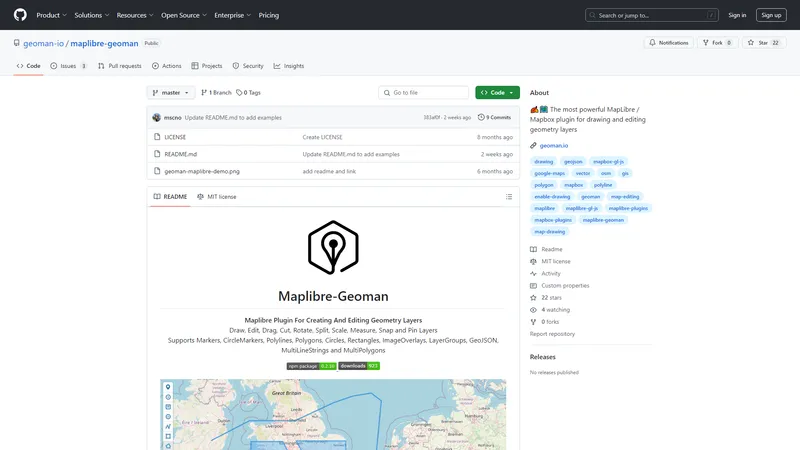
Maplibre-Geoman is the most powerful plugin for MapLibre and Mapbox, designed for drawing and editing geometry layers. It offers a comprehensive set of tools for creating, editing, and managing various types of geometry layers, including markers, polylines, polygons, circles, and more. With features like drawing, editing, dragging, cutting, rotating, splitting, scaling, measuring, snapping, and pinning, Maplibre-Geoman is an essential tool for GIS professionals, developers, and anyone needing advanced map editing capabilities. Whether you're building a web application for mapping, spatial analysis, or data visualization, Maplibre-Geoman provides the flexibility and functionality to meet your needs. The plugin supports both free and pro versions, with the pro version offering additional features and capabilities. Visit geoman.io/docs/maplibre for detailed documentation and get started with enhancing your mapping projects today.

Top Features

  1. Drawing and editing geometry layers
  2. Drag, cut, rotate, split, and scale features
  3. Measure distances and areas
  4. Snap to existing features for precise editing
  5. Pin layers for fixed positioning

Simple Definition of Usecases

  1. Creating detailed maps for urban planning projects, allowing planners to draw and edit building footprints, roads, and green spaces.
  2. Analyzing environmental data by drawing and editing polygons to represent different ecosystems and measuring their areas.
  3. Developing web applications for real estate, enabling users to draw and edit property boundaries and add markers for listings.
  4. Building interactive maps for tourism, allowing users to draw and edit routes, add markers for points of interest, and measure distances.
  5. Conducting spatial analysis for research projects, drawing and editing polylines to represent data paths and measuring their lengths.

Frequently Asked Questions

Q:

What is Maplibre-Geoman?

A:

Maplibre-Geoman is a powerful plugin for MapLibre and Mapbox that enables drawing and editing of geometry layers.

Q:

What types of geometry layers does Maplibre-Geoman support?

A:

Maplibre-Geoman supports markers, CircleMarkers, polylines, polygons, circles, rectangles, ImageOverlays, LayerGroups, GeoJSON, MultiLineStrings, and MultiPolygons.

Q:

How can I install Maplibre-Geoman?

A:

You can install the free version via npm with 'npm install @geoman-io/maplibre-geoman-free'. For the pro version, you need to configure your .npmrc file with a license key.

Q:

What are the main features of Maplibre-Geoman?

A:

Main features include drawing and editing geometry layers, drag, cut, rotate, split, scale, measure, snap, and pin layers.

Q:

Where can I find documentation for Maplibre-Geoman?

A:

Documentation is available at geoman.io/docs/maplibre.

Related AI Tools

Lecca.io - แพลตฟอร์ม AI และระบบอัตโนมัติแบบไม่ต้องเขียนโค้ด | Top 4 AI Tool loading
Lecca.io เป็นแพลตฟอร์มที่ช่วยให้คุณสร้าง AI Agents และระบบอัตโนมัติได้โดยไม่ต้องเขียนโค้ด ด้วยความสามารถในการเชื่อมต่อกับเครื่องมือและแอปพลิเคชันต่างๆ เช่น Gmail, Google Sheets, Hubspot, OpenAI, และอื่นๆ Lecca.io ช่วยให้คุณสามารถสร้างระบบอัตโนมัติที่ตอบสนองความต้องการเฉพาะของธุรกิจได้อย่างมีประสิทธิภาพ แพลตฟอร์มนี้ยังรองรับการใช้งานแบบโมดูลาร์ที่ให้คุณสามารถนำ API Keys ของตัวเองมาใช้ สร้างเครื่องมือที่กำหนดเอง และเลือกผู้ให้บริการ AI ที่ต้องการได้ นอกจากนี้ Lecca.io ยังมีฟีเจอร์ Human in the loop ที่ช่วยให้คุณสามารถเพิ่มการตรวจสอบโดยมนุษย์ในกระบวนการอัตโนมัติเพื่อให้มั่นใจในคุณภาพและความสอดคล้องกับกฎระเบียบต่างๆ ด้วยการเป็นแพลตฟอร์มที่สามารถโฮสต์บนโครงสร้างพื้นฐานของคุณเองและปรับแต่งได้ตามความต้องการ Lecca.io จึงเป็นทางเลือกที่ยืดหยุ่นและทรงพลังสำหรับธุรกิจที่ต้องการนำ AI และระบบอัตโนมัติมาใช้ในการทำงาน
การจัดการลำดับงาน AI
Freemium
Photes.io | Top 4 AI Tool loading
Photes.io is an AI-powered note-taking assistant designed to transform photos into structured text notes. Whether you're capturing images from slides, meetups, or classes, Photes.io uses advanced AI to understand the context and content of your images, generating well-structured notes that can be exported to popular note-taking apps like Notion, Obsidian, and Google Docs. With features like AI-powered text extraction, integration with various note-taking apps, and the ability to enhance notes with external references, Photes.io aims to elevate your note-taking experience, making it more efficient and comprehensive. Ideal for students, professionals, and anyone looking to streamline their note-taking process, Photes.io turns your smartphone into a smart notepad, allowing you to capture, organize, and enhance your ideas on the go.
ผู้ช่วยบันทึกข้อความ AI
Freemium
Craft Docs | Top 4 AI Tool loading
Craft Docs is a powerful and beautifully designed documentation tool built for Mac and iOS. It offers instant sync across devices, Apple Intelligence, and GPT 4o integration, making it a top choice for users looking to organize their digital content seamlessly. Craft Docs has won multiple awards, including the Apple Design Award and The Webby Award, for its innovative features and user-friendly interface. Whether you're planning your days, summarizing content with AI, or collaborating in real-time, Craft Docs provides a comprehensive solution for all your documentation needs. Download Craft for free and experience the difference.
ผู้ช่วยเอกสาร AI
Freemium
Free Amazing Translator - แปลภาษาได้อย่างอัศจรรย์ด้วย AI ฟรี | Top 4 AI Tool loading
Free AI Translator เป็นเครื่องมือแปลภาษาที่ขับเคลื่อนด้วยเทคโนโลยี AI ที่ทันสมัย ช่วยให้คุณสามารถแปลข้อความ เอกสาร รูปภาพ และไฟล์เสียงได้อย่างรวดเร็วและแม่นยำในกว่า 100 ภาษา ไม่ว่าคุณจะเป็นนักเรียน นักศึกษา หรือมืออาชีพ เครื่องมือนี้จะช่วยให้การสื่อสารข้ามวัฒนธรรมเป็นเรื่องง่ายและมีประสิทธิภาพ ด้วยฟังก์ชันการแปลที่หลากหลาย รวมถึงการตรวจสอบไวยากรณ์และการปรับปรุงเนื้อหา คุณสามารถมั่นใจได้ว่าข้อความที่แปลออกมาจะมีความถูกต้องและเป็นธรรมชาติ นอกจากนี้ยังมีแผนราคาที่ยืดหยุ่นสำหรับผู้ใช้ทุกประเภท ตั้งแต่แผนฟรีไปจนถึงแผนระดับมืออาชีพและองค์กร
แปล
Freemium
Liquify Pro - สร้างร้านค้า Shopify ระดับสูงด้วย Webflow | Top 4 AI Tool loading
Liquify Pro เป็นเครื่องมือที่ช่วยให้คุณสร้างธีม Shopify ที่ปรับแต่งได้อย่างสมบูรณ์โดยใช้ Webflow และแปลงเป็นร้านค้า Shopify ที่ใช้งานได้เต็มรูปแบบอย่างง่ายดาย ด้วย Liquify Pro คุณสามารถควบคุมเนื้อหาได้อย่างเต็มที่ใน Shopify ในขณะที่ยังคงรักษาอิสระในการออกแบบจาก Webflow เครื่องมือนี้เหมาะสำหรับผู้ที่ต้องการสร้างร้านค้าออนไลน์ที่มีประสิทธิภาพสูงและมีความยืดหยุ่นในการออกแบบ Liquify Pro มีคุณสมบัติที่พร้อมใช้งาน เช่น การสนับสนุน Shopify Liquid อย่างเต็มรูปแบบ การแปลงแบบอัตโนมัติผ่านการรวม GitHub และการจัดการเนื้อหาใน Shopify ได้อย่างง่ายดาย นอกจากนี้ยังมีคอมโพเนนต์ที่สร้างไว้ล่วงหน้าและเครื่องมือดีบักที่ช่วยให้คุณแก้ไขข้อผิดพลาดได้อย่างรวดเร็ว Liquify Pro เป็นทางเลือกที่ยอดเยี่ยมสำหรับผู้ที่ต้องการสร้างร้านค้า Shopify ที่มีประสิทธิภาพและความยืดหยุ่นสูง
ผู้ช่วยอีคอมเมิร์ซ
Subscription
VEED.IO | Top 4 AI Tool loading
VEED.IO is a comprehensive video editing platform that leverages AI to help users create professional-quality videos quickly and efficiently. Whether you're a marketer, educator, business professional, or content creator, VEED.IO offers a suite of tools to streamline your video creation process. From AI-powered video generation to advanced editing features, VEED.IO ensures that your videos stand out in a crowded digital landscape. With a focus on user-friendly interfaces and powerful functionalities, VEED.IO is designed to meet the diverse needs of modern video creators.
Subscription
Buildfy - Build Beautiful GUIs Without Writing Code | Top 4 AI Tool loading
Buildfy is a professional GUI builder designed to simplify the creation of CustomTkinter interfaces through an intuitive drag-and-drop interface. With Buildfy, users can design, preview, and export their graphical user interfaces (GUIs) in minutes, eliminating the need for extensive coding knowledge. The platform offers both a free version and a Pro version, catering to a wide range of users from beginners to advanced developers. The free version includes essential features like a widget selection panel, real-time preview, basic customization options, and theme switching between dark and light modes. The Pro version unlocks advanced functionalities such as premium widgets, project saving and loading, Python code export, and a smart grid system for precise alignment. Buildfy's versatile themes and intuitive interface make it an ideal tool for creating professional-grade GUIs for various applications, from simple forms to complex dashboards. The platform also provides example projects and tutorials to help users get started and stay updated with new features and updates. Buildfy is developed by Pratyush Mishra under the Proxlight brand and is available for download on Gumroad. With its focus on simplicity, efficiency, and versatility, Buildfy is positioned as a leading solution for GUI design in the CustomTkinter ecosystem.
ไม่มีโค้ดและโค้ดต่ำ
Freemium
Google Maps Extended Routes Extension | Boost your routes planning | Top 4 AI Tool loading
Google Maps Extended Routes Extension is a powerful tool designed to enhance your route planning experience on Google Maps. Whether you're a cyclist, motorbiker, or anyone needing to plan complex routes, this extension offers a range of features to make your journey smoother and more efficient. From extending routes beyond the standard 10 points limit to optimizing multi-stop routes for shorter travel, this extension is perfect for those who need more control and flexibility in their route planning. Additionally, it allows you to export routes to popular services like Apple Maps, TomTom Planner, Bing, and Yandex Maps, and download routes as GPX or KML files for offline use. With features like appending route segments, splitting long routes, and reversing any route, this extension is a must-have for anyone who frequently plans routes on Google Maps.
ตัววางแผนการเดินทาง AI
Freemium

Frequently Asked Questions

What is MaoMaoYu Top4 AI Tools Directory?

Top 4 AI — '4' means 'For', MaoMaoYu Top For AI Tools Directory - top4ai.com is building an ai tools directory that helps you get your favorite ai tools, free ai tools list. It can get best ai writing tools, best free ai tools for writing articles, content at scale ai detector, best ai email marketing tools, ai paraphrasing tools, best ai seo tools, ai study tools, 'pearson' and 'ai' and 'study tools', ai generator tools, ai hashtags generator tools, best ai tools for research, ai art tools, ai music tools, ai video editing tools, ai pair coding tools, ai photo tools, ai tools for detecting photoshopped imagers, best ai tools for start up companies who are researching their market and more here.

How to found your ai tools in MaoMaoYu Top4 AI tools directory?

1. Open top4ai.com.

2. Explore the ai tools in the MaoMaoYu Top4 AI tools directory.

3. Click the ai tools that you need to get the detail and visit it.

What are the main features of MaoMaoYu Top4 AI Tools Directory?

1. Explore a simple definition of AI tools and discover how to fast find the perfect one for your needs. Streamline your workflow with the right AI solution.

2. Intelligent Search Engine: Thinking of what you think, saving you time, saving you trouble

Is it free to submit ai tools to MaoMaoYu Top4 AI Tools Directory?

Yes, it's free currently.

What's the categories list of AI Tools that MaoMaoYu Top4 AI Tools Directory support?

We will support all kinds of AI Tools later. Please wait for a few days.

What's the frequency for the up of AI tools in MaoMaoYu Top4 AI Directory?

The list of AI tools will be updated daily.

Is it support QuillBot, GPT-4o or Sora AI here?

You can get the QuillBot, GPT-4o or Sora AI tool here. Here is the introduction of GPT-4o and Sora video, and you can visit the website of the tools.

Troubleshooting

If the content aren't appearing, try a different browser, clear your cache. If issues persist, contact us at support@top4ai.com | support@maomaoyu.coffee.

What are the usage rights of the AI tools?

MaoMaoYu Top4 AI Tools Directory is just the AI Directory for AI tools. The usage rights of the AI tools are based on the AI tools' website.