Links
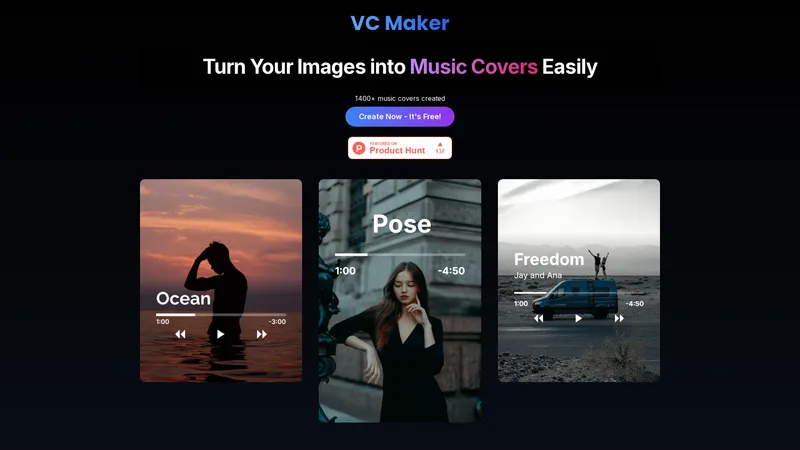
VC Maker, also known as Visual Cover Maker, is an innovative online tool designed to help users create stunning album covers, song covers, and unique designs effortlessly. With its user-friendly interface and a wide array of customization options, VC Maker caters to both professional musicians and casual users alike. The platform allows you to upload any standard image format and enhance it with custom text, music controls, filters, and more. All editing is done directly within your browser, ensuring your privacy is protected. VC Maker is completely free to use, with no hidden charges or restrictions. Whether you're looking to create visuals for social media, design professional album covers, or simply experiment with creative designs, VC Maker provides the tools you need to bring your ideas to life. The platform is optimized for both desktop and mobile devices, making it accessible anytime, anywhere. With over 1400 music covers already created, VC Maker is a trusted choice for anyone seeking to elevate their visual content.
Top Features
- Add custom text to your covers
- Overlay music player elements
- Apply stunning filters to your images
- Highlight the artist with style
- Download your cover in high quality
- Share directly to social media
Simple Definition of Usecases
- A musician uploads an image of their band and adds custom text, music controls, and filters to create a professional album cover for their new release.
- A social media influencer uses VC Maker to design eye-catching visuals for their Instagram posts, incorporating custom captions and stylish filters to engage their audience.
- A graphic designer experiments with different design elements in VC Maker to create unique song covers for a client's music project, ensuring each cover stands out.
- A content creator designs a series of visuals for their YouTube channel, using VC Maker to add progress bars and play buttons to give their thumbnails an interactive look.
- A casual user explores VC Maker's features to create personalized covers for their playlist, experimenting with various filters and text styles to achieve the desired aesthetic.
Frequently Asked Questions
What is VC Maker (Visual Cover Maker)?
VC Maker (Visual Cover Maker) is a versatile tool that allows you to create stunning album covers, song covers, and unique designs. Customize your images with music controls, captions, filters, progress bars, and more—all within your browser.
Is VC Maker (Visual Cover Maker) free to use?
Yes! VC Maker (Visual Cover Maker) is completely free to use with no restrictions. You can access all features without any cost or hidden charges.
Can I create social media posts with VC Maker (Visual Cover Maker)?
Absolutely! VC Maker (Visual Cover Maker) lets you design visuals perfect for social media. Add customizable titles, captions, and design elements to make your posts stand out.
How does VC Maker (Visual Cover Maker) protect my privacy?
VC Maker (Visual Cover Maker) does not store your uploaded images or input text. All editing takes place directly within your browser, ensuring your privacy is protected. Your designs remain entirely yours.
Can I add music-related elements to my images?
Yes! VC Maker (Visual Cover Maker) allows you to add progress bars, play buttons, and other music controls to your images, giving them a professional and interactive look.
Related AI Tools

Frequently Asked Questions
What is MaoMaoYu Top4 AI Tools Directory?
Top 4 AI — '4' means 'For', MaoMaoYu Top For AI Tools Directory - top4ai.com is building an ai tools directory that helps you get your favorite ai tools, free ai tools list. It can get best ai writing tools, best free ai tools for writing articles, content at scale ai detector, best ai email marketing tools, ai paraphrasing tools, best ai seo tools, ai study tools, 'pearson' and 'ai' and 'study tools', ai generator tools, ai hashtags generator tools, best ai tools for research, ai art tools, ai music tools, ai video editing tools, ai pair coding tools, ai photo tools, ai tools for detecting photoshopped imagers, best ai tools for start up companies who are researching their market and more here.
How to found your ai tools in MaoMaoYu Top4 AI tools directory?
1. Open top4ai.com.
2. Explore the ai tools in the MaoMaoYu Top4 AI tools directory.
3. Click the ai tools that you need to get the detail and visit it.
What are the main features of MaoMaoYu Top4 AI Tools Directory?
1. Explore a simple definition of AI tools and discover how to fast find the perfect one for your needs. Streamline your workflow with the right AI solution.
2. Intelligent Search Engine: Thinking of what you think, saving you time, saving you trouble
Is it free to submit ai tools to MaoMaoYu Top4 AI Tools Directory?
Yes, it's free currently.
What's the categories list of AI Tools that MaoMaoYu Top4 AI Tools Directory support?
We will support all kinds of AI Tools later. Please wait for a few days.
What's the frequency for the up of AI tools in MaoMaoYu Top4 AI Directory?
The list of AI tools will be updated daily.
Is it support QuillBot, GPT-4o or Sora AI here?
You can get the QuillBot, GPT-4o or Sora AI tool here. Here is the introduction of GPT-4o and Sora video, and you can visit the website of the tools.
Troubleshooting
If the content aren't appearing, try a different browser, clear your cache. If issues persist, contact us at support@top4ai.com | support@maomaoyu.coffee.
What are the usage rights of the AI tools?
MaoMaoYu Top4 AI Tools Directory is just the AI Directory for AI tools. The usage rights of the AI tools are based on the AI tools' website.