AI Developer ToolsAI Productivity ToolsAI Workflow ManagementAI Team Collaboration
Users of this tool
Developers looking to integrate AI-powered screen and audio capture into their applications.AI businesses needing a reliable pipeline for data capture and processing.End-users interested in automating tasks such as meeting transcription and screen activity logging.Researchers and data scientists working on AI projects requiring continuous data capture.IT professionals managing multi-device environments and needing comprehensive data capture solutions.
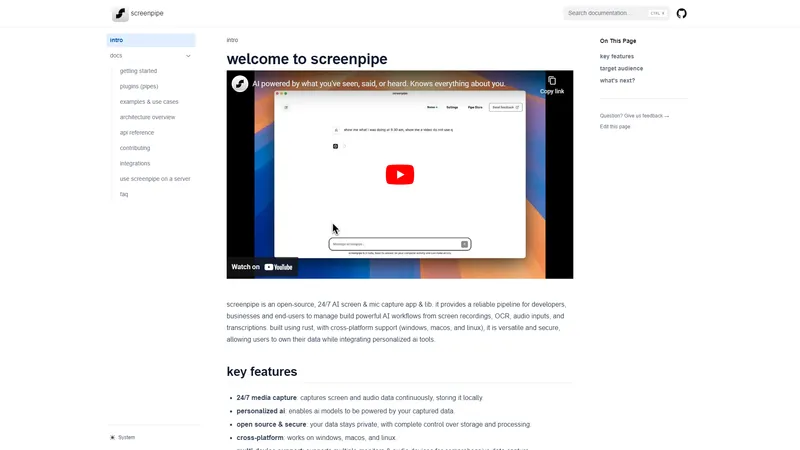
Welcome to ScreenPipe, an open-source, 24/7 AI screen and mic capture app and library. ScreenPipe provides a reliable pipeline for developers, businesses, and end-users to manage and build powerful AI workflows from screen recordings, OCR, audio inputs, and transcriptions. Built using Rust, with cross-platform support (Windows, macOS, and Linux), ScreenPipe is versatile and secure, allowing users to own their data while integrating personalized AI tools. Key features include 24/7 media capture, personalized AI, open-source security, cross-platform compatibility, multi-device support, and plugin extensibility. ScreenPipe is suitable for developers, AI businesses, and anyone interested in automating data capture and creating AI-powered workflows.
Top Features
24/7 media capture: Continuous screen and audio data capture stored locally.
Personalized AI: AI models powered by captured data for tailored workflows.
Open source & secure: Data privacy with complete control over storage and processing.
Cross-platform: Works on Windows, macOS, and Linux.
Multi-device support: Supports multiple monitors and audio devices for comprehensive data capture.
Plugins & pipes: Extend functionality with TypeScript plugins running within a JS runtime.
Simple Definition of Usecases
Developers can use ScreenPipe to create applications that require continuous screen and audio capture for AI-driven analytics.
AI businesses can integrate ScreenPipe into their workflows to capture and process data for training AI models.
End-users can automate meeting transcription by capturing audio and screen activity, then processing it with AI tools.
Researchers can use ScreenPipe to gather continuous data for AI projects, such as studying user behavior or developing new AI algorithms.
IT professionals can manage multi-device environments by capturing comprehensive data from multiple monitors and audio sources for analysis and troubleshooting.
Frequently Asked Questions
Q:
Is ScreenPipe open-source?
A:
Yes, ScreenPipe is an open-source project, allowing users to view, modify, and contribute to the codebase.
Q:
Does ScreenPipe support multiple operating systems?
A:
Yes, ScreenPipe supports Windows, macOS, and Linux, providing cross-platform compatibility.
Q:
Can I extend ScreenPipe's functionality with plugins?
A:
Yes, ScreenPipe allows the creation and use of plugins (pipes) in TypeScript to extend its functionality.
Q:
Is my data secure with ScreenPipe?
A:
Yes, ScreenPipe ensures data privacy by storing all captured data locally and allowing users complete control over storage and processing.
Q:
What are some typical use cases for ScreenPipe?
A:
Typical use cases include meeting transcription, screen activity logging, and integrating AI-powered workflows into applications.
AI Facefy is a cutting-edge platform that offers free and secure online face swapping services. Utilizing advanced artificial intelligence, AI Facefy enables users to seamlessly swap faces in photos and videos, creating realistic and entertaining content. Whether you're looking to create fun memes, engage in cosplay, or enhance your social media presence, AI Facefy provides a user-friendly interface and quick processing times. The platform ensures privacy by deleting uploaded photos within 24 hours and offers high-quality output with natural facial expressions. With features like seamless face replacement, creative possibilities, and support for various media formats, AI Facefy is a versatile tool for both casual users and content creators. Discover the endless creative opportunities and transform your images and videos with AI Facefy today.
Yevideo is an all-in-one AI video and AI image creation platform that aggregates multiple state-of-the-art generative AI models into a single, cohesive studio. Designed for creatives, marketers, and developers, the platform provides a streamlined and intuitive workflow for transforming text prompts, images, and reference videos into high-quality visual content. Yevideo distinguishes itself by not just exposing raw AI models, but by curating them with clear use-case recommendations, estimated credit costs, and an integrated workspace that simplifies the creative process. The platform supports an extensive range of tasks including text-to-image, image-to-image, text-to-video, image-to-video, video-to-video, and AI video editing. Users can generate content using models like Google's Veo 3.1 and Gemini Omni Video, ByteDance's Seedance 2.0, Kuaishou's Kling 3.0, and image models like Google's Nano Banana Pro and OpenAI's GPT Image 2. The introduction of a 'Gemini Omni Video' model, which leverages Gemini's world knowledge and physics reasoning, underscores Yevideo's commitment to integrating the most advanced capabilities. A key feature for new users is the welcome bonus of free credits, allowing them to test the platform without immediate financial commitment. For professional users, Yevideo offers a practical and efficient alternative to using multiple, disparate AI tools, centralizing project management, credit tracking, and output history. The platform's pricing operates on a credit-based system, where each generation (image or video) consumes a specific amount of credits based on the complexity and model chosen. This credits system provides a pay-per-use feel, ensuring users only pay for what they generate. Yevideo also explicitly grants commercial usage rights to paid subscribers, making it a viable tool for businesses creating marketing assets, social media content, and product visuals. The platform's user interface is designed to be intuitive, with clear model cards that outline each model's strengths, such as 'Best for motion imitation' or 'Best for text rendering in images'. This guided approach helps users select the right tool for their specific task, reducing the learning curve typically associated with advanced AI generation. Furthermore, Yevideo includes a 'daily check-in' feature and feedback rewards, encouraging community engagement and providing ongoing value to its user base. The platform actively seeks user feedback to refine its offerings and has a visible roadmap for future features like an invite program. By aggregating diverse AI models under one roof and providing a seamless, integrated user experience, Yevideo positions itself as the definitive solution for anyone looking to harness the power of AI for visual content creation.
Browser Use is a cutting-edge platform designed to make websites accessible for AI agents by extracting all interactive elements. This allows AI agents to focus on enhancing user experiences and optimizing workflows. With state-of-the-art performance, Browser Use combines advanced AI capabilities with robust browser automation to ensure seamless web interactions. Whether you're an individual developer or a large enterprise, Browser Use offers a range of plans to fit your needs, from open source to enterprise solutions. The platform supports any LangChain LLM, including GPT-4, Claude 3, and Llama 2, making it a versatile tool for AI-driven browser automation.
Recall.ai is a cutting-edge platform that enables developers to integrate AI-driven bots into video conferences. These bots can generate and stream low-latency audio and video, making them ideal for creating interactive AI agents that can listen and react to meetings in real-time. Recall.ai's Output Media functionality allows any web-app to be rendered into ultra-low-latency audio and video, which can then be streamed into video conferences. This capability opens up a wide range of use-cases, from AI-powered sales agents to coaches and recruiters. The platform supports multiple video conferencing platforms, including Zoom, Google Meet, Microsoft Teams, and Webex, providing comprehensive access to conversation data such as audio, video, transcripts, and metadata with just one API call. Recall.ai is designed for developers looking to enhance their video conferencing experiences with AI, offering easy integration and a variety of sample repositories to get started quickly.
IntraPaint is a free and open-source image editor for desktop PCs. It combines standard digital painting and image editing tools with advanced AI-based features, including image generation and inpainting. IntraPaint bridges the gap between traditional digital editing and AI-driven workflows, combining the precision of manual techniques with the efficiency of AI tools for a more seamless creative process. IntraPaint is available for Windows and Linux. macOS support is possible with manual setup and compilation.
Ollama is a cutting-edge platform designed to help users get up and running with large language models (LLMs) quickly and efficiently. Whether you're a developer, researcher, or AI enthusiast, Ollama provides a seamless experience to run, customize, and create your own models. With support for popular models like Llama 3.3, Phi 3, Mistral, and Gemma 2, Ollama caters to a wide range of AI applications. The platform is available for macOS, Linux, and Windows, ensuring accessibility across different operating systems. Ollama's user-friendly interface, extensive documentation, and active community on Discord and GitHub make it a go-to resource for anyone looking to leverage the power of LLMs. Whether you're exploring pre-trained models or developing custom solutions, Ollama offers the tools and support you need to succeed in the rapidly evolving field of artificial intelligence.
AI Server is an open-source AI server that provides a unified API for integrating various AI models and services, including LLM APIs, Ollama, ComfyUI, and FFmpeg. It offers a self-hosted private gateway to manage access to multiple AI APIs, making it an ideal solution for organizations looking to centralize their AI integrations. With native typed integrations for popular programming languages, live monitoring and analytics, and built-in UIs for various AI features, AI Server simplifies the process of incorporating AI into your applications. Whether you're a developer looking to integrate AI into your system apps or an admin managing AI providers, AI Server provides the tools and flexibility you need.
Open WebUI is an extensible, self-hosted AI interface that adapts to your workflow, all while operating entirely offline. It provides a ready to use platform for integrating AI models into your daily tasks, making it more efficient and convenient. With a focus on practical applications, Open WebUI offers a lightweight and automated solution for users seeking to optimize their productivity. Whether you're a developer, researcher, or hobbyist, Open WebUI's intuitive design and seamless integration with various AI models make it the essential tool for enhancing your workflow. The platform is currently undergoing a major revamp to improve user experience and performance, ensuring it remains the most efficient choice for AI-driven tasks.
AI Chatbot
Freemium
Frequently Asked Questions
What is MaoMaoYu Top4 AI Tools Directory?
Top 4 AI — '4' means 'For', MaoMaoYu Top For AI Tools Directory - top4ai.com is building an ai tools directory that helps you get your favorite ai tools, free ai tools list. It can get best ai writing tools, best free ai tools for writing articles, content at scale ai detector, best ai email marketing tools, ai paraphrasing tools, best ai seo tools, ai study tools, 'pearson' and 'ai' and 'study tools', ai generator tools, ai hashtags generator tools, best ai tools for research, ai art tools, ai music tools, ai video editing tools, ai pair coding tools, ai photo tools, ai tools for detecting photoshopped imagers, best ai tools for start up companies who are researching their market and more here.
How to found your ai tools in MaoMaoYu Top4 AI tools directory?
1. Open top4ai.com.
2. Explore the ai tools in the MaoMaoYu Top4 AI tools directory.
3. Click the ai tools that you need to get the detail and visit it.
What are the main features of MaoMaoYu Top4 AI Tools Directory?
1. Explore a simple definition of AI tools and discover how to fast find the perfect one for your needs. Streamline your workflow with the right AI solution.
2. Intelligent Search Engine: Thinking of what you think, saving you time, saving you trouble
Is it free to submit ai tools to MaoMaoYu Top4 AI Tools Directory?
Yes, it's free currently.
What's the categories list of AI Tools that MaoMaoYu Top4 AI Tools Directory support?
We will support all kinds of AI Tools later. Please wait for a few days.
What's the frequency for the up of AI tools in MaoMaoYu Top4 AI Directory?
The list of AI tools will be updated daily.
Is it support QuillBot, GPT-4o or Sora AI here?
You can get the QuillBot, GPT-4o or Sora AI tool here. Here is the introduction of GPT-4o and Sora video, and you can visit the website of the tools.
Troubleshooting
If the content aren't appearing, try a different browser, clear your cache. If issues persist, contact us at support@top4ai.com | support@maomaoyu.coffee.
What are the usage rights of the AI tools?
MaoMaoYu Top4 AI Tools Directory is just the AI Directory for AI tools. The usage rights of the AI tools are based on the AI tools' website.
