Links
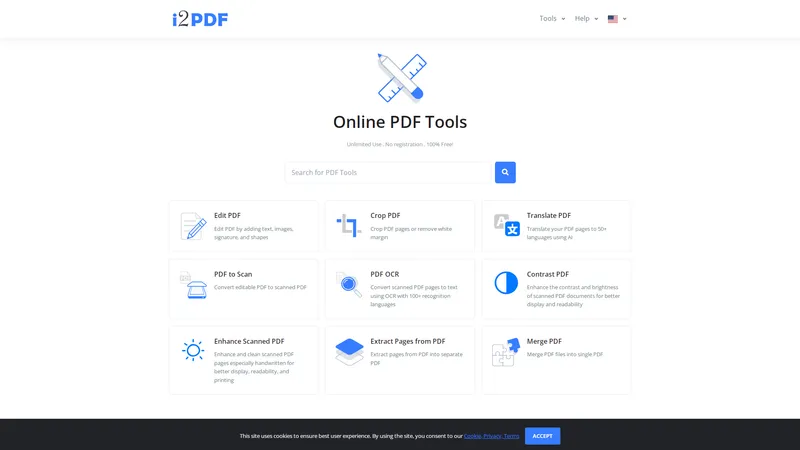
i2PDF is a comprehensive online platform offering a wide array of free PDF tools designed to meet the diverse needs of users. Whether you're a student, professional, or casual user, i2PDF provides an intuitive and efficient solution for all your PDF-related tasks. From editing and converting PDFs to enhancing and securing them, i2PDF ensures a seamless experience with its user-friendly interface and robust features. The platform supports unlimited use without the need for registration, making it accessible to everyone. With a commitment to privacy and security, i2PDF guarantees that your files are safe and automatically deleted after 30 minutes. Explore the full suite of tools and discover how i2PDF can simplify your PDF management tasks.
Top Features
- Edit PDF
- Crop PDF
- Translate PDF
- PDF to Scan
- PDF OCR
- Contrast PDF
- Enhance Scanned PDF
- Extract Pages from PDF
- Merge PDF
- Split PDF
- Compress PDF
- PDF to Grayscale
- Source Code to PDF
- Invert PDF Colors
- PDF Dark Mode
- Extract Images from PDF
- Images to PDF
- PDF to Images
- Remove Pages from PDF
- Rotate PDF
- Organize PDF
- Redact PDF
- Sign PDF
- Watermark PDF
- Deskew PDF
- Extract Tables from PDF
- Color PDF
- Unlock PDF
- Protect PDF
- Edit PDF Metadata
- Annotate PDF
- Flatten PDF
- Add Page Numbers to PDF
- Resize PDF
- N-Up PDF
- Header Footer PDF
- Add Margin to PDF
- URL to PDF
- Repair PDF
- PDF Viewer
- PDF Fast Web View
- Reverse PDF
- Compare PDF
- PDF to QR Code
- Decompress PDF
- LaTeX to PDF
- Extract Fonts from PDF
- Table to PDF
- Add Bates Numbers to PDF
- Measure PDF
- PDF to CMYK
- PDF to RGB
- PDF to EPUB
- EPUB to PDF
- eBook to PDF
- JPG to PDF
- PDF to JPG
- PNG to PDF
- PDF to PNG
- TIFF to PDF
- PDF to TIFF
- Text to PDF
- PDF to Text
- HTML to PDF
- PDF to HTML
- Word to PDF
- PDF to Word
- PowerPoint to PDF
- PDF to PowerPoint
- Excel to PDF
- CSV to PDF
- PDF to XML
- XML to PDF
- PDF to JSON
- JSON to PDF
- CAD to PDF
- PDF to CAD
- DWG to PDF
- PDF to DWG
- DXF to PDF
- PDF to DXF
- SVG to PDF
- PDF to SVG
- GIF to PDF
- PDF to GIF
- WEBP to PDF
- PDF to WEBP
- BMP to PDF
- PDF to BMP
- PS to PDF
- PDF to PS
- EPS to PDF
- PDF to EPS
- DICOM to PDF
- PDF to DICOM
- AZW3 to PDF
- MOBI to PDF
- DJVU to PDF
- Convert to PDF
Simple Definition of Usecases
- A student needs to merge multiple PDFs of lecture notes into a single document for easier study.
- A professional requires translating a PDF document into multiple languages for international clients.
- A researcher wants to extract tables from a PDF and save them as CSV for data analysis.
- A business owner needs to add a watermark to a PDF contract before sending it to a client.
- A casual user wants to convert a scanned PDF to text for editing purposes.
User Reviews
Liam O'Connor
Student
"I was amazed by the variety of tools available on i2PDF. As a student, I often need to merge and split PDFs, and this platform makes it so easy. The best part is that it's completely free and doesn't require any registration. Highly recommend it to anyone dealing with PDFs regularly."
Liam O'Connor
Student
"I was amazed by the variety of tools available on i2PDF. As a student, I often need to merge and split PDFs, and this platform makes it so easy. The best part is that it's completely free and doesn't require any registration. Highly recommend it to anyone dealing with PDFs regularly."
Sophia Martinez
Business Owner
"i2PDF has been a lifesaver for my small business. I frequently need to add watermarks to contracts and invoices, and this tool does it effortlessly. The interface is user-friendly, and the results are always professional. The only downside is that the files are deleted after 30 minutes, but it's a minor inconvenience for such a great service."
Ethan Nguyen
Professional
"I use i2PDF for translating PDF documents, and it works like a charm. The translation feature supports multiple languages, and the accuracy is impressive. It's a must-have tool for anyone working with international documents. I also appreciate the privacy policy, which ensures my files are safe."
Isabella Johnson
Researcher
"As a researcher, I often need to extract tables from PDFs for data analysis. i2PDF makes this process quick and easy. The extracted data is accurate, and I can save it in various formats like CSV and Excel. The platform is reliable, and I haven't encountered any issues so far."
Noah Smith
Casual User
"I love using i2PDF for converting scanned PDFs to text. The OCR feature is excellent, and it saves me a lot of time. The platform is straightforward to use, and I appreciate that it's free. I highly recommend it to anyone who needs to edit scanned documents."
Frequently Asked Questions
What is i2PDF?
i2PDF is a free online platform offering a wide range of PDF tools for editing, converting, enhancing, and securing PDF documents.
How to merge PDFs on i2PDF?
To merge PDFs on i2PDF, simply upload the PDF files you want to merge, and the platform will combine them into a single document.
What to do if a PDF is password-protected?
i2PDF offers an 'Unlock PDF' tool that allows you to remove password protection from a PDF document.
How to convert a PDF to Word?
Use the 'PDF to Word' tool on i2PDF to convert a PDF document into an editable Word file.
Is i2PDF free to use?
Yes, i2PDF is completely free to use with no registration required.
How secure is i2PDF?
i2PDF ensures the security of your files by automatically deleting them after 30 minutes and not sharing them with any third parties.
Can I translate a PDF on i2PDF?
Yes, i2PDF offers a 'Translate PDF' tool that supports translation into over 50 languages.
How to extract images from a PDF?
Use the 'Extract Images from PDF' tool on i2PDF to extract images from a PDF document and save them in various formats.
What is the maximum file size for PDFs on i2PDF?
The maximum file size for PDFs on i2PDF is typically 100 MB, but it may vary depending on the specific tool.
How to add a watermark to a PDF?
Use the 'Watermark PDF' tool on i2PDF to add a text or image watermark to your PDF document.
Related AI Tools

Frequently Asked Questions
What is MaoMaoYu Top4 AI Tools Directory?
Top 4 AI — '4' means 'For', MaoMaoYu Top For AI Tools Directory - top4ai.com is building an ai tools directory that helps you get your favorite ai tools, free ai tools list. It can get best ai writing tools, best free ai tools for writing articles, content at scale ai detector, best ai email marketing tools, ai paraphrasing tools, best ai seo tools, ai study tools, 'pearson' and 'ai' and 'study tools', ai generator tools, ai hashtags generator tools, best ai tools for research, ai art tools, ai music tools, ai video editing tools, ai pair coding tools, ai photo tools, ai tools for detecting photoshopped imagers, best ai tools for start up companies who are researching their market and more here.
How to found your ai tools in MaoMaoYu Top4 AI tools directory?
1. Open top4ai.com.
2. Explore the ai tools in the MaoMaoYu Top4 AI tools directory.
3. Click the ai tools that you need to get the detail and visit it.
What are the main features of MaoMaoYu Top4 AI Tools Directory?
1. Explore a simple definition of AI tools and discover how to fast find the perfect one for your needs. Streamline your workflow with the right AI solution.
2. Intelligent Search Engine: Thinking of what you think, saving you time, saving you trouble
Is it free to submit ai tools to MaoMaoYu Top4 AI Tools Directory?
Yes, it's free currently.
What's the categories list of AI Tools that MaoMaoYu Top4 AI Tools Directory support?
We will support all kinds of AI Tools later. Please wait for a few days.
What's the frequency for the up of AI tools in MaoMaoYu Top4 AI Directory?
The list of AI tools will be updated daily.
Is it support QuillBot, GPT-4o or Sora AI here?
You can get the QuillBot, GPT-4o or Sora AI tool here. Here is the introduction of GPT-4o and Sora video, and you can visit the website of the tools.
Troubleshooting
If the content aren't appearing, try a different browser, clear your cache. If issues persist, contact us at support@top4ai.com | support@maomaoyu.coffee.
What are the usage rights of the AI tools?
MaoMaoYu Top4 AI Tools Directory is just the AI Directory for AI tools. The usage rights of the AI tools are based on the AI tools' website.