एआई डिज़ाइन जनरेटरएआई वेबसाइट डिज़ाइनरनो-कोड और लो-कोडएआई ग्राफ़िक डिज़ाइन
Users of this tool
Designers looking to prototype and iterate on UI components quickly.Product managers needing to visualize product ideas before development.Engineers who require well-designed UI components for their projects.Startups aiming to build and test product concepts efficiently.Sales teams needing visually appealing UI components for presentations.
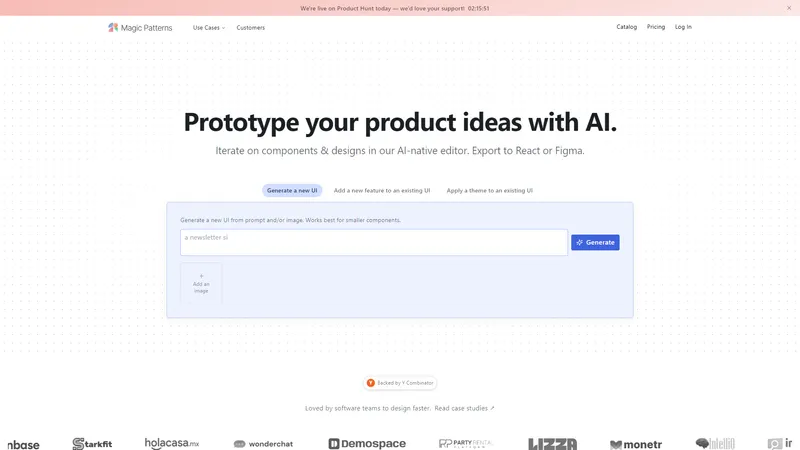
Magic Patterns is an AI-driven design tool that empowers software teams to prototype and iterate on product ideas rapidly. With an AI-native editor, users can generate new UI components, add features to existing designs, and apply themes seamlessly. The tool supports export to React or Figma, making it versatile for various design workflows. Magic Patterns is backed by Y Combinator and has garnered positive feedback from its user base, particularly for its ability to accelerate the design process. The platform also features a multiplayer canvas for real-time team collaboration and a Chrome extension for design inspiration from popular websites. Whether you're a designer, product manager, or engineer, Magic Patterns offers a comprehensive suite of tools to streamline your design process and bring your ideas to life quickly.
Top Features
AI-native editor for generating and iterating on UI components.
Export options to React and Figma.
Multiplayer canvas for real-time team collaboration.
Chrome extension for design inspiration.
Community-generated component catalog.
Simple Definition of Usecases
A designer needs to quickly prototype a new feature for an existing product. They use Magic Patterns to generate the UI component and iterate on it within the AI-native editor, then export it to Figma for further refinement.
A product manager wants to visualize a new product idea before presenting it to stakeholders. They input their idea into Magic Patterns, which generates a UI prototype that they can share with their team for feedback.
An engineer is working on a project that requires custom UI components. They use Magic Patterns to generate the components, apply a theme, and export them to React for integration into their codebase.
A startup is testing multiple product concepts and needs to iterate quickly. They use Magic Patterns to generate and modify UI components, allowing them to test different ideas efficiently.
A sales team needs visually appealing UI components for a presentation. They use Magic Patterns to generate the components and apply a professional theme, ensuring the presentation looks polished and professional.
Frequently Asked Questions
Q:
How does Magic Patterns generate UI components?
A:
Magic Patterns uses AI to generate UI components based on user prompts or images. The AI-native editor allows users to input their ideas, and the tool generates the corresponding UI components.
Q:
Can I export the generated components to other design tools?
A:
Yes, Magic Patterns supports exporting components to React and Figma, making it easy to integrate the generated components into your existing design workflow.
Q:
Is Magic Patterns suitable for team collaboration?
A:
Absolutely. Magic Patterns features a multiplayer canvas that allows teams to collaborate in real-time, making it ideal for collaborative design projects.
Q:
How can I get design inspiration using Magic Patterns?
A:
Magic Patterns offers a Chrome extension that allows you to browse design inspiration from popular websites. You can use this extension to find ideas and apply them to your projects.
Q:
What types of components can I generate with Magic Patterns?
A:
Magic Patterns can generate a wide range of UI components, including buttons, forms, navigation menus, and more. The tool is designed to handle various design needs, from simple components to complex interfaces.
UÍ-Unify एक अत्याधुनिक UI लाइब्रेरी संग्रह है जो कई UI लाइब्रेरीज़ के सर्वश्रेष्ठ घटकों को एक ही मंच पर लाता है। यह प्लेटफ़ॉर्म डेवलपर्स को तेज़, आसान और अधिक कुशल तरीके से विकास करने में सक्षम बनाता है। UÍ-Unify AI-सहायता प्रदान करता है, जिससे आप अपने घटकों को सिर्फ़ वर्णन करके बना सकते हैं। यह प्लेटफ़ॉर्म Aceternity UI, Magic UI, और Shadcn/ui जैसी लोकप्रिय UI लाइब्रेरीज़ को एकीकृत करता है, जिससे डेवलपर्स को विभिन्न स्रोतों से घटकों को खोजने और उपयोग करने की आवश्यकता नहीं होती। UÍ-Unify का उद्देश्य वेब और मोबाइल एप्लिकेशन विकास को सरल और अधिक सुविधाजनक बनाना है। इसके अलावा, यह प्लेटफ़ॉर्म डॉक्यूमेंटेशन, शोकेस, और AI-सहायता प्रदान करता है, जिससे डेवलपर्स को अपने प्रोजेक्ट्स को अधिक प्रभावी ढंग से पूरा करने में मदद मिलती है।
AI Facefy is a cutting-edge platform that offers free and secure online face swapping services. Utilizing advanced AI technology, it allows users to seamlessly swap faces in photos and videos, creating realistic and engaging content. Whether for entertainment, practical use, or creative expression, AI Facefy provides a user-friendly experience with high-quality output. The platform ensures privacy by deleting uploaded photos within 24 hours and offers quick processing times, making it a versatile tool for various user groups. With features like seamless face replacement, creative possibilities, and support for multiple media formats, AI Facefy stands out as a leading solution in the AI face swapping domain.
TapUI एक आधुनिक UI कंपोनेंट लाइब्रेरी है जो डेवलपर्स को सुंदर, एक्सेसिबल, और प्रदर्शन-उन्मुख UI कंपोनेंट्स प्रदान करती है। यह React Native, TypeScript, Shadcn/ui, और Tailwind CSS जैसी आधुनिक तकनीकों पर बनी है, जो इसे वेब और मोबाइल ऐप्लिकेशन्स के लिए आदर्श बनाती है। TapUI का उद्देश्य डेवलपर्स को स्टाइलिंग और एनिमेशन की चिंता किए बिना, सीधे काम पर ध्यान केंद्रित करने की सुविधा प्रदान करना है। यह पूरी तरह से WCAG 2.0 अनुपालन करता है, जिससे यह सभी उपयोगकर्ताओं के लिए सुलभ है। इसके अलावा, TapUI में लाइट और डार्क मोड, रिस्पॉन्सिव डिज़ाइन, और कस्टमाइज़ेशन के लचीले विकल्प शामिल हैं। यह उच्च-स्तरीय प्रदर्शन और उत्पादन-तैयार कंपोनेंट्स के साथ आता है, जो इसे आपके अगले प्रोजेक्ट के लिए एक आदर्श विकल्प बनाता है।
CopyWeb एक AI-संचालित वेब क्लोनिंग टूल है जो किसी भी वेबसाइट डिज़ाइन को उत्पादन-तैयार कोड में तुरंत परिवर्तित करता है। यह उपकरण डेवलपर्स को स्क्रीनशॉट, वेबसाइट URL, या Figma डिज़ाइन को साफ, प्रतिक्रियाशील कोड में बदलने की अनुमति देता है। CopyWeb का उपयोग करके, आप अपने वेब प्रोजेक्ट्स को तेजी से और अधिक कुशलता से पूरा कर सकते हैं। यह उपकरण विभिन्न फ्रेमवर्क्स जैसे React, Vue, और HTML/CSS को समर्थन देता है, और सभी उत्पन्न कोड मोबाइल-फ्रेंडली और प्रतिक्रियाशील होते हैं।
AI Art Generator: Photo, Draw is a cutting-edge mobile application designed to unleash your creativity by transforming your ideas and photos into stunning AI-generated artworks. Whether you're looking to design a unique logo, create a personalized avatar, or turn your photos into masterpieces, this app offers a wide range of features to cater to your artistic needs. With advanced AI technology, you can generate art in various styles, including 3D rendering, anime, sketching, and realism. The app also includes AI face swap and avatar creation tools, allowing you to explore endless creative possibilities. AI Art Generator is perfect for artists, designers, social media enthusiasts, and anyone looking to add a touch of creativity to their digital content. The app is free to download, with optional in-app purchases for premium features and subscriptions.
21st.dev डिज़ाइन इंजीनियर्स के लिए एक अत्याधुनिक प्लेटफॉर्म है, जो React Tailwind कंपोनेंट्स के साथ पॉलिश्ड यूआई को तेज़ी से शिप करने में मदद करता है। यह प्लेटफॉर्म shadcn/ui से प्रेरित है और डिज़ाइन इंजीनियर्स द्वारा, डिज़ाइन इंजीनियर्स के लिए बनाया गया है। 21st.dev के साथ, आप एक कमांड के साथ कंपोनेंट्स इंस्टॉल कर सकते हैं और अपने प्रोजेक्ट्स को और अधिक कुशल और प्रभावी बना सकते हैं। यह प्लेटफॉर्म आपको Ready to use, Automated, और Optimize कंपोनेंट्स प्रदान करता है, जो आपके डिज़ाइन प्रोसेस को सरल और सहज बनाते हैं।
Tempo Labs is a cutting-edge platform designed to revolutionize the way designers and developers collaborate on React applications. By leveraging the power of AI, Tempo empowers users to build React apps 10 times faster, providing a seamless integration of design and development workflows. The platform offers a drag-and-drop editor that feels like a design tool, allowing users to edit React code visually. This innovative approach not only speeds up the development process but also ensures that designers and developers are working from a single source of truth. Tempo Labs supports any React codebase, enabling users to bring their existing projects into the platform and continue development without starting from scratch. With features like visual editing, design system management, and integration with popular tools like VSCode and GitHub, Tempo Labs is the ultimate solution for modern web development. Whether you're a seasoned developer or a designer looking to bring your ideas to life, Tempo Labs provides the tools and resources you need to turn your concepts into functional React applications efficiently and effectively.
Relume एक AI-संचालित वेबसाइट बिल्डर है जो डिजाइनरों और डेवलपर्स को मिनटों में साइटमैप, वायरफ्रेम और स्टाइल गाइड बनाने में मदद करता है। यह उपकरण डिजाइन प्रक्रिया को सरल और अधिक कुशल बनाता है, जिससे उपयोगकर्ता अपने प्रोजेक्ट्स को तेजी से पूरा कर सकते हैं। Relume के साथ, आप AI को अपने डिजाइन सहयोगी के रूप में उपयोग कर सकते हैं, न कि प्रतिस्थापन के रूप में। यह उपकरण विपणन वेबसाइटों के लिए त्वरित और प्रभावी समाधान प्रदान करता है, जिससे डिजाइनरों और डेवलपर्स को अपने काम में और अधिक उत्पादक बनने में मदद मिलती है।
एआई वेबसाइट डिज़ाइनर
Freemium
Frequently Asked Questions
What is MaoMaoYu Top4 AI Tools Directory?
Top 4 AI — '4' means 'For', MaoMaoYu Top For AI Tools Directory - top4ai.com is building an ai tools directory that helps you get your favorite ai tools, free ai tools list. It can get best ai writing tools, best free ai tools for writing articles, content at scale ai detector, best ai email marketing tools, ai paraphrasing tools, best ai seo tools, ai study tools, 'pearson' and 'ai' and 'study tools', ai generator tools, ai hashtags generator tools, best ai tools for research, ai art tools, ai music tools, ai video editing tools, ai pair coding tools, ai photo tools, ai tools for detecting photoshopped imagers, best ai tools for start up companies who are researching their market and more here.
How to found your ai tools in MaoMaoYu Top4 AI tools directory?
1. Open top4ai.com.
2. Explore the ai tools in the MaoMaoYu Top4 AI tools directory.
3. Click the ai tools that you need to get the detail and visit it.
What are the main features of MaoMaoYu Top4 AI Tools Directory?
1. Explore a simple definition of AI tools and discover how to fast find the perfect one for your needs. Streamline your workflow with the right AI solution.
2. Intelligent Search Engine: Thinking of what you think, saving you time, saving you trouble
Is it free to submit ai tools to MaoMaoYu Top4 AI Tools Directory?
Yes, it's free currently.
What's the categories list of AI Tools that MaoMaoYu Top4 AI Tools Directory support?
We will support all kinds of AI Tools later. Please wait for a few days.
What's the frequency for the up of AI tools in MaoMaoYu Top4 AI Directory?
The list of AI tools will be updated daily.
Is it support QuillBot, GPT-4o or Sora AI here?
You can get the QuillBot, GPT-4o or Sora AI tool here. Here is the introduction of GPT-4o and Sora video, and you can visit the website of the tools.
Troubleshooting
If the content aren't appearing, try a different browser, clear your cache. If issues persist, contact us at support@top4ai.com | support@maomaoyu.coffee.
What are the usage rights of the AI tools?
MaoMaoYu Top4 AI Tools Directory is just the AI Directory for AI tools. The usage rights of the AI tools are based on the AI tools' website.
