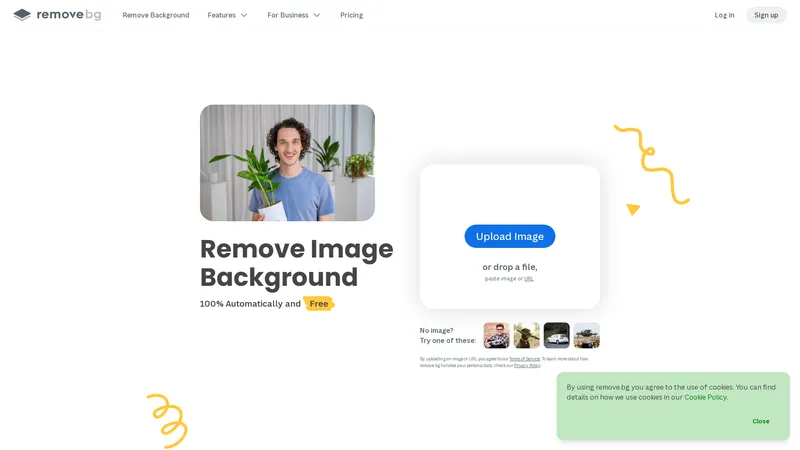
Remove.bg is a cutting-edge online tool designed to automatically remove backgrounds from images with just one click. Powered by advanced AI technology, it delivers high-quality results in just 5 seconds, making it an essential tool for professionals and individuals alike. Whether you need to create transparent PNGs, add white backgrounds, isolate subjects, or extract cutouts, remove.bg simplifies the process, saving time and enhancing creativity. The platform integrates seamlessly with popular design software, eCommerce platforms, and computer environments through its API and plugins, ensuring a smooth workflow. With features like the Magic Brush and support for various user groups—including photographers, marketers, developers, and enterprises—remove.bg caters to diverse needs. Its freemium model offers free basic services with premium options for advanced features, making it accessible to everyone. Explore remove.bg to revolutionize your image editing experience and boost your productivity.
Top Features
Automatic background removal in 5 seconds
AI-powered technology for high-quality results
Create transparent PNGs
Add white backgrounds to photos
Extract or isolate subjects
Get cutouts of photos
Integrations with popular design software
API for custom workflows
Magic Brush for precise editing
Plugins for Photoshop, Windows, Mac, Linux, and Android
Design templates for creative projects
Freemium pricing model
Simple Definition of Usecases
An individual uses remove.bg to create a transparent PNG of their pet for a personalized greeting card.
A photographer uses the tool to isolate subjects from hundreds of wedding photos, saving hours of manual editing.
A marketing professional adds white backgrounds to product images for a consistent eCommerce catalog.
A developer integrates remove.bg's API into their app to automate background removal for user-uploaded images.
An eCommerce business uses the tool to extract cutouts of car photos for their online dealership platform.
Frequently Asked Questions
Q:
What is remove.bg?
A:
Remove.bg is an AI-powered online tool that automatically removes backgrounds from images in just 5 seconds.
Q:
What does remove.bg do?
A:
It removes backgrounds from images, creates transparent PNGs, adds white backgrounds, isolates subjects, and extracts cutouts.
Q:
How to use remove.bg?
A:
Upload an image to the website, and the AI will automatically remove the background. You can then download the edited image.
Q:
What to do if the background removal isn't perfect?
A:
Use the Magic Brush feature to manually refine the edges and improve the result.
Q:
How to integrate remove.bg into my workflow?
A:
Use the API or download plugins for popular design software like Photoshop, Windows, Mac, Linux, and Android.
Q:
Is remove.bg free?
A:
Yes, remove.bg offers a freemium model with free basic services and premium options for advanced features.
Q:
What file formats does remove.bg support?
A:
Remove.bg supports common image formats like JPG, PNG, and more.
Q:
Can I use remove.bg for commercial purposes?
A:
Yes, but you may need a premium subscription depending on the volume and usage.
Q:
Does remove.bg work on mobile devices?
A:
Yes, remove.bg has an Android app and is accessible via mobile browsers.
Q:
How does remove.bg handle user data?
A:
Remove.bg follows strict privacy policies to ensure user data is protected. Refer to their Privacy Policy for details.
AI Facefy is a cutting-edge platform that offers free and secure online face swapping services. Utilizing advanced AI technology, it allows users to seamlessly swap faces in photos and videos, creating realistic and engaging content. Whether for entertainment, practical use, or creative expression, AI Facefy provides a user-friendly experience with high-quality output. The platform ensures privacy by deleting uploaded photos within 24 hours and offers quick processing times, making it a versatile tool for various user groups. With features like seamless face replacement, creative possibilities, and support for multiple media formats, AI Facefy stands out as a leading solution in the AI face swapping domain.
Editaimg एक अत्याधुनिक AI-संचालित इमेज एडिटिंग प्लेटफ़ॉर्म है जो फोटो एडिटिंग को सरल, **कुशल** और सबके लिए सुलभ बनाता है। चाहे आप एक पेशेवर फ़ोटोग्राफ़र हों, एक ई-कॉमर्स व्यवसायी, या सिर्फ कोई जो सोशल मीडिया के लिए अपनी तस्वीरों को बेहतर बनाना चाहता है, Editaimg आपके लिए है। यह प्लेटफ़ॉर्म पारंपरिक फोटोशॉप कौशल की आवश्यकता को समाप्त करता है और एक **सरल**, **सहज** इंटरफ़ेस प्रदान करता है जहाँ आप केवल एक इमेज अपलोड करके और एक प्रॉम्प्ट लिखकर जटिल एडिट कर सकते हैं। बैकग्राउंड हटाने से लेकर ऑब्जेक्ट रिप्लेसमेंट, इमेज अपस्केलिंग और स्टाइल ट्रांसफ़ॉर्म तक, यह AI इमेज एडिटर आपकी रचनात्मकता को नई ऊंचाइयों तक ले जाता है। हमारा मिशन एक **व्यावहारिक** और **एकीकृत** समाधान प्रदान करना है जो छवि संपादन की प्रक्रिया को सुव्यवस्थित करता है, जिससे आप सेकंडों में पेशेवर-ग्रेड परिणाम प्राप्त कर सकते हैं। वेबसाइट पर एक अंतर्निहित जनरेशन हिस्ट्री और साइन-इन सुविधा भी है, जो उपयोगकर्ताओं को अपने पिछले काम को संग्रहीत और एक्सेस करने की अनुमति देती है। प्लेटफ़ॉर्म को ध्यान में रखते हुए डिज़ाइन किया गया है, चाहे आप शुरुआती हों या विशेषज्ञ, यह AI इमेज एडिटर आपको बिना किसी तकनीकी ज्ञान के आश्चर्यजनक परिणाम प्राप्त करने में मदद करता है। यह एक ऐसा टूल है जो न केवल समय बचाता है बल्कि आपकी कल्पना को भी जीवंत करता है, जो आज के डिजिटल परिदृश्य में एक आवश्यक संसाधन है। हम क्रेडिट-आधारित मूल्य निर्धारण प्रदान करते हैं जो कभी समाप्त नहीं होता, जिससे आप अपनी गति से काम कर सकते हैं। Editaimg सिर्फ एक उपकरण नहीं है; यह आपकी रचनात्मक यात्रा का एक साथी है।
Yevideo is an all-in-one AI video and AI image creation platform that aggregates multiple state-of-the-art generative AI models into a single, cohesive studio. Designed for creatives, marketers, and developers, the platform provides a streamlined and intuitive workflow for transforming text prompts, images, and reference videos into high-quality visual content. Yevideo distinguishes itself by not just exposing raw AI models, but by curating them with clear use-case recommendations, estimated credit costs, and an integrated workspace that simplifies the creative process. The platform supports an extensive range of tasks including text-to-image, image-to-image, text-to-video, image-to-video, video-to-video, and AI video editing. Users can generate content using models like Google's Veo 3.1 and Gemini Omni Video, ByteDance's Seedance 2.0, Kuaishou's Kling 3.0, and image models like Google's Nano Banana Pro and OpenAI's GPT Image 2. The introduction of a 'Gemini Omni Video' model, which leverages Gemini's world knowledge and physics reasoning, underscores Yevideo's commitment to integrating the most advanced capabilities. A key feature for new users is the welcome bonus of free credits, allowing them to test the platform without immediate financial commitment. For professional users, Yevideo offers a practical and efficient alternative to using multiple, disparate AI tools, centralizing project management, credit tracking, and output history. The platform's pricing operates on a credit-based system, where each generation (image or video) consumes a specific amount of credits based on the complexity and model chosen. This credits system provides a pay-per-use feel, ensuring users only pay for what they generate. Yevideo also explicitly grants commercial usage rights to paid subscribers, making it a viable tool for businesses creating marketing assets, social media content, and product visuals. The platform's user interface is designed to be intuitive, with clear model cards that outline each model's strengths, such as 'Best for motion imitation' or 'Best for text rendering in images'. This guided approach helps users select the right tool for their specific task, reducing the learning curve typically associated with advanced AI generation. Furthermore, Yevideo includes a 'daily check-in' feature and feedback rewards, encouraging community engagement and providing ongoing value to its user base. The platform actively seeks user feedback to refine its offerings and has a visible roadmap for future features like an invite program. By aggregating diverse AI models under one roof and providing a seamless, integrated user experience, Yevideo positions itself as the definitive solution for anyone looking to harness the power of AI for visual content creation.
White Background Online is an advanced background removal tool that utilizes AI models for precise image extraction, supports a variety of image formats, and is free to use. Developed by a team of programmers with backgrounds in major companies, they possess rich technical experience and innovation capabilities. The emergence of White Background has solved the problem of complex background removal for users, making image processing more efficient and convenient. Whether it's individual users or professional designers, they can easily complete high-quality image editing work with this tool. White Background is not just a tool, but also a powerful weapon to enhance image processing efficiency.
Gemini 2.5 Flash Image Google DeepMind द्वारा विकसित एक क्रांतिकारी AI छवि जनरेटर है। यह उच्च गुणवत्ता वाली छवियों को त्वरित और सहज तरीके से बनाने में सक्षम है। इसकी प्रमुख विशेषताओं में चरित्र स्थिरता, बहु-छवि संयोजन, और प्राकृतिक भाषा संपादन शामिल हैं। Gemini 2.5 Flash Image का उपयोग करके आप किसी भी प्रॉम्प्ट को पेशेवर गुणवत्ता वाली छवियों में बदल सकते हैं। यह तकनीक Google की उन्नत AI मॉडल पर आधारित है, जो छवि निर्माण और संपादन को और भी सरल और प्रभावी बनाती है।
Image to Video AI एक अत्याधुनिक AI टूल है जो आपकी छवियों को उच्च गुणवत्ता वाले वीडियो में बदलता है। यह सिर्फ एक ऐप नहीं है, बल्कि एक गेम-चेंजर है जो आपकी छवियों को सहजता से वीडियो में परिवर्तित करता है। इसकी उन्नत AI क्षमताओं के साथ, Image to Video AI स्मूद ट्रांज़िशन और शानदार विजुअल्स प्रदान करता है। यह आपकी उंगलियों पर एक पेशेवर वीडियो एडिटर की तरह है, जो आपकी छवियों को जीवंत बनाने के लिए तैयार है। चाहे आप एक शौक़ीन हों जो नए रचनात्मक रास्तों की खोज कर रहे हों या एक पेशेवर जो अपने प्रोजेक्ट्स को बढ़ाना चाहते हों, Image to Video AI आपकी मदद के लिए यहां है। यह शक्तिशाली और बहुमुखी है। Image to Video AI के बारे में और जानने के लिए हमारे प्लेग्राउंड में जाएं और आज ही अपनी छवियों को परिवर्तित करना शुरू करें!
Instant 3D AI एक अत्याधुनिक AI-संचालित प्लेटफॉर्म है जो उपयोगकर्ताओं को तस्वीरों से तुरंत 3D मॉडल बनाने की सुविधा प्रदान करता है। यह प्लेटफॉर्म 1,400 से अधिक रचनाकारों द्वारा विश्वसनीय है और 4.8/5 की उत्कृष्ट रेटिंग प्राप्त कर चुका है। आज ही 250 से अधिक मॉडल जनरेट किए गए हैं। यह प्लेटफॉर्म उन लोगों के लिए आदर्श है जो 3D मॉडलिंग में नए हैं या जो तेजी से और सटीक 3D मॉडल बनाना चाहते हैं।
AI Photo Online एक शक्तिशाली और सहज फोटो संपादन प्लेटफॉर्म है जो उपयोगकर्ताओं को AI-संचालित उपकरणों के माध्यम से अपनी तस्वीरों को संपादित करने और परफेक्ट बनाने की सुविधा प्रदान करता है। यह प्लेटफॉर्म Ready to use और Automated है, जिससे उपयोगकर्ता बिना किसी तकनीकी ज्ञान के भी अपनी तस्वीरों को Professional तरीके से संपादित कर सकते हैं। AI Photo Online के मुख्य उपकरणों में Background Remover, Image Upscale, और Magic Eraser शामिल हैं, जो उपयोगकर्ताओं को Concise और Efficient तरीके से अपनी तस्वीरों को संपादित करने में मदद करते हैं। यह प्लेटफॉर्म Practical और Handy है, जिससे उपयोगकर्ता किसी भी समय और कहीं से भी अपनी तस्वीरों को संपादित कर सकते हैं। AI Photo Online उपयोगकर्ताओं को Optimize और Streamline करने के लिए डिज़ाइन किया गया है, जिससे वे अपने समय और प्रयास को बचा सकते हैं।
एआई पृष्ठभूमि हटानेवाला
Freemium
Frequently Asked Questions
What is MaoMaoYu Top4 AI Tools Directory?
Top 4 AI — '4' means 'For', MaoMaoYu Top For AI Tools Directory - top4ai.com is building an ai tools directory that helps you get your favorite ai tools, free ai tools list. It can get best ai writing tools, best free ai tools for writing articles, content at scale ai detector, best ai email marketing tools, ai paraphrasing tools, best ai seo tools, ai study tools, 'pearson' and 'ai' and 'study tools', ai generator tools, ai hashtags generator tools, best ai tools for research, ai art tools, ai music tools, ai video editing tools, ai pair coding tools, ai photo tools, ai tools for detecting photoshopped imagers, best ai tools for start up companies who are researching their market and more here.
How to found your ai tools in MaoMaoYu Top4 AI tools directory?
1. Open top4ai.com.
2. Explore the ai tools in the MaoMaoYu Top4 AI tools directory.
3. Click the ai tools that you need to get the detail and visit it.
What are the main features of MaoMaoYu Top4 AI Tools Directory?
1. Explore a simple definition of AI tools and discover how to fast find the perfect one for your needs. Streamline your workflow with the right AI solution.
2. Intelligent Search Engine: Thinking of what you think, saving you time, saving you trouble
Is it free to submit ai tools to MaoMaoYu Top4 AI Tools Directory?
Yes, it's free currently.
What's the categories list of AI Tools that MaoMaoYu Top4 AI Tools Directory support?
We will support all kinds of AI Tools later. Please wait for a few days.
What's the frequency for the up of AI tools in MaoMaoYu Top4 AI Directory?
The list of AI tools will be updated daily.
Is it support QuillBot, GPT-4o or Sora AI here?
You can get the QuillBot, GPT-4o or Sora AI tool here. Here is the introduction of GPT-4o and Sora video, and you can visit the website of the tools.
Troubleshooting
If the content aren't appearing, try a different browser, clear your cache. If issues persist, contact us at support@top4ai.com | support@maomaoyu.coffee.
What are the usage rights of the AI tools?
MaoMaoYu Top4 AI Tools Directory is just the AI Directory for AI tools. The usage rights of the AI tools are based on the AI tools' website.
