Links
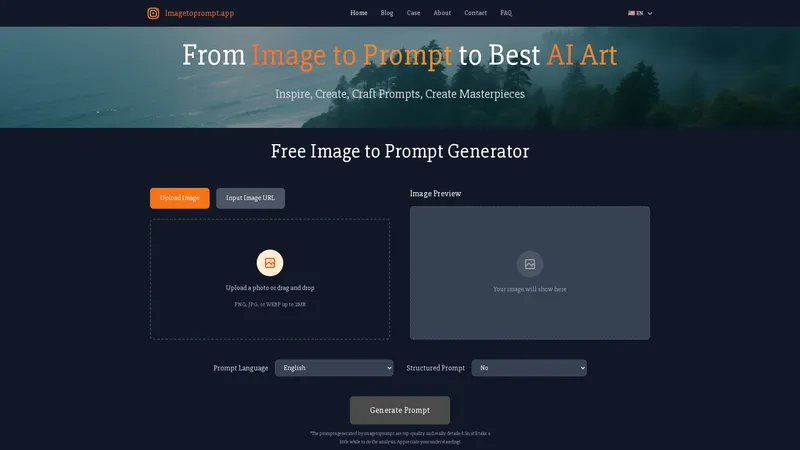
The Image to Prompt Generator is a free, ready-to-use AI tool designed to make AI art creation more efficient and streamlined. It provides a simple, intuitive solution for artists, designers, and creators by analyzing any uploaded image and generating comprehensive, high-quality text prompts. These detailed prompts are compatible with leading AI art models like Stable Diffusion, Midjourney, and DALL-E, enabling users to recreate styles, generate variations, or gain insights into AI image interpretation. The tool is completely free with no usage limits, requires no registration, and prioritizes user privacy by deleting all uploaded images immediately after processing. Its multi-language support and seamless integration make it a practical and essential asset for anyone looking to optimize their creative workflow with AI.
Top Features
- Free, unlimited AI-powered prompt generation
- Multi-language prompt output (11 languages supported)
- Compatibility with major AI art models (Stable Diffusion, Midjourney, DALL-E)
- No registration or login required
- Privacy-focused: images deleted immediately after processing
- Simple three-step process: upload, select language, generate
- Detailed prompts covering subject, style, color, lighting, and composition
Simple Definition of Usecases
- A digital artist finds a stunning landscape photo online but wants to create a fantasy version. They upload the image to the generator, select English, and receive a detailed prompt describing 'a mystical forest with glowing mushrooms, ethereal fog, and a vibrant color palette, digital painting style.' They use this prompt in Midjourney to generate several unique fantasy artworks, saving hours of manual prompt crafting.
- A social media manager needs consistent visual branding for a client's campaign. They upload the brand's key mood board image. The tool generates a concise prompt outlining the 'minimalist aesthetic, pastel color scheme, and clean composition.' The manager uses this prompt across multiple AI image generation sessions to produce a cohesive set of graphics for Instagram and Facebook ads, ensuring brand style consistency efficiently.
- A game developer is brainstorming creature designs. They sketch a rough concept of a mechanical shark and take a photo. Uploading it, they get a prompt detailing a 'massive, mechanical shark-like creature with dark blue metallic plating, glowing blue accents, and a complex futuristic armor structure.' This prompt is fed into Stable Diffusion to rapidly iterate on the design, exploring different angles and details, accelerating the pre-production phase.
- A non-native English speaker who creates AI art struggles with writing effective prompts. They use the tool's multi-language support, uploading an image and selecting their native language (e.g., Spanish). The generator provides a high-quality, descriptive prompt in Spanish. They can then use this as a base, translating key terms to create effective English prompts for DALL-E, bridging the language gap in their creative process.
- An e-commerce seller needs to create multiple product showcase images for a new line of jewelry. They photograph a single necklace. The tool generates a prompt describing 'a close-up of a delicate silver necklace with a gemstone pendant, studio lighting, professional product photography style.' They use this optimized prompt to generate dozens of high-quality, varied background images for the same product, dramatically reducing photoshoot costs and time.
User Reviews
Elara Vance
Freelance Illustrator & AI Artist
"As a freelance illustrator dabbling in AI, I've found most prompt tools either too simplistic or overly complex. Image to Prompt strikes the perfect balance. Last week, I was stuck trying to reverse-engineer the style of a classic painter for a client project. I uploaded a reference image, and within seconds, it gave me a paragraph detailing not just the subject but the brushstroke technique, color temperature, and lighting mood—details I would have spent an hour piecing together. The prompt was so accurate that my first Stable Diffusion output was nearly client-ready. The fact that it's completely free and requires no account is the cherry on top. It has become the first step in my new workflow, turning visual inspiration into actionable AI instructions effortlessly. It doesn't just generate a prompt; it provides an analysis that teaches you how to see an image like an AI does."
Elara Vance
Freelance Illustrator & AI Artist
"As a freelance illustrator dabbling in AI, I've found most prompt tools either too simplistic or overly complex. Image to Prompt strikes the perfect balance. Last week, I was stuck trying to reverse-engineer the style of a classic painter for a client project. I uploaded a reference image, and within seconds, it gave me a paragraph detailing not just the subject but the brushstroke technique, color temperature, and lighting mood—details I would have spent an hour piecing together. The prompt was so accurate that my first Stable Diffusion output was nearly client-ready. The fact that it's completely free and requires no account is the cherry on top. It has become the first step in my new workflow, turning visual inspiration into actionable AI instructions effortlessly. It doesn't just generate a prompt; it provides an analysis that teaches you how to see an image like an AI does."
Kaito Tanaka
Creative Director at Ad Agency
"Working in a fast-paced Tokyo ad agency, we constantly need to prototype visual concepts. This tool has been a game-changer for rapid ideation. We used it during a brainstorm for a beverage campaign. Instead of describing a 'refreshing, dynamic splash' with words, our designer quickly mocked up a simple composite image in Photoshop. We ran it through the generator, and it output a prompt describing 'high-speed photography of a water droplet impacting a liquid surface, crisp highlights, motion blur, vibrant cyan and white color scheme.' We plugged that into DALL-E 3 and had a selection of stunning, on-brand reference images in minutes, which we then presented to the client. It cut our concept development time significantly. The only minor drawback is the wait time for generation, but as the site says, the detail is worth it. I'd love to see a batch upload feature in the future for even faster workflow."
Anya Petrova
Indie Game Developer & Studio Founder
"I run a small indie game studio, and resources are tight. Concept art is a major bottleneck. A colleague recommended this tool, and I was skeptical—how good could a free tool be? I uploaded a very rough, messy sketch of a character idea, just basic shapes and a pose. The AI didn't just list what it saw ('person standing'); it inferred intent. The prompt described a 'weary traveler in tattered robes, leaning on a staff, under a twilight sky, fantasy character concept art style, detailed fabric textures.' It read the emotion and story from my crude lines. We used that prompt to generate dozens of iterations, refining the character's look without paying an artist for multiple sketches. It's like having a junior concept artist who works at the speed of light. The privacy guarantee was also crucial, as our early concepts are confidential. This tool is now embedded in our pre-production pipeline."
Marisol Flores
University Professor of Digital Arts
"Teaching a university course on digital media, I've been looking for tools to help students understand the connection between visual input and AI output. This generator is an excellent pedagogical tool. I have students bring in a favorite artwork, upload it, and analyze the generated prompt. We then discuss what the AI prioritized (often composition and style over emotional intent) and what it missed. It demystifies the 'black box' of AI image generation. The multi-language feature is also fantastic for my international students. They can get prompts in their native language, which helps them build vocabulary before translating to English for the AI models. It's more than a utility; it's a learning platform. I wish there was a way to save or export a history of prompts for classroom comparison, but for a free tool, its educational value is outstanding."
Darius King
AI Art Hobbyist
"I'm a hobbyist who loves creating AI art but has aphantasia—I can't visualize images in my mind. Describing what I want to create has always been my biggest hurdle. This tool has literally opened up a new world for me. I can scour Pinterest for images that evoke a feeling I want, upload them, and get a rich, descriptive prompt that serves as a perfect recipe. Recently, I wanted to create an image of a 'cozy, magical bookstore.' I found a photo of a cluttered antique shop and a painting of a starry night. I ran both through the generator, combined elements from the two prompts, and got a breathtaking result from Midjourney that matched the vibe I couldn't mentally picture. It's an accessibility tool for creativity. The interface is so simple and straightforward, with no distracting features. It does one job, and it does it exceptionally well."
Frequently Asked Questions
What is the Image to Prompt tool?
It is a free AI tool that analyzes any uploaded image and generates a detailed text description (a 'prompt'). This prompt can be used with AI art generators like Midjourney or Stable Diffusion to create new images similar in style, content, or composition to the original.
What does the generated prompt include?
Prompts are comprehensive and typically include descriptions of the main subject, background environment, artistic style, color palette, lighting, atmosphere, composition, and specific details, providing a thorough textual representation of the image.
How to use the Image to Prompt Generator?
Using it is simple and efficient: 1) Upload an image file or paste an image URL. 2) Select your desired output language. 3) Click 'Generate Prompt.' Wait a few seconds for the detailed analysis, then copy and use the provided prompt with your preferred AI art generator.
How to get the most accurate prompts fast?
For the most efficient and accurate results, use clear, high-contrast source images with a well-defined subject. The AI analyzes visual details, so simpler compositions often yield more concise and directly usable prompts. The processing time is for depth, so a clear image helps the AI work optimally.
Is Image to Prompt free to use?
Yes, it is completely free with no usage limits, registration, or login required. You can generate as many prompts as you need without any cost.
Which AI image models are supported?
The generated prompts are versatile and compatible with all major AI art models, including Stable Diffusion, Midjourney, DALL-E, and Flux. The prompts are structured to work seamlessly across these platforms.
What happens to my uploaded images?
Your privacy is a priority. All uploaded images are used solely for real-time prompt generation and are permanently deleted from the servers immediately after processing. No images are stored or used for any other purpose.
Why does prompt generation take some time?
The tool performs a deep, detailed analysis of your image to produce a high-quality, comprehensive prompt. This in-depth processing ensures the output is valuable and precise, making the short wait worthwhile for the quality of the result.
Related AI Tools

Frequently Asked Questions
What is MaoMaoYu Top4 AI Tools Directory?
Top 4 AI — '4' means 'For', MaoMaoYu Top For AI Tools Directory - top4ai.com is building an ai tools directory that helps you get your favorite ai tools, free ai tools list. It can get best ai writing tools, best free ai tools for writing articles, content at scale ai detector, best ai email marketing tools, ai paraphrasing tools, best ai seo tools, ai study tools, 'pearson' and 'ai' and 'study tools', ai generator tools, ai hashtags generator tools, best ai tools for research, ai art tools, ai music tools, ai video editing tools, ai pair coding tools, ai photo tools, ai tools for detecting photoshopped imagers, best ai tools for start up companies who are researching their market and more here.
How to found your ai tools in MaoMaoYu Top4 AI tools directory?
1. Open top4ai.com.
2. Explore the ai tools in the MaoMaoYu Top4 AI tools directory.
3. Click the ai tools that you need to get the detail and visit it.
What are the main features of MaoMaoYu Top4 AI Tools Directory?
1. Explore a simple definition of AI tools and discover how to fast find the perfect one for your needs. Streamline your workflow with the right AI solution.
2. Intelligent Search Engine: Thinking of what you think, saving you time, saving you trouble
Is it free to submit ai tools to MaoMaoYu Top4 AI Tools Directory?
Yes, it's free currently.
What's the categories list of AI Tools that MaoMaoYu Top4 AI Tools Directory support?
We will support all kinds of AI Tools later. Please wait for a few days.
What's the frequency for the up of AI tools in MaoMaoYu Top4 AI Directory?
The list of AI tools will be updated daily.
Is it support QuillBot, GPT-4o or Sora AI here?
You can get the QuillBot, GPT-4o or Sora AI tool here. Here is the introduction of GPT-4o and Sora video, and you can visit the website of the tools.
Troubleshooting
If the content aren't appearing, try a different browser, clear your cache. If issues persist, contact us at support@top4ai.com | support@maomaoyu.coffee.
What are the usage rights of the AI tools?
MaoMaoYu Top4 AI Tools Directory is just the AI Directory for AI tools. The usage rights of the AI tools are based on the AI tools' website.