Links
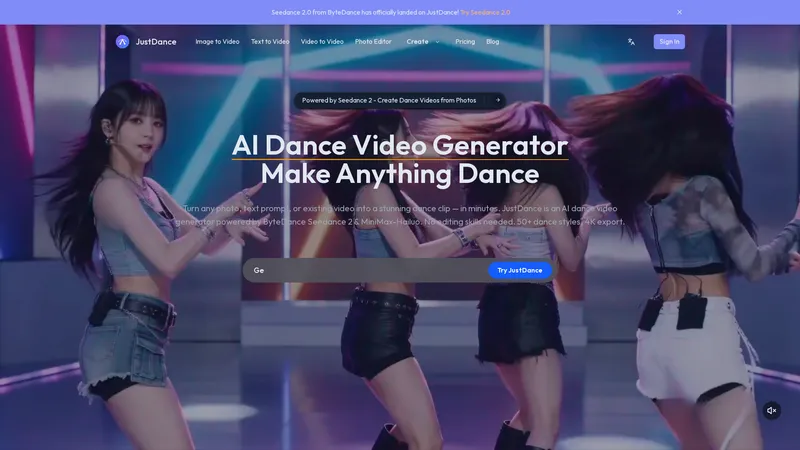
JustDance is the leading AI dance video generator that empowers anyone to transform a simple photo, text prompt, or existing video into a captivating dance clip. Powered by ByteDance's Seedance 2 and MiniMax-Hailuo AI, this tool delivers professional-quality, realistic dance animations with over 50 styles and 4K export capabilities. Designed for both beginners and seasoned creators, JustDance eliminates the need for video editing skills, offering a streamlined 3-step process: upload, select a style, and generate. With over 10,000 AI dance videos created and 5,000 active creators, it's the most efficient way to produce viral-ready content for TikTok, Instagram, and YouTube. The platform's core features include image-to-video, text-to-video, and video-to-video transformation, each optimized for accurate pose detection, natural motion, and cinematic aesthetics. Whether you're a social media influencer looking to stand out, a marketing team seeking cost-effective content, or a pet owner wanting a fun dance clip, JustDance provides a practical, intuitive, and lightweight solution that saves time and boosts creativity. Its user experience is seamless, with a clean interface that guides you through each step, and technical features like 4K resolution, monthly style updates, and privacy protection ensure high-quality results. JustDance is not just a tool; it's a gateway to effortless creativity, making dance content accessible to everyone.
Top Features
- Image-to-video: Upload photos to generate dance videos
- Text-to-video: Describe a scene to create dance clips from scratch
- Video-to-video: Transform existing videos into new styles (e.g., live-action to anime)
- 50+ dance styles including hip-hop, K-pop, ballet, salsa, and kung fu
- 4K video export for high-quality content
- Powered by ByteDance Seedance 2 and MiniMax-Hailuo AI
- No editing skills required, automated pose detection and motion generation
- Monthly style updates for fresh content
- Privacy protection for uploaded content
- 2-5 minute average generation time
Simple Definition of Usecases
- A TikTok influencer uploads a selfie, selects a hip-hop style, and generates a viral dance video in 3 minutes to boost engagement on the platform, using the image-to-video feature with 4K export.
- A marketing team for a music label types a prompt for 'urban shuffle under neon lights' to create a promotional clip for a new single, leveraging text-to-video for quick, customized content without needing a photo.
- A pet owner uploads a photo of their cat and selects a comedy dance style, creating a shareable video for a family gathering, using the image-to-video feature with automated motion generation.
- A content creator transforms a live-action dance performance into an anime style using video-to-video, refreshing old content for a new audience on YouTube, restoring timing and motion.
- A small business owner describes a 'K-pop dance in a futuristic stadium' via text-to-video to produce a low-cost advertisement, using the tool's efficient generation to meet a tight deadline.
User Reviews
Mara K.
Small Business Owner
"I've been using JustDance for about two months now, and I'm genuinely impressed. As a small business owner, I needed a quick way to create engaging social media content without hiring a video editor. This tool has been a lifesaver. I uploaded a simple product photo and turned it into a fun dance video for Instagram Reels. The AI dance video generator made it look professional with smooth movements and great lighting. The best part is how intuitive it is—I just uploaded the image, picked a style, and within minutes, I had a 4K video ready. It's so easy to use that even my team members with no video experience can do it. The variety of dance styles is fantastic, and the monthly updates keep things fresh. I highly recommend it to anyone looking to boost their online presence cheaply and effectively."
Mara K.
Small Business Owner
"I've been using JustDance for about two months now, and I'm genuinely impressed. As a small business owner, I needed a quick way to create engaging social media content without hiring a video editor. This tool has been a lifesaver. I uploaded a simple product photo and turned it into a fun dance video for Instagram Reels. The AI dance video generator made it look professional with smooth movements and great lighting. The best part is how intuitive it is—I just uploaded the image, picked a style, and within minutes, I had a 4K video ready. It's so easy to use that even my team members with no video experience can do it. The variety of dance styles is fantastic, and the monthly updates keep things fresh. I highly recommend it to anyone looking to boost their online presence cheaply and effectively."
Elio V.
Content Creator
"JustDance is an excellent tool for creating quick dance videos. I'm a content creator on TikTok, and this AI dance video generator has helped me produce viral content faster. The text-to-video feature is my favorite—I can describe a scene like 'a ballet dancer in a dark theater' and get a realistic video without needing a photo. The quality is surprising, especially with 4K export. However, I wish there were more advanced editing options for fine-tuning the motion. Sometimes the AI doesn't perfectly capture the exact moves I want, but overall, it's a solid tool for non-experts like me. The 2-5 minute generation time is a huge plus, and the privacy policy gives me peace of mind. Definitely worth the subscription for frequent users."
Sofia L.
Marketing Manager
"I'm a marketing manager, and JustDance has been a game-changer for our campaigns. We needed a cost-effective way to produce dance-themed ads for a new product launch, and this tool delivered. The image-to-video feature allowed us to turn our product photos into engaging dance clips that went viral on social media. The AI dance video generator handled pose detection perfectly, even for group shots. I also love the video-to-video feature—we transformed a live-action ad into an anime style, which was a hit with our younger audience. The pricing is reasonable for business use, and the 50+ styles give us plenty of options. My only minor complaint is the lack of a bulk processing feature, but for now, it's efficient enough. Highly recommend for marketing teams."
Jasper T.
Casual User
"JustDance is a fun and practical tool for personal use. I used it to create a dance video of my dog for a family gathering, and everyone loved it. The AI dance video generator made my pet's movements look natural and hilarious. The process was simple: upload a photo, choose a style, and download. I appreciate that there's no watermark on paid plans, making it shareable. The only downside is that the AI sometimes struggles with non-human subjects like pets, resulting in slightly awkward movements. But for the price and ease of use, it's a great value. I've also tried other tools, but none are as user-friendly or focused on dance content. I'll keep using it for future projects."
Rina J.
Dance Instructor
"As a dance instructor, I was skeptical about using AI dance video generators, but JustDance exceeded my expectations. I used the text-to-video feature to create examples for my students, describing specific ballet and hip-hop moves. The AI reproduced the sequences accurately with realistic lighting and stage settings. This has saved me hours of filming and editing. The 4K export is fantastic for sharing on social media, and the intuitive interface means I can focus on teaching rather than technical stuff. I also love the monthly style updates—they keep content fresh for my classes. The only improvement I'd suggest is adding more classical dance styles, but the current selection is solid. This tool has become an essential part of my teaching toolkit."
Frequently Asked Questions
What is an AI dance video generator?
An AI dance video generator is a tool that uses artificial intelligence to create dance videos from various inputs like photos, text prompts, or existing videos. JustDance is a prime example, leveraging advanced AI models like ByteDance Seedance 2 and MiniMax-Hailuo to analyze poses, generate realistic motion, and add cinematic effects, all without requiring any video editing skills.
What does JustDance do?
JustDance transforms your photos, text descriptions, or videos into dance clips. You can upload a clear photo of a person or pet, describe a dance scene, or restyle an existing video. The AI then processes the input to produce a realistic dance video in your chosen style, with options for 4K quality and no watermark on paid plans.
What photos work best?
Clear, well-lit photos with full-body or upper-body shots produce the best results. The AI Dance Video Generator relies on accurate pose detection, so photos with minimal background clutter and good contrast help generate smoother animations. Selfies, portraits, pet photos, and even illustrations all work effectively.
How to make a dance video fast?
Using JustDance, you can create a dance video in under 5 minutes. Simply upload a photo to the image-to-video feature, select one of 50+ dance styles, and click generate. The AI handles all processing automatically, delivering a high-quality video in 2-5 minutes, making it the most efficient way to produce professional dance content quickly.
How does JustDance compare to general-purpose AI video tools?
Unlike general-purpose AI video generators, JustDance is specifically optimized for dance content. It offers over 50 specialized dance styles, precise motion detection for realistic dancing, and faster generation times (2-5 minutes). The focus on dance means better quality movements and more style options, rather than just a generic video tool with dance bolted on.
Can I use the videos commercially?
Yes, JustDance allows commercial use of generated videos on paid plans. This means you can use the clips for marketing, advertising, social media campaigns, or any business purposes. Free plans may include watermarks or limitations, so check the pricing page for details on commercial licensing.
Is my uploaded content private?
Absolutely. JustDance prioritizes user privacy. Uploaded content is processed securely and not shared without your consent. The platform also has a privacy policy and terms of service that outline how data is handled. You can delete your content after generation if desired.
Does it work with non-human subjects?
Yes, JustDance can work with pet photos and other non-human subjects. The AI analyzes the body structure to generate dance-like movements, though results may vary depending on the subject's shape. For best results, use clear photos with distinct outlines.
Related AI Tools

Frequently Asked Questions
What is MaoMaoYu Top4 AI Tools Directory?
Top 4 AI — '4' means 'For', MaoMaoYu Top For AI Tools Directory - top4ai.com is building an ai tools directory that helps you get your favorite ai tools, free ai tools list. It can get best ai writing tools, best free ai tools for writing articles, content at scale ai detector, best ai email marketing tools, ai paraphrasing tools, best ai seo tools, ai study tools, 'pearson' and 'ai' and 'study tools', ai generator tools, ai hashtags generator tools, best ai tools for research, ai art tools, ai music tools, ai video editing tools, ai pair coding tools, ai photo tools, ai tools for detecting photoshopped imagers, best ai tools for start up companies who are researching their market and more here.
How to found your ai tools in MaoMaoYu Top4 AI tools directory?
1. Open top4ai.com.
2. Explore the ai tools in the MaoMaoYu Top4 AI tools directory.
3. Click the ai tools that you need to get the detail and visit it.
What are the main features of MaoMaoYu Top4 AI Tools Directory?
1. Explore a simple definition of AI tools and discover how to fast find the perfect one for your needs. Streamline your workflow with the right AI solution.
2. Intelligent Search Engine: Thinking of what you think, saving you time, saving you trouble
Is it free to submit ai tools to MaoMaoYu Top4 AI Tools Directory?
Yes, it's free currently.
What's the categories list of AI Tools that MaoMaoYu Top4 AI Tools Directory support?
We will support all kinds of AI Tools later. Please wait for a few days.
What's the frequency for the up of AI tools in MaoMaoYu Top4 AI Directory?
The list of AI tools will be updated daily.
Is it support QuillBot, GPT-4o or Sora AI here?
You can get the QuillBot, GPT-4o or Sora AI tool here. Here is the introduction of GPT-4o and Sora video, and you can visit the website of the tools.
Troubleshooting
If the content aren't appearing, try a different browser, clear your cache. If issues persist, contact us at support@top4ai.com | support@maomaoyu.coffee.
What are the usage rights of the AI tools?
MaoMaoYu Top4 AI Tools Directory is just the AI Directory for AI tools. The usage rights of the AI tools are based on the AI tools' website.