Links
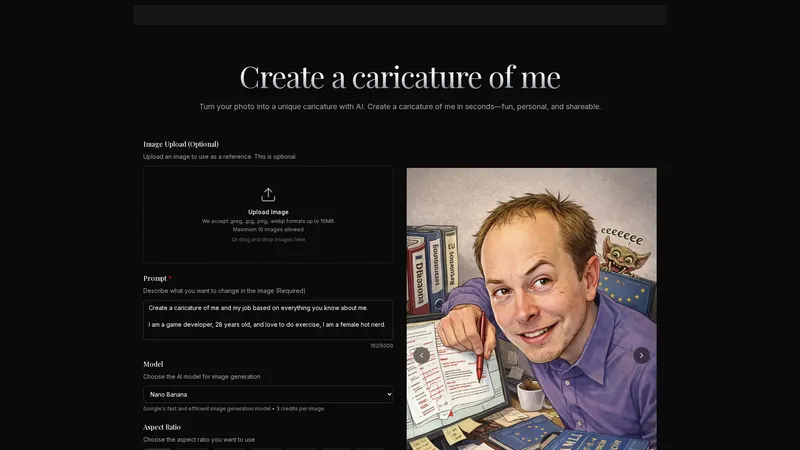
Create a caricature of me is a ready-to-use, automated AI tool that transforms your personal photos into unique, personalized caricatures in seconds. It's designed to be simple and efficient, requiring no design skills. Users upload a photo, provide a text prompt describing the desired artistic style, and the AI generates a caricature that retains the subject's likeness while adding creative flair. The platform leverages multiple powerful AI models, including Google's fast and efficient image generation model, to deliver high-quality results suitable for social media, gifts, professional avatars, and personal projects. The process is streamlined and intuitive, making it accessible to anyone looking to add a fun, artistic twist to their images. With support for various aspect ratios and output formats, it offers practical flexibility for diverse use cases.
Top Features
- AI-Powered Image-to-Image Transformation
- Multi-Model Support (Google, OpenAI, Flux, etc.)
- Customizable Prompts for Style Control
- Multiple Aspect Ratio and Format Options
- High-Resolution Download Outputs
- User-Friendly, No-Skills-Required Interface
- Credit-Based Pay-Per-Use Pricing Model
Simple Definition of Usecases
- A social media manager needs unique profile pictures for a client's new campaign. They use the tool to upload headshots of team members, prompting for a 'vibrant cartoon style with exaggerated features.' Within minutes, they generate a cohesive set of caricatures, making the brand's social channels stand out with a fun and recognizable visual identity.
- For a friend's birthday, a user wants a memorable and personal gift. They upload a favorite photo from a recent trip, describing a 'watercolor painting style with a dreamy background.' The resulting caricature is printed on a high-quality canvas, creating a one-of-a-kind piece of art that captures the friend's personality and a shared memory.
- A small business owner is launching a podcast and needs eye-catching cover art. They use their professional headshot and prompt the AI for a 'modern vector art caricature with a tech-themed background.' The tool generates a polished, stylized image that is both professional and engaging, perfectly suited for podcast platforms and promotional materials.
- A teacher organizes a virtual yearbook for their class. Students upload their photos and describe their desired styles, from 'anime character' to 'renaissance portrait.' The teacher uses the tool to efficiently process all requests, creating a diverse and personalized collection of caricatures that makes the digital yearbook fun and inclusive for everyone.
- A gaming streamer wants to refresh their channel branding. They provide a screenshot of their gaming avatar and ask for a 'hyper-stylized, cyberpunk caricature with neon accents.' The AI produces a dynamic image that becomes their new Twitch avatar, YouTube thumbnail template, and merchandise design, enhancing their online persona and viewer engagement.
User Reviews
Anya Petrova
Freelance Illustrator & Children's Book Author
"As a freelance illustrator, I'm always skeptical of AI art tools, but 'Create a caricature of me' surprised me with its precision. I needed a quick concept for a children's book character based on my niece. Uploading her photo and typing 'whimsical storybook illustration with big, curious eyes' gave me a perfect starting sketch in under 30 seconds. The likeness was preserved beautifully—the shape of her smile, the tilt of her head—while the AI added the perfect fairy-tale texture and soft colors. It didn't replace my work; it accelerated my brainstorming phase dramatically. I've since used it to generate style variations for client presentations. The credit system is transparent, and the output quality is consistently high for web and print. It's become an indispensable part of my creative toolkit."
Anya Petrova
Freelance Illustrator & Children's Book Author
"As a freelance illustrator, I'm always skeptical of AI art tools, but 'Create a caricature of me' surprised me with its precision. I needed a quick concept for a children's book character based on my niece. Uploading her photo and typing 'whimsical storybook illustration with big, curious eyes' gave me a perfect starting sketch in under 30 seconds. The likeness was preserved beautifully—the shape of her smile, the tilt of her head—while the AI added the perfect fairy-tale texture and soft colors. It didn't replace my work; it accelerated my brainstorming phase dramatically. I've since used it to generate style variations for client presentations. The credit system is transparent, and the output quality is consistently high for web and print. It's become an indispensable part of my creative toolkit."
Rohan Desai
HR & Culture Manager at a Tech Startup
"Organizing our company's annual family day was a challenge, especially for virtual attendees. We used this tool to create personalized caricature badges for every employee and their family members. The process was remarkably efficient. We set up a simple form for photo uploads and style preferences. The bulk generation feature (though we had to manage credits carefully) saved us countless hours compared to hiring an artist. The results were a huge hit! People loved seeing themselves and their kids as cute cartoons or elegant sketches. It fostered a great sense of community and fun. The only minor drawback was that very low-light or heavily filtered photos sometimes produced less accurate results, requiring a re-upload. Overall, a fantastic tool for large-scale, personalized engagement."
Elara Vance
Small Business Owner & Digital Party Planner
"I run a small Etsy shop selling custom digital party packages. Before discovering this site, offering personalized caricature invitations was too time-consuming. Now, it's my best-selling add-on. Clients send me a family photo, and I use prompts like 'joyful watercolor caricature for a 5th birthday party' to create a unique main illustration for their invites. The control through text prompts is incredible—I can specify colors, themes, and even minor details like 'holding a balloon.' The output is always high-resolution, perfect for printing. My clients are thrilled, and my workflow is so much faster. The pay-per-credit model is ideal for my business; I only pay for what I use. This tool has genuinely helped scale my small business creatively and financially."
Kaito Tanaka
President of a University Student Association
"For our university's international student association newsletter, we wanted a fresh, visual theme. We used this tool to transform committee headshots into a unified set of anime-style caricatures. The process was intuitive and fast, which was crucial with our tight deadline. The ability to choose specific aspect ratios meant the images fit our layout perfectly without extra editing. The caricatures were recognizable and added a playful, welcoming tone to our communications. Some styles worked better than others; the 'sketch' model gave incredibly detailed line art, while some of the more experimental outputs were less consistent. Customer support was responsive when we had a billing query. A very solid tool that brought our creative vision to life efficiently."
Maya Fernandez
Nurse and Casual User
"I'm not tech-savvy at all, and the idea of 'AI image generation' sounded complicated. But this website is wonderfully straightforward. I just wanted a fun new picture for my dating profile. I uploaded a clear selfie, typed in 'friendly cartoon version of me, sitting in a cozy café,' and clicked generate. In seconds, I had a charming, slightly whimsical version of myself that felt authentic yet more engaging than a standard photo. It sparked so many conversations! The interface guides you step-by-step, and the prompts have helpful examples. I've since made caricatures for my parents' anniversary and my sister's graduation. It's like having a friendly, instant artist at your fingertips. Absolutely love it."
Frequently Asked Questions
What is 'Create a caricature of me'?
It is an AI-powered web tool that transforms your uploaded photos into personalized caricatures. You provide a photo and a text description of the desired style, and the AI generates a creative, recognizable caricature in seconds.
What does the credit system mean?
The platform uses a pay-per-use credit system. Each image generation costs a certain number of credits (e.g., 3 credits for Google's model). You purchase credits in packs. It's not a subscription; you only pay for the images you actually create.
What to do to get the best results?
Use a clear, well-lit, front-facing photo. Write a specific and descriptive prompt (e.g., 'cartoon style with large eyes and a superhero cape'). Experiment with different AI models offered to see which style best matches your vision.
How to fast generate a caricature?
The process is already fast. For the quickest result: 1) Have a ready, high-quality photo. 2) Use the default or a fast model like Google's. 3) Input a concise prompt. 4) Click generate. The entire process can take under a minute.
How does the image transformation work?
It uses 'image-to-image' AI generation. The AI model analyzes your uploaded photo to understand features and composition. It then uses your text prompt as a guide to creatively reinterpret and stylize the image, blending the original likeness with the new artistic direction.
Can I use the generated images commercially?
You should review the website's Terms of Service for specific licensing details. Typically, users retain rights to their output for personal and commercial use, but it's essential to confirm there are no restrictions, especially regarding the AI models used.
What image formats are supported for upload and download?
For upload: JPEG, JPG, PNG, WEBP formats up to 10MB. For download: PNG and JPG formats are available.
Related AI Tools

Frequently Asked Questions
What is MaoMaoYu Top4 AI Tools Directory?
Top 4 AI — '4' means 'For', MaoMaoYu Top For AI Tools Directory - top4ai.com is building an ai tools directory that helps you get your favorite ai tools, free ai tools list. It can get best ai writing tools, best free ai tools for writing articles, content at scale ai detector, best ai email marketing tools, ai paraphrasing tools, best ai seo tools, ai study tools, 'pearson' and 'ai' and 'study tools', ai generator tools, ai hashtags generator tools, best ai tools for research, ai art tools, ai music tools, ai video editing tools, ai pair coding tools, ai photo tools, ai tools for detecting photoshopped imagers, best ai tools for start up companies who are researching their market and more here.
How to found your ai tools in MaoMaoYu Top4 AI tools directory?
1. Open top4ai.com.
2. Explore the ai tools in the MaoMaoYu Top4 AI tools directory.
3. Click the ai tools that you need to get the detail and visit it.
What are the main features of MaoMaoYu Top4 AI Tools Directory?
1. Explore a simple definition of AI tools and discover how to fast find the perfect one for your needs. Streamline your workflow with the right AI solution.
2. Intelligent Search Engine: Thinking of what you think, saving you time, saving you trouble
Is it free to submit ai tools to MaoMaoYu Top4 AI Tools Directory?
Yes, it's free currently.
What's the categories list of AI Tools that MaoMaoYu Top4 AI Tools Directory support?
We will support all kinds of AI Tools later. Please wait for a few days.
What's the frequency for the up of AI tools in MaoMaoYu Top4 AI Directory?
The list of AI tools will be updated daily.
Is it support QuillBot, GPT-4o or Sora AI here?
You can get the QuillBot, GPT-4o or Sora AI tool here. Here is the introduction of GPT-4o and Sora video, and you can visit the website of the tools.
Troubleshooting
If the content aren't appearing, try a different browser, clear your cache. If issues persist, contact us at support@top4ai.com | support@maomaoyu.coffee.
What are the usage rights of the AI tools?
MaoMaoYu Top4 AI Tools Directory is just the AI Directory for AI tools. The usage rights of the AI tools are based on the AI tools' website.