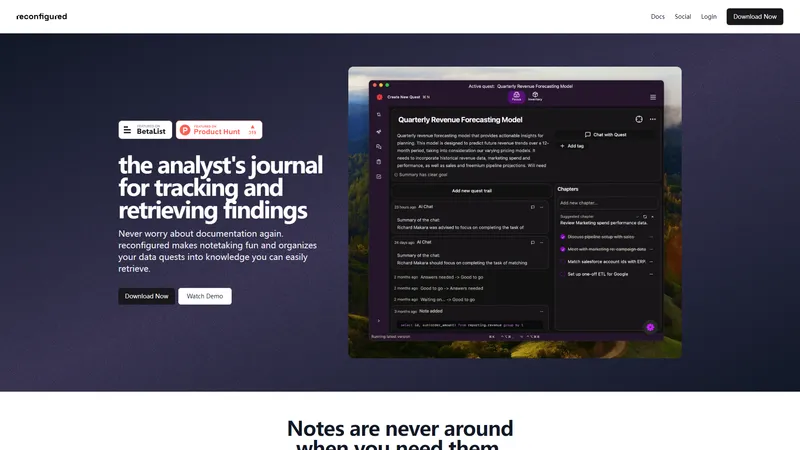
Reconfigured is a ready-to-use, automated, and intuitive journaling tool designed specifically for analysts. It transforms the way you document and organize your data quests, making notetaking fun and efficient. With features like quest-style journal mechanics, contextual suggestions, and an embedded AI, reconfigured helps you stay organized without extra cognitive load. Whether you're working on Windows or Mac, this tool seamlessly integrates into your workflow, ensuring that your notes are always accessible and actionable. Say goodbye to scattered notes and hello to a more streamlined and effective way of working.
Top Features
Quest-style journal mechanics
Add context from anywhere with the reconf sidekick
Contextual suggestions & automation
Chat with the you from the past using embedded AI
Seamless integration with Windows and Mac
Simple Definition of Usecases
Tracking SQL query development: Use the quest-style journal to document each step of your SQL query development, ensuring that you can easily revisit and understand your thought process.
Organizing data analysis projects: Utilize the contextual suggestions feature to break down complex data analysis tasks into manageable steps, keeping your project on track.
Collaborating with team members: Share your quest journal with team members to provide context and updates on your progress, enhancing collaboration and knowledge sharing.
Documenting exploratory data analysis: Use the reconf sidekick to quickly add text, code, screenshots, or voice notes as you explore new datasets, ensuring that no insight is lost.
Revisiting past analyses: Leverage the embedded AI to discuss your past thought processes, helping you to recall and build upon previous findings.
User Reviews
Kate Mortenson
Product Analyst
★★★★★
"Reconfigured is quickly becoming as precious to me as my pen and paper. A journal purpose built for analysts that aims to record our notes and organize our data to make it actionable - dare I say even fun - reconfigured has changed the way I work. I traded my pen for a hotkey and honestly, breaking the habit of picking up my pen has been the hardest part. Like, being so for real with you all, I no longer have to discipline my curiosity. I can follow the query to it's end, start branching off when the query opens more questions, and even record any random thought I have to revisit later."
Roni Ström
Freelance Business Designer
★★★★★
"I've struggled for a long time to systematically manage my data analysis and engineering tasks using traditional to-do apps. My typical workflow involved juggling several tabs in DBVisualizer or VSCode for work-in-progress SQL queries, alongside a few Google Docs to track metadata like metrics, business rules, and database schemas. Meanwhile, I maintained task statuses in Todoist or Trello. The problem was that the connection between my tasks, queries, and metadata was always broken, leading to inefficiency and constant context switching. After using the new reconfigured for a few weeks, I can confidently say it has completely transformed how I work. The journaling approach is a game-changer - storing all the context related to a task in one place makes it so much easier to stay on top of things. The biggest benefit for me is that I no longer have to switch between different apps. With a simple hotkey, I can capture new insights directly within the task I'm working on, and everything is automatically organized in a journal format. It’s streamlined, intuitive, and has drastically improved my productivity. I highly recommend reconfigured to anyone facing similar challenges!"
Anna Bergevin
Lead Data Product Manager
★★★★★
"Congrats on the pivot guys. I think your new direction solves a problem for every analyst I know. When I told someone about it last week they said, “Oh my gosh this would help me so much. I just have this giant OneNote file right now.” I’ve seen people use Jira for this - unsuccessfully. I’ve seen people to try to do this in Notebooks or ReadMe (including past me) and that clutters up your documentation with your messy journey of creating and discovering. And if/when team features come along I think it could be massively useful knowledge management tool across analytics teams (over time and across tools) and a people management tool (async status updates? flag things for escalation, etc.). And could be useful for adjacent personas at some point too (like maybe not all product workflows but certainly qualitative research spikes or quant analytics projects - with or without a paired analyst). It feels sticky to me. Really congrats on the pivot."
Louisa (Ifeoma) Igbonoba
Data Analyst
★★★★
"Recently, I had the opportunity to test reconfigured, a new AI-powered journal designed specifically for investigative and analytics workflows. This tool intrigued me with its promise of seamless integration, AI insights, and collaboration features. After exploring it, I identified some unique strengths as well as areas for growth—and I’m excited to share my thoughts in the carousel below!⤵️ If you’re in the analytics, research, AI or investigative space, this feedback might resonate with you. Let’s drive the future of innovation together.💃"
Ankit Kumar
Data Analyst
★★★★★
"As an analyst, it’s easy to get caught up in the chaos when building SQL queries and working with data. Often, there's no central repository to track metrics and definitions, which keeps changing frequently. Recently, I tried reconfigured ♥️, a tool built by Niko Korvenlaita and Richard Makara, which has transformed my analytical workflow into a well-organized investigation. and supporting my process without adding cognitive load, thus, helping me focus on uncovering insights. It lets you add text, code snippets, screenshots, or voice notes which is a true game-changer. Plus, it helps turn my thoughts and ideas into actionable to-dos and notifies me if I stray off course. The best part? The embedded AI lets me revisit my past thoughts, ensuring that nothing valuable slips through the cracks. Reconfigured has indeed made my analysis easier and more structured by providing a dedicated space for documentation without relying on external tools."
Frequently Asked Questions
Q:
What is reconfigured?
A:
Reconfigured is a journaling tool designed for analysts to track and organize their data quests, making notetaking efficient and fun.
Q:
What does the reconf sidekick do?
A:
The reconf sidekick allows you to add text, code, screenshots, or voice notes from anywhere on your screen with a simple hotkey.
Q:
How to use reconfigured for SQL query development?
A:
Use the quest-style journal to document each step of your SQL query development, ensuring you can easily revisit and understand your thought process.
Q:
How to fast track data analysis projects with reconfigured?
A:
Utilize the contextual suggestions feature to break down complex data analysis tasks into manageable steps, keeping your project on track.
Q:
Is reconfigured a browser-based application?
A:
No, reconfigured is a desktop application that works seamlessly on both Windows and Mac.
Q:
I'm not an analyst, can I still use this tool?
A:
Yes, while reconfigured is designed with analysts in mind, anyone who needs to document and organize complex workflows can benefit from it.
Q:
Is this meant for personal or collaborative work?
A:
Reconfigured is primarily designed for personal use, but it also offers features for team collaboration, especially in the Team plan.
Q:
I am concerned about privacy and security. Are you SOC-2 compliant?
A:
Reconfigured is committed to privacy and security, but it is not currently SOC-2 compliant. However, they are working towards achieving this certification.
Q:
I need IT to approve any new app. Can you help me with that?
A:
Yes, reconfigured provides documentation and support to help you get IT approval for using the tool in your organization.
Q:
Can I choose in which region my data is hosted in?
A:
Currently, reconfigured does not offer region-specific data hosting options, but this feature is under consideration for future updates.
AI STL Generator is a specialized web platform built for makers, designers, educators, and small businesses that need to turn 2D images or text prompts into 3D printable STL files. Positioned as the fastest free AI STL maker, it focuses on a specific bottleneck in the 3D printing workflow: converting ideas into watertight, slicing-ready models without requiring CAD expertise. Instead of forcing users to learn Blender, Fusion 360, or Meshmixer, the site offers a ready to use AI workbench that generates geometry from natural language or reference images and then automatically repairs the mesh for 3D printing. For anyone tired of cleaning non-manifold edges, inverted normals, zero-thickness walls, or floating islands, this platform promises a more efficient path from concept to physical print. It is not a generic 3D asset generator; it is a print-first tool designed around the realities of FDM and resin printing, slicer compatibility, and the practical needs of people who actually run printers every day.
Website Positioning: AI STL Generator positions itself as the number one AI STL generator for 3D printing and makers. The homepage emphasizes speed, print readiness, and compatibility with popular slicers such as Bambu Studio, Cura, PrusaSlicer, OrcaSlicer, Creality Print, and ideaMaker. Rather than competing as a broad 3D modeling suite, it owns the narrow but valuable niche of AI-powered STL creation. Its tagline and hero section make the value proposition clear: turn 2D images and prompts into 3D printable STL files. The site also includes auxiliary tools like a 3D viewer, 3D converter, printability checker, and STL repair, which together form a compact ecosystem for makers who want to go from idea to download without leaving the browser. This positioning is smart because the hardest part of AI 3D generation is not creating an attractive mesh; it is creating a mesh that survives a slicer without manual repair. AI STL Generator addresses that directly.
Target Audience: The platform speaks to a wide range of users. FDM hobbyists who own Bambu Lab, Prusa, Creality, or similar printers are a core audience. They want functional parts, custom organizers, replacement pieces, and decorative models that print reliably. Tabletop gamers and Dungeon Masters are another key group. They need custom miniatures, monsters, terrain pieces, and character models from Midjourney art, character sketches, or text prompts. Etsy sellers and small-batch print shops use the tool to shorten turnaround times for personalized keychains, plaques, cake toppers, and gifts. STEM educators and FabLab coordinators use it to introduce 3D printing without a CAD learning curve. Product designers and mechanical engineers use it for rapid concept models and form studies. Cosplay makers and prop builders use it to turn reference images into printable armor pieces, props, and accessories. Finally, AI enthusiasts and hobbyist 3D artists use it to explore generative geometry without needing to master a traditional modeling package. For all these users, the promise is the same: reduce the friction between an idea and a printed object.
Core Features: The feature set is built around a few powerful capabilities. Text-to-STL generation lets users type a description, such as a tabletop paladin, a mechanical rocker arm, or a minimalist rubber duck, and receive a 3D mesh ready for printing. Image-to-STL generation accepts JPG and PNG files, including photos, concept art, sketches, and logos, then reconstructs depth, volume, and topology. Multi-image support allows multiple angles for more accurate reconstruction. The printability check automatically detects non-manifold edges, inverted normals, and zero-thickness walls. The built-in STL repair then seals the mesh to create a watertight solid. Users can choose AI model detail levels such as Basic, Pro, and Ultra detail, with Ultra detail available on Pro and costing additional credits. Output formats include STL and 3MF. Character pose options include None, A-Pose, and T-Pose, which is helpful for miniature and character generation. Real-world size scaling allows users to scale to an estimated height with the origin at the base. The platform also includes a 3D viewer so users can inspect geometry in the browser, plus converters such as SVG to STL, STL to 3MF, and 3MF to STL. There is an AI miniature generator and a remesh and repair tool that acts as a lightweight STL editor. For 3D printing specifically, the system optimizes for flat-bottom geometry, bed adhesion, and minimal support requirements, which helps reduce warping and failed prints.
Content Features: The website content is designed to educate and reassure. It uses clear, benefit-driven headlines, step-by-step workflow explanations, and real examples of generated models such as a knight paladin, a precision rocker arm, a Nefertiti bust, and a designer rubber duck. Each featured creation includes triangle counts, a 3D inspection link, and a prompt or description. This helps users understand what is possible and sets realistic expectations about detail levels. The FAQ section answers common questions about STL generation, image-to-STL conversion, watertightness, editing, and pricing. The homepage also highlights compatibility with major slicers and includes user testimonials from an FDM hobbyist, tabletop gamer, Etsy seller, and STEM educator. The content is concise, practical, and focused on outcomes rather than technical jargon. It also offers tips and tricks for getting better results, such as using clear reference images, choosing the right detail level, and checking printability before downloading. These tips and tricks are valuable for beginners and experienced makers alike. For users who want to push the tool further, the site includes tricks for combining text prompts with image references and for using multiple images to improve reconstruction. Overall, the content builds trust by showing real models, real users, and real print workflows.
User Experience: The user experience is designed to be simple and fast. The workbench is the center of the product. Users choose Image to STL or Text to STL, upload images or enter a prompt, select an AI model, choose output format, set pose and size options, and click Generate 3D Model. A credit cost is shown next to the button, so there are no surprises. The 3D Model Preview pane lets users inspect the result before downloading. The workflow is split into three phases: input your idea, AI mesh generation and auto-watertight, and download STL and slice to print. This structure makes the process feel manageable even for first-time users. The site also offers a daily check-in for free credits, which encourages return visits and lowers the barrier to entry. Sign-in is available for account management, while Start Free leads directly into the workbench. The visual design is clean and modern, with a dark theme and bright accents that appeal to maker and tech audiences. The navigation includes STL Studio, 3D Viewer, 3D Converter, Pricing, Daily Check-in, Sign in, and Start Free. The overall experience is intuitive, and the platform avoids unnecessary complexity. For makers who value speed, this is one of the most efficient ways to go from an idea to a printable file. Many users will find it to be the most efficient option for quick, print-ready STL generation, especially when compared with manual modeling or repairing failed AI meshes.
Technical Features: Under the hood, AI STL Generator uses advanced neural networks to analyze images and prompts, then generate 3D geometry. The system performs automatic topology repair, remeshing, and mesh closure. It checks for non-manifold edges, inverted normals, and zero-thickness walls, then fixes them. The output is a manifold, watertight solid suitable for slicing. The platform supports STL and 3MF export, with GLB mentioned for visualization. It is compatible with Bambu Studio, Cura, PrusaSlicer, OrcaSlicer, Creality Print, and ideaMaker. The AI model tiers allow users to trade credits for detail, with Pro and Ultra detail options for higher-fidelity meshes. The system also supports character pose settings, real-world scaling, and flat-base optimization. The 3D viewer provides interactive inspection, and the converter tools handle format changes. The printability checker is a critical technical differentiator because it catches problems before the slicer does. The STL repair tool can adjust mesh density, simplify polygon counts, and flatten the base. This combination of generative AI and mesh repair is what makes the platform practical for real 3D printing, not just visual rendering. The technical stack is oriented toward reliability, repeatability, and slicer compatibility, which are the metrics that matter most to makers.
Workflow and Practical Benefits: The typical workflow is straightforward. A user starts with an idea, a sketch, a photo, or a text prompt. They upload or type it into the workbench. They select a detail level, output format, pose, and size. The AI generates a mesh, runs automatic repair, and presents a preview. The user inspects the model in 3D, then downloads the STL or 3MF. The file imports directly into their slicer without third-party repairs. This saves time, reduces failed prints, and lowers material waste. For Etsy sellers, it can cut turnaround from days to minutes. For educators, it removes the CAD barrier and lets students see their drawings become physical objects. For tabletop gamers, it enables custom miniatures that match a campaign or character concept. For engineers, it provides rapid concept validation. For cosplay makers, it accelerates prop development. The platform is especially useful for anyone who needs a ready to use output rather than a raw 3D asset. It is also a more efficient alternative to learning complex software for simple shapes and organic models. The site's focus on watertight geometry and printability means fewer failed prints, less wasted filament, and less time spent in repair tools. That is a practical, measurable benefit that matters to both hobbyists and businesses.
Pricing and Accessibility: AI STL Generator uses a freemium model. Users can log in daily to claim free check-in credits and generate STL files without paying. There are also pay-as-you-go credit packs and subscription plans for regular creators. The Generate 3D Model button shows a credit cost, typically 5 credits for a standard generation, with Ultra detail costing additional credits and available on Pro. This makes the pricing transparent and flexible. Casual users can rely on daily free credits, while power users can buy credits or subscribe. The Start Free call to action emphasizes no credit card required and instant download. This lowers the barrier for first-time users and encourages experimentation. The pricing page likely contains more details, but the homepage already communicates that the tool is accessible to hobbyists, educators, and small businesses. The freemium approach is well suited to the maker market, where usage can be sporadic or project-based. It also allows users to test the quality before committing to a paid plan. For many, the free daily credits are enough for occasional projects, while professionals will find the paid options affordable compared with the time saved.
Why It Matters for US Makers: In the United States, 3D printing has moved from a niche hobby to a mainstream tool for prototyping, education, small business, and creative expression. Makers expect fast results, clear pricing, and compatibility with the printers they already own. AI STL Generator fits that expectation by focusing on the most popular slicers and by promising watertight, print-ready files. American small businesses, especially Etsy sellers and custom gift shops, need to respond to customer requests quickly. A tool that turns a sketch into a printable STL in minutes can be a competitive advantage. Educators need low-barrier tools that work in a classroom without extensive training. Hobbyists want to spend time printing, not repairing meshes. Cosplayers and prop makers need to scale models accurately and avoid fragile walls. By addressing these needs, AI STL Generator aligns with the practical, outcome-oriented culture of the US maker community. It also fits the growing interest in AI-assisted design, where generative tools augment human creativity rather than replace it. The platform's emphasis on printability, repair, and slicer compatibility makes it more than a novelty; it is a workflow tool.
Final Thoughts: AI STL Generator is a focused, practical, and accessible platform for turning ideas into 3D printable STL files. Its core strengths are image-to-STL and text-to-STL generation, automatic printability checking, watertight repair, slicer compatibility, and a simple three-step workflow. It serves hobbyists, tabletop gamers, Etsy sellers, educators, engineers, cosplay makers, and AI enthusiasts. The freemium pricing and daily free credits make it easy to try, while credit packs and subscriptions support regular use. For anyone who wants a ready to use solution that is more efficient than manual modeling and more reliable than generic AI 3D generators, AI STL Generator is worth exploring. With the right tips and tricks, users can get better results from prompts and images, and with a few advanced tricks, they can push detail and scale further. In a crowded field of AI 3D tools, this platform stands out by focusing on the essential requirement: a file that actually prints. That focus makes it one of the most efficient and practical tools available for makers today.
Overview
MiroFish is a chat-first prediction engine that turns a plain-language question into a living scenario. Instead of returning one confident answer, it builds a knowledge graph, runs a multi-agent simulation, and hands back a structured prediction report. You ask the question the way you would ask ChatGPT, and the system handles seed material, simulation, and reporting as one continuous workflow. The product states its own promise plainly: predict anything, but talk to it like ChatGPT. That single sentence captures both the ambition and the interface. The ambition is broad scenario prediction for questions where human reaction drives the outcome. The interface is deliberately familiar, so the learning curve stays close to zero.
Website Positioning
MiroFish does not position itself as an oracle. It positions itself as a rehearsal space. The homepage makes the distinction explicit in its comparison section, which sets a single chat answer, manual research, and the MiroFish simulation side by side. A single chat answer is fast but collapses competing audience reactions into one confident response. Manual research is grounded and careful but slow when a decision depends on many groups influencing each other at once. MiroFish sits between them: a ready to use environment where agents, memory, social surfaces, emergent clusters, and a report you can keep questioning live in one place. The value proposition is not absolute accuracy. It is speed of insight into how reactions might compound.
Why Reaction Beats a Static Answer
Most planning questions fail not because the analysis is wrong, but because the analysis ignores feedback loops. A price change does not produce a single customer response. It produces a first reaction, a narrative that forms around that reaction, and a second wave of people reacting to the narrative rather than the price. A policy announcement behaves the same way. MiroFish is built for this class of problem. Its use case sections frame the product around moments where reaction matters more than a static answer: campaign tests, pricing reactions, policy stress tests, and market narratives. Each moment has the same shape. A small group moves first, a story forms, and everyone else responds to the story.
Target Audience
The tool targets anyone whose decision depends on how groups of people will respond to each other. Product marketers use it to pressure-test a launch narrative before the first dollar of spend. Pricing and revenue managers use it to model which customer segment pushes back first after an increase. Policy and public affairs teams use it as a tabletop exercise for coalition formation and second-order reactions. Strategy consultants use it to generate hypotheses faster than a research cycle allows. Founders use it to sanity-check positioning against a skeptical category. Crisis communications teams use it to rehearse how an accusation could outrun an official explanation. Screenwriters and narrative designers use it for creative continuation. The common thread is that all of these users need plausible reactions, not a single verdict.
Core Features
The product is text-first by design. You start with a question, then decide whether supporting files are necessary, without losing the speed of a chat interface. An orchestration layer runs graph building, simulation, and reporting behind the scenes while you stay inside one conversation. Every answer ends with a structured result card that contains a summary, a report entry point, and a follow-up path. Optional attachments in PDF, Markdown, and plain text act as reality seeds, grounding the simulation in a specific strategy memo, product FAQ, policy brief, market note, or research summary. A sample orchestration preview on the homepage shows three example questions so a first-time visitor can see the shape of a good prompt before committing to one.
Knowledge Graph Step
Before any agent speaks, the system extracts actors, relationships, pressures, and factual anchors from your question and any attached material. This step is why the output holds together. A simulation that starts from raw text tends to drift, because the model has no explicit structure to reason from. Building the graph first forces the scenario to name its stakeholders and the forces acting on them. In practice, this is often the most valuable part of the run, because writing the actors and incentives down reveals assumptions you did not know you were making. Users who want tighter results learn to front-load this step by naming the decision, the audience, the trigger, and the time horizon in the question itself.
Agent Simulation Step
The simulation stage lets personas interact across short-form and threaded social surfaces over multiple rounds. Agents carry memory, so a position taken in round one shapes behavior in round three. Clusters form. Moderate voices stay quiet until a specific framing appears. Early backlash from one segment supplies vocabulary that later segments reuse. This is the part that separates the product from a sentiment dashboard, because sentiment dashboards tell you what people think now, while the simulation explores what they might think after hearing what everyone else thinks. The number of rounds, the surfaces, and the persona set remain adjustable through how you frame the question and what seed material you provide.
Prediction Report
The run condenses emergent behavior into a structured report. A typical report contains an executive summary, risk signals, narrative paths, and follow-up questions. The sample report previewed on the site covers a price increase and identifies the highest-risk path as a compressed story that turns the announcement into a trust issue before value evidence becomes visible. Risk signals list early backlash from price-sensitive segments, narrative compression into a simpler accusation, and influencer framing that outruns the official message. Narrative paths describe what happens if the value story holds, if comparison charts are missing, and if supporters lack reusable language. That structure is designed to make the next question obvious rather than to close the topic.
Deep Interaction
The workflow does not stop at the report. You continue asking questions against the generated world. Which persona creates the first negative cascade. What changes if we announce a transition plan. Which evidence line reduces confusion fastest. This is where the most efficient use of the tool appears, because a single seeded world can answer a dozen related questions that would each require a separate research project in the physical world. Follow-up questions also function as an assumption audit, since the answers show which variables actually move the outcome and which ones barely matter.
Prompt Craft and Playbooks
The site ships short, practical playbooks so a visitor gets value before opening the full product. The guidance is direct: name the decision, the audience, the likely trigger, and the time horizon. A narrow question gives the simulated world less room to drift. The playbook section also covers seed files and report reading, and it collects the tips and tricks that experienced users converge on, such as treating the output as decision support and hunting for resistance signals, narrative bridges, and assumptions worth checking with real data. The recommended next step after reading a report is to ask which group changes the result if its incentive changes.
Use Cases in Practice
Four scenarios anchor the product page. Campaign test asks what happens if a positioning statement launches in a skeptical category, and it simulates how audience groups might amplify, resist, or reinterpret the message before money is spent. Pricing reaction explores the friction behind an increase by modeling sentiment, value perception, and objection paths across segments before the announcement. Policy stress test acts as a tabletop exercise for controversy, coalition formation, and second-order effects. Market narrative examines how narrative, incentives, and sentiment interact in situations where spreadsheets miss the feedback loop between analysts, retail attention, and public discourse. Each scenario shares a common purpose: surfacing the reaction you did not budget for.
Content Features
The homepage is unusually task-oriented for a landing page. It pairs bilingual section labels in English and Chinese with concrete sample prompts, a workflow diagram in five steps, four playbooks, a comparison table, a report preview, and a plain FAQ. The comparison table does real work, because it tells a visitor when not to use the product as clearly as when to use it. The FAQ avoids overclaiming and states that the output is exploratory decision support rather than a guaranteed forecast. A long row of small directory badges sits at the bottom of the page, kept deliberately compact so the product experience stays focused.
User Experience
The experience is built around staying inside a single conversation. There is no separate graph editor to learn, no dashboard to configure, and no report builder to assemble. You type a question, attach files only if they help, and read a result card that links to the deeper report. The text-first approach makes the first run fast and the hundredth run faster. Because the orchestration runs behind the chat, the user never has to manage a pipeline manually. That design choice is what makes the tool practical for someone who needs an answer before a meeting rather than after a research sprint.
Technical Features
Under the interface, four technical components cooperate. A knowledge graph layer extracts structure from unstructured input. A multi-agent simulation layer runs personas with memory across multiple rounds and multiple social surfaces. A synthesis layer compresses emergent behavior into narrative paths, risk signals, and confidence cues. An orchestration layer sequences the three and keeps the conversation state intact across follow-up questions. File ingestion handles PDF, Markdown, and text, which covers the seed formats that knowledge workers actually produce. The architecture is designed for repeated interrogation of a persistent world rather than one-shot generation.
Limitations and Honest Framing
The product repeats one caution in several places, and the repetition is a feature. MiroFish is not a guaranteed forecast. Personas are plausible archetypes rather than your actual customers. Reports are designed to be edited by a human before they reach an executive audience. Any result worth acting on deserves validation with analytics, customer research, or a real pilot. Users who treat the output as a hypothesis generator get the most from it. Users who treat it as a verdict will be disappointed. The site says as much, which is rare and useful in a category full of confident claims.
Getting Started
The fastest path is to open the chat and type one narrow question about a decision you already face. Add a seed file only when the scenario needs specific actors, incentives, or prior context. Read the result card, open the report, then ask the follow-up questions the report suggests. Keep the question tight, keep the time horizon explicit, and treat every run as a rehearsal. When the question is worth simulating, MiroFish turns a few minutes of typing into a structured world you can interrogate for hours, which is a more efficient trade than most planning tools offer.
In a crowded digital landscape, a memorable brand identity is no longer a luxury but a necessity. LogoAI, available at brandlogoai.com, is a ready to use AI-powered logo design platform built for modern businesses that need professional branding without the traditional time, cost, or learning curve. By combining intelligent design automation with a clean, browser-based interface, LogoAI enables anyone to generate, customize, and download a complete visual identity in minutes. The platform is designed to make brand creation more efficient, replacing hours of manual design work with an automated process that delivers consistent, high-quality results every time.
Website positioning is clear: LogoAI calls itself the most advanced AI logo generator for modern businesses. It is not merely a template-based tool but an intelligent online logo maker that uses a Smart Logo Architect to analyze brand details and produce tailored logo concepts. The service positions itself at the intersection of artificial intelligence and practical design, offering a solution that is both accessible to non-designers and useful to professionals who need fast, reliable outputs. LogoAI focuses on speed, quality, and scalability, ensuring that every generated logo is print-ready, vector-based, and adaptable across business cards, websites, social media, and large-format printing.
The target audience is broad but well defined. Small business owners and startup founders are the primary users, especially those who need a professional logo immediately for launch, funding pitches, or local marketing. Freelance designers and agencies use LogoAI to streamline client concepting, quickly producing multiple directions before investing deeper design time. E-commerce sellers depend on it for storefront images, product packaging, and brand consistency across marketplaces. Marketing and social media managers leverage the tool to create campaign-specific branding assets without waiting on design queues. Nonprofit organizations, event planners, bloggers, podcasters, and content creators also benefit from the platform's straightforward workflow and professional output. In each case, LogoAI solves the same core problem: the need for a high-quality, customizable logo without advanced design skills or expensive software.
The core features of LogoAI center on AI-powered design and complete brand asset generation. The AI Logo Generator analyzes the user's brand name, industry, and design preferences, then creates six unique concepts in under 60 seconds. This automated approach removes the blank-canvas anxiety and gives users immediate, relevant options. The Complete Brand Kit extends the logo into a broader identity system with a Logo Font Generator, Brand Color Palette AI, and Typography Designer, helping users maintain visual consistency beyond the logo itself. Instant Downloads provide multiple formats including SVG Logo Export, transparent PNG, and high-resolution vector files, ensuring the logo works everywhere from favicon to billboard. The platform is fully customizable: colors, fonts, icons, and layout can all be edited using the built-in AI Image Editor, so the final result feels personal rather than generic. Professional quality is guaranteed through industry-standard vector output, making the logos suitable for commercial printing and digital use alike.
The user experience is intentionally intuitive and streamlined. LogoAI follows a three-step process that is easy to understand even for first-time users. Step one asks the user to enter brand details such as name, industry, and style preferences. Step two presents six generated concepts for selection, with the chosen design becoming the foundation for further refinement. Step three allows the user to customize and download the final logo in multiple formats. There is no software installation, no account setup barrier for basic generation, and no design jargon. The interface uses clear labels, visual prompts, and a logical flow that keeps every action focused on moving toward a finished logo. This ease of use makes the tool feel effortless while still delivering professional results.
Content features enrich the platform beyond the generator itself. The Style Inspiration section showcases curated logo styles including Minimalist, Tech, Luxury, Retro, Abstract, and Geometric. Each style is presented with a short descriptor, helping users articulate the mood they want before generating concepts. A detailed FAQ section answers common questions about pricing, design skills, vector formats, speed, and editing after download, reducing hesitation and clarifying the value proposition. The How It Works section breaks the process into simple, actionable steps. Together, these content resources serve as a lightweight, built-in guide that educates users and supports confident decision-making, further demonstrating the practical nature of the platform.
Technical features emphasize scalability and compatibility. All logos are generated as vector graphics, meaning they can be resized infinitely without loss of quality. SVG Logo Export delivers clean, editable source files for professional design software, while transparent PNG files are ready to use for web and social media. The platform's automated branding engine runs in the browser, providing instant results without downloads or installations. The Smart Logo Architect applies design principles such as balance, contrast, and typography hierarchy to each output, ensuring that the generated logos are not just random marks but thoughtfully composed brand identities. High-resolution output meets print standards, so users can confidently use their logos for physical products, signage, and promotional materials.
LogoAI operates on a freemium pricing model. Basic logo generation is completely free, allowing users to create and download high-quality logos with no upfront cost. Premium upgrades unlock additional features such as advanced editing tools and complete brand kit downloads. This pricing structure lowers the barrier to entry and allows users to test the platform before committing financially. The free tier delivers real value, not just a watermarked preview, while the premium tier provides expanded capabilities for users who need deeper customization and full brand assets. This model aligns well with the needs of cost-conscious small businesses and startups.
The overall benefit of LogoAI is its ability to reduce the time, cost, and complexity of brand creation. Instead of spending days or weeks on logo design, users can go from idea to finished asset in minutes. The automated generator removes the need for back-and-forth with designers, while the customizable editor preserves creative control. This makes brand building more efficient for solo entrepreneurs, lean teams, and anyone who needs a professional logo fast. The platform's intuitive interface, combined with its powerful AI and vector-ready output, creates a seamless experience from start to finish. For modern businesses that demand speed without sacrificing quality, LogoAI is a practical, reliable, and immediately actionable tool.
In summary, LogoAI is a ready to use online logo maker that makes professional brand identity accessible to everyone. Its automated AI design engine, complete brand kit, and high-quality downloads streamline the entire branding process. The platform is more efficient than traditional design methods, more intuitive than complex design software, and more affordable than hiring a professional agency. Whether you are launching a startup, refreshing an existing brand, or creating client assets, LogoAI delivers the essential tools and outputs needed to build a cohesive, professional identity in seconds.
Kirkify is a web-based AI face swap platform that has rapidly become the definitive tool for creating Charlie Kirk-themed memes. The service allows anyone to upload a photo and transform every face into the instantly recognizable likeness of Charlie Kirk, a process known as Kirkification. Built on Replicate-hosted face-swap models, Kirkify delivers consistent, share-ready results in typically under 30 seconds. The platform is designed to be ready to use from the moment a visitor lands on the homepage: no account creation, no credit card, and no desktop software are required for the first free Kirkification. This low-friction approach has helped Kirkify ride the viral wave on TikTok, X, Reddit, and Threads, where the Kirkification trend has generated millions of impressions.
Website Positioning
Kirkify positions itself as the most accessible and focused Charlie Kirk face swap tool on the internet. Unlike general-purpose face swap apps that require complex settings or manual masking, Kirkify does one thing exceptionally well: it detects all faces in an uploaded image and applies a single consistent Charlie Kirk reference look. This focus makes Kirkify more efficient for meme creators who need instantly recognizable results without learning a full editing suite. The site emphasizes speed, simplicity, and virality. Headlines such as Free to try, no sign-up required and Join millions creating viral Kirkified memes underline its ambition to be the default choice for anyone participating in the Kirkification trend. The brand voice is playful, direct, and tailored to internet culture, which resonates with its core audience of social media users.
Target Audience
Kirkify's primary audience includes meme creators, TikTok and X influencers, political satire enthusiasts, and everyday users who want to prank friends. The tool also appeals to content marketers looking to jump on viral trends, small social media teams, and bloggers who need quick visual gags. Because Kirkify requires no technical skill, its audience ranges from teenagers sharing group chat jokes to professional content creators producing daily posts. The free first credit and free queue option lower the barrier for casual users, while the credit-based paid model supports power users who need faster processing and batch output. The site's blog and how-to guides further serve beginners who are discovering the Kirkification trend for the first time. Students, office workers, and meme page administrators all find Kirkify accessible because it strips away the complexity of traditional photo editing.
Core Features
Kirkify's feature set is deliberately streamlined but effective. The main workspace is a drag-and-drop upload area that accepts JPG, PNG, and WEBP files up to 8MB. Once an image is uploaded, the automated AI detects every face, regardless of whether the user selects single face or multiple faces mode. GIF support is listed as coming soon, which would extend the tool to animated memes. The face swap engine uses facial landmark mapping and style transfer to impose a consistent Charlie Kirk look. Most jobs complete in under 30 seconds, and the output is delivered as a downloadable PNG or shareable link. The platform also offers a free queue option that processes images without consuming credits, albeit at a slower pace. A built-in showcase gallery displays community-created Kirkified images, providing inspiration and demonstrating the tool's capabilities. An AI Video generator is linked as a secondary tool for creating videos from text or images, extending the brand's utility.
The consistency of the output is a key technical advantage. Kirkify uses one reference image for all renders, which ensures that every Kirkified face looks exactly the same across selfies, group shots, and different lighting conditions. This single-source policy is what makes Kirkify memes instantly recognizable and highly shareable. The platform's dependence on Replicate-hosted models means that processing is handled on robust cloud infrastructure, allowing users to get results without installing anything. The site maintains transparency by linking to Replicate's documentation, signaling a commitment to technical reliability.
Content Features
Beyond the core face swap tool, Kirkify offers a growing content ecosystem. The Showcase page is a gallery of user-generated Kirkified images that serves as social proof and inspiration. The Blog contains articles, tips and tricks, and step-by-step tutorials on how to make the most of Kirkification. Topics likely include best practices for choosing source photos, optimizing memes for different platforms, and staying within satire and fair use boundaries. The site also provides dedicated landing pages for related tools, such as Kirkify AI Free, Kirkify AI Online, and Kirkify AI Generator, each targeting specific search intents. The footer includes a link to an About page, Contact, Pricing, Privacy Policy, Terms of Service, Refund Policy, and Refund Application, indicating a commitment to transparency and user trust. This content depth helps Kirkify rank in search engines and establishes it as an authoritative resource for the Kirkification trend. The existence of a How to Kirkify tutorial page and multiple guides demonstrates the platform's investment in user education.
User Experience
Kirkify's user experience is intentionally intuitive and frictionless. The homepage immediately presents the workspace with a clear call to action: Start Kirkifying Free. Users can drag and drop an image without creating an account, which is rare among AI tools. The interface uses simple language, large buttons, and visual cues to guide users through the three-step process: upload, AI transformation, download and share. The free first credit is prominently advertised, and the free queue option ensures that even users who run out of credits can still use the service. The automated nature of the face swap means users never need to manually select facial landmarks or adjust settings. This level of simplicity makes Kirkify accessible to non-technical users while still delivering professional-quality memes. The inclusion of a 2 Credits indicator for signed-in users suggests a lightweight dashboard for tracking usage, though the full account features are not detailed in the homepage content.
The overall user experience is designed for speed. From landing on the page to downloading a finished meme, the entire workflow can take under a minute. This aligns with the needs of social media users who want to post timely reactions to news events or trending topics. The absence of a mandatory signup eliminates a major drop-off point, and the promise of no credit card required reduces risk perception. For users who do create an account, the credit system likely provides a history of generated images and faster access to premium features. Kirkify's seamless transition from upload to result makes it a favorite among users who value convenience over complexity.
Technical Features
Technically, Kirkify leverages Replicate's face-swap model, which is a hosted machine learning API. This architecture allows the site to offload GPU-intensive processing to Replicate's servers, ensuring consistent performance regardless of the user's device. The model is specifically tuned to replace all faces in an image with a single Charlie Kirk reference look. The output format is PNG, which supports high-quality downloads suitable for sharing on social platforms. The input size limit of 8MB covers most smartphone photos and web images, and the supported formats (JPG, PNG, WEBP) align with common web standards. The automated face detection uses facial landmark mapping, a technique that identifies key points on each face to ensure accurate alignment and blending. This results in natural-looking swaps that preserve the original photo's lighting and proportions, which is essential for the meme to be both recognizable and funny.
The site's technical implementation also includes a queue system. Free users can either spend a credit for rapid processing or join a free queue that processes images when server capacity allows. This dual-track system enables Kirkify to offer free access while incentivizing paid credits for priority processing. The Replicate integration likely includes webhook callbacks or polling to update users when their image is ready, as indicated by the Queue status updates show progress feature. This transparent feedback loop keeps users informed and reduces frustration. The API model codeplugtech/face-swap is mentioned openly, giving technically inclined users confidence in the underlying technology.
Pricing and Accessibility
Kirkify uses a freemium pricing model. New users receive one free Kirkification credit with no credit card required, which serves as a trial. Additional swaps can be obtained either by waiting in the free queue or by purchasing credit packs. The exact pricing tiers are available on the Pricing page, but the homepage emphasizes the free entry point and the optional paid credits for faster processing. This model is well-suited to a viral tool because it allows massive adoption without upfront cost while monetizing power users who need volume or speed. The 2 Credits indicator suggests that signed-in users can see their balance, and the presence of a Refund Policy and Refund Application page indicates a mature billing system. For casual users, the free queue is a practical option that keeps the tool accessible even after the initial free credit is spent. The intuitive credit system is easy to understand and aligns with the pay-per-use expectations of internet users.
Value Proposition
Kirkify's value proposition is straightforward: it offers the simplest and fastest way to create Charlie Kirk face swaps for social media. Compared to general-purpose image editors or other face swap tools, Kirkify saves time, removes technical barriers, and produces consistent results that are optimized for virality. The ready to use nature of the platform means users can create a meme in seconds, not minutes. The automated face detection eliminates manual work, making it more efficient than manual Photoshop alternatives. The intuitive interface ensures that even first-time visitors can succeed, while the tips and tricks on the blog help users refine their meme-making skills. The seamless integration with Replicate's cloud infrastructure guarantees reliable processing on any device, and the single reference image policy ensures that every Kirkified face is instantly recognizable. For content creators, marketers, and casual pranksters alike, Kirkify delivers a unique combination of speed, consistency, and fun. It is not merely a face swap tool; it is a social media trend enabler that turns ordinary photos into shareable cultural moments.
Conclusion
In summary, Kirkify is a focused, ready to use AI face swap tool that has captured the viral Kirkification trend. Its automated, intuitive, and seamless workflow transforms any photo into a Charlie Kirk meme in under 30 seconds, with no signup required for the first use. The freemium model, free queue, and credit-based paid options make it accessible to casual users and power users alike. The site's content ecosystem, including showcase gallery, blog, and dedicated guides, provides added value and SEO strength. With robust technical underpinnings from Replicate and a clear understanding of internet culture, Kirkify is poised to remain the definitive platform for Charlie Kirk transformations. Whether you are a meme creator, a marketer, or just someone who wants to prank friends, Kirkify offers a practical, efficient, and genuinely entertaining way to join the trend.
Pony Diffusion is a versatile text-to-image diffusion model built for creators who want to bring imaginative pony-themed visuals to life. It is designed to be ready to use from the very first prompt, letting artists, hobbyists, and developers generate high-quality, non-photorealistic images with remarkable ease. Instead of forcing users through complex workflows, Pony Diffusion makes the entire process simple and intuitive. You type a description, choose your style cues, and the model handles the heavy lifting, returning detailed artwork that matches your creative vision. This combination of artistic flexibility and user-friendly design makes it one of the most practical tools for exploring AI-generated illustration, character design, and visual storytelling.
The core model is a latent text-to-image diffusion system fine-tuned on a dataset of roughly 80,000 pony images. That dedicated fine-tuning ensures the generated artwork stays relevant to the pony aesthetic while still offering enough variation to support an impressive range of styles. From cute, cartoon-like characters to more dramatic or expressive fantasy scenes, Pony Diffusion understands the visual language that makes pony art so appealing. The result is a more efficient creative process, especially for those who need concept art, character studies, or social media visuals without spending hours on manual illustration. Rather than starting from a blank canvas, you can describe the scene, mood, and composition, and the model fills in the rest.
What makes Pony Diffusion especially attractive is its emphasis on accessibility. Users are not expected to hold a degree in machine learning or understand every technical detail behind diffusion models. The website offers a playground where anyone can experiment immediately, and the model can be used directly through a text prompt. You can see how your ideas translate into visual form in seconds. This hands-on experience removes the usual friction associated with AI art tools, making it easy for beginners to jump in while still giving advanced users enough control to shape results carefully. The model supports a scoring system, such as including score_9 in a prompt, which helps the model target higher-quality outputs. That kind of simple, effective control is exactly what both new users and power users need.
The open-access nature of Pony Diffusion is another major advantage. It is released under a CreativeML OpenRAIL license, meaning users can freely use, redistribute, and modify the model under clear guidelines. This creates a strong foundation for community-driven development. Developers can build on the model, fine-tune it for specific projects, or integrate it into their own tools. Artists and content creators can use it without worrying about restrictive licensing. Because the community is encouraged to share feedback, discuss results, and collaborate on improvements, the ecosystem around Pony Diffusion keeps growing. This is particularly valuable for small teams and independent creators who want reliable, open tools for their work.
For anyone interested in AI art, Pony Diffusion also serves as an excellent learning resource. The model has been integrated into platforms such as PixAI as an optional base model for training LoRA adapters, which makes it a practical starting point for exploring fine-tuning. Users can learn how prompts affect composition, how aesthetic ranking shapes image quality, and how custom datasets influence output. The model uses CLIP-based aesthetic ranking to evaluate images during training, helping it learn what makes a visually appealing result. By experimenting with different prompts, score tags, and style modifiers, users can better understand how to guide the diffusion process. The learning curve is gentle, and the potential for creative exploration is broad.
In addition to individual use, Pony Diffusion supports a wide variety of professional workflows. Game developers can generate concept art for fantasy characters, indie studios can prototype illustrated worlds, and writers can create visual references for their stories. Content creators can design thumbnails, channel art, and background visuals that stand out. Teachers and workshop facilitators can generate safe, creative images for educational exercises. The model’s non-photorealistic style makes it especially useful for projects where a hand-drawn or animated aesthetic is preferred. It avoids the uncanny valley often associated with photorealistic AI models and instead leans into expressive, stylized artwork that feels intentional and polished.
Pony Diffusion also handles the practical side of creative work. Because the model is open and lightweight enough to be fine-tuned and deployed in various environments, users have flexibility in how they generate images. Some will use the official playground for quick experiments, while others will integrate the model into their own Python scripts or use it within other applications. The provided documentation, example code, and community discussions make it possible to move from experimentation to integration without excessive friction. Whether you are creating a standalone image or building an entire pipeline, the model’s behavior is predictable and customizable. This predictability is key to making it a dependable part of any creative toolkit.
The community element should not be underestimated. Pony Diffusion is not just a model; it is a shared project sustained by enthusiastic users. Creators share their prompts, discuss techniques, and offer feedback on generated images. That collaborative atmosphere helps everyone improve. For newcomers, seeing what others have created provides inspiration and a sense of what is possible. For experienced users, participating in discussions can lead to more advanced modeling techniques or new ways to use the tool. The official site links to related tweets, community resources, and platforms like Hugging Face and Discord, so users can easily find support and inspiration. This kind of engagement creates a positive cycle where every new user makes the ecosystem richer for everyone else.
Pony Diffusion’s licensing terms also make it easy to use the output in real projects. As long as users follow the CreativeML OpenRAIL license, they can use images for personal and commercial purposes. This is a major benefit for freelance artists, streamers, and small business owners who want original visuals without spending a lot of money on commissioned artwork. The model can generate concept pieces, product mockups, custom illustrations, and more, all in a fraction of the time it might take using traditional methods. By reducing the time between idea and visual, Pony Diffusion empowers creators to iterate more quickly and explore more directions before settling on a final design.
The playground experience is another reason why this tool stands out. It is designed to be convenient and approachable, removing the need to install software or manage complex model files. You can open the playground, type your prompt, and see the model’s response almost immediately. This is especially helpful for creative brainstorming. Instead of sketching dozens of rough ideas by hand, you can generate a range of visual possibilities and then choose the one that best matches your vision. The ability to quickly generate variations makes the creative process more efficient and opens up new ways of thinking about character design and world-building.
For more technical users, the model’s architecture provides ample room for experimentation. Because it is a diffusion model, users can adjust various parameters to influence the output, including the guidance scale, number of inference steps, and the inclusion of quality tags. Understanding these settings allows creators to fine-tune the balance between creativity and adherence to the prompt. The model’s fine-tuning on high-quality pony images gives it a solid baseline, but the user controls still play an essential role in getting the perfect result. This combination of strong default behavior and user-driven customization makes Pony Diffusion both reliable and flexible.
The practical applications of Pony Diffusion extend beyond simple image creation. The model can be integrated into workflows for storyboarding, book illustration, animation pre-production, and even custom merchandise design. A fan artist can create a whole series of characters that maintain a consistent visual style. A roleplaying community can generate portraits for their games. A writer can develop visual mood boards for settings and scenes. This breadth of use makes Pony Diffusion more than just a toy, it is a creative partner for anyone working in visual media.
In summary, Pony Diffusion V6 XL is a powerful, accessible, and community-driven text-to-image model that makes high-quality pony-themed artwork easy to create. Its fine-tuned training data, user-friendly interface, and open-access license make it a practical choice for both casual experimentation and serious creative work. The model’s intuitive controls, including quality scoring tags and CLIP-assisted aesthetic ranking, give users the ability to generate striking results while still maintaining full creative control. Whether you are a digital artist exploring new tools, a developer building AI-powered projects, or simply someone who loves imaginative pony art, Pony Diffusion offers an engaging and satisfying way to turn text into beautiful images. The model’s mission is simple: make powerful AI creativity accessible to everyone, and do it with style, community, and open collaboration at the center.
VidRush AI is an all-in-one generative AI creation platform built for modern creators who need video, image, and music production tools without the overhead of managing five different subscriptions. The platform combines some of the world's most advanced foundation models, including Google Veo 3.1, Seedance 2.5, Kling 3.0, Wan 2.6, Nano Banana Pro, Seedream 5.0, GPT Image 2, and Suno AI, inside a single streamlined workspace. It is designed for both independent storytellers and professional production teams who want to transform text prompts, still photos, existing footage, or simple musical ideas into finished creative assets in minutes.
Website Positioning
VidRush AI positions itself as the definitive all-in-one alternative to fragmented creative AI workflows. In a market where powerful video tools are often separated from image tools, and music generation remains a separate platform, VidRush AI brings the entire production chain into one place. The site emphasizes broad accessibility: beginners can describe an idea in natural language, while professionals can fine-tune outputs with model selection, resolution, aspect ratio, camera motion, and multi-reference controls. The value proposition is straightforward: instead of learning many different interfaces, users can switch between cinematic text-to-video generation, photo animation, image editing, and AI music creation without leaving the workspace.
Target Audience
The platform is especially relevant for creators in the United States and other major media markets who want outputs that are ready to use for commercial publishing. YouTube creators and vloggers can build complete videos using Veo 3.1 footage, Nano Banana thumbnails, and Suno background music inside one dashboard. Social media marketers serving TikTok, Instagram Reels, and YouTube Shorts need fast turnaround for vertical ad formats, and VidRush AI responds with 9:16 aspect ratio support, native audio, and commercial licensing clarity. E-commerce brands can animate product photos into lifestyle videos and produce professional product shots from text descriptions. Independent filmmakers, video editors, and digital studios rely on the integrated model suite for previsualization, style transfer, and scene extension. Game developers use image generation for concept art, video-to-video for cinematic in-engine capture, and AI music for original soundtracks without expensive licensing fees. Musicians and audio producers can also create full vocal tracks, instrumental beds, and dynamic song variations from simple lyric prompts.
Core Features
VidRush AI provides six main creative modes: Text to Video, Image to Video, Video to Video, Text to Image, Image to Image, and AI Music Generation. The Text to Video mode lets users turn narrative scripts into cinematic clips with realistic physics, complex camera movement, and synchronized native audio. Image to Video is optimized for animating photographs, artwork, and product images while preserving identity and minimizing the character drift that often appears in earlier AI tools. Video to Video offers style transformation, motion replication, and footage extension based on user-provided reference clips. The Text to Image tool creates photorealistic portraits, commercial product visuals, concept art, and illustrations from descriptive words, while Image to Image supports remixing, restyling, and upscaling with identity retention. The AI Music Generator, powered by Suno 5.5 and previous Suno versions, turns text prompts and lyrics into complete songs with natural vocals, expressive instrumentation, and full dynamic range.
Foundation AI Model Integration
A major technical advantage offered by VidRush AI is its direct access to multiple state-of-the-art models. For video creation, users can choose Google Veo 3.1 for its impressive native audio and physics, Seedance 2.5 for multi-modal referencing and character consistency, Kling 3.0 for lifelike human motion, or Wan 2.6 for cinematic camera movement. For image generation, the platform includes Nano Banana Pro for photorealistic skin tones and lighting, Seedream 5.0 for high-resolution artistic texture, GPT Image 2 for complex typography and visual reasoning, and Flux 2 for rapid texture synthesis. Music generation is handled through Suno 5.5, 5.0, and 4.5, giving users access to the latest developments in AI vocal synthesis and arrangement. By offering a menu of excellent models rather than a single proprietary engine, VidRush AI lets users select the right tool for each specific job.
User Experience and Workflow
VidRush AI turns complex production tasks into a direct four-step process. First, users choose a media type and preferred model. Second, they write a prompt in natural language or upload reference assets such as start and end frames, existing images, or audio clips. Third, they configure output parameters such as aspect ratio, duration, camera behavior, lyrics, and instrumental preferences. Fourth, they generate, preview, iterate, and export high-resolution files ready for publishing. This workflow removes the friction commonly associated with installing open-source models, managing GPU hardware, or jumping between multiple web apps. For creators who have struggled with technical setup, the platform offers a convenient, simplified path forward. Even with no prior machine learning experience, users can produce compelling results because the interface highlights intuitive presets and model guidance.
Content Quality and Media Capabilities
VidRush AI supports a broad range of content creation needs. Text-to-video results can include cinematic sci-fi cityscapes, product-focused luxury advertising, documentary-style nature footage, and narrative action scenes. Image-to-video examples demonstrate animated character sequences, clothing physics, hair motion, and environmental effects that match the photographic source. Image generation covers futuristic portraits, commercial packaging, e-commerce product images, and stylized digital art. Music tracks are suitable for YouTube backgrounds, social media ads, game audio, podcasts, and full streaming releases. This breadth makes VidRush AI unusually practical for creators who produce in multiple formats. The same team can generate a product hero image, turn it into an engaging animation, and add an original soundtrack before publishing a coordinated campaign from one workspace.
Commercial Rights and Licensing
For many creators, especially those operating in the United States, commercial rights are among the most important considerations when selecting an AI tool. VidRush AI states that content created under active paid subscription plans or purchased credit packages includes full commercial licensing rights. Users can monetize videos on YouTube and TikTok, run client advertising campaigns, publish game assets, sell generated images, distribute music through streaming platforms, and deliver content for commercial television or film projects. This removes the uncertainty and legal friction that often come with open-source weights or free-tier restrictions. For agencies and small studios, that licensing clarity is a major reason to move beyond fragmented free tools and centralize production on a platform with transparent terms.
Performance and Technical Infrastructure
VidRush AI uses distributed, high-throughput GPU clusters to accelerate rendering. According to the platform's published workflow information, images typically render in 5 to 15 seconds, full-length or cinematic video clips complete in one to three minutes, and song generation typically produces two variations in one to two minutes. This speed matters enormously for content teams working on tight deadlines. In addition to speed, the technical backend supports up to 4K upscaling and flexible aspect ratios including 16:9 widescreen, 9:16 vertical shorts, and 1:1 square content. The platform's architecture is designed to balance high-volume user demand and priority processing through different tier plans.
Optimization and Community Resources
The site includes a community and showcase area where creators can examine authentic video and image outputs, including cinematic science fiction scenes, stylized anime-inspired visuals, e-commerce animations, and realistic wildlife footage. These examples serve as creative references and offer practical tips and tricks for users who are still learning prompt design or model selection. The showcase also helps users understand the stylistic differences between models such as Veo 3.1, Seedance, Kling, and Nano Banana. By seeing how different models handle color, motion, lighting, and character consistency, users can make more informed choices before spending credits. This educational layer makes the platform more accessible to newcomers and helps experienced users optimize their workflows.
Productivity and Business Value
For a production team, the ability to handle video, image, and music in one tool is a major cost saver. A creator who previously paid separately for a text-to-video service, an image model subscription, a background music license, and a standalone image animation platform can replace these fragmented tools with one subscription. This consolidation lowers monthly expenses, reduces time spent copying files between platforms, and simplifies account administration. The integrated environment allows creators to keep their entire content pipeline in one place, which is especially important for teams that produce daily content. Workflows become more efficient when creators are not forced to leave their editing context to generate a thumbnail or a music bed.
The Essential Creative Controls
Although VidRush AI is designed to be simple enough for beginners, it also delivers the essential creative controls required by advanced users. Model choice gives users control over aesthetic style and motion handles. The multi-reference feature allows image inputs to guide character appearance, composition, and product detail, which is extremely useful for branded content. Output controls include resolution, aspect ratio, duration, camera motion, and lyric inputs for music generation. Advanced users can enter the same visual prompt into different models, compare results, and choose the most effective output. This makes the platform a serious tool for art directors and production designers who need predictable visual outcomes rather than random generations.
Getting Started and Pricing Flexibility
VidRush AI invites new users to start with free starter credits, meaning individuals can test video, image, and music generation without immediately making a financial commitment. After testing, users can choose between monthly subscription plans for recurring creation needs or on-demand credit packs for occasional bursts of work. The credit system is based on model complexity, output length, and resolution, giving fair and transparent usage expectations. The platform also runs promotional discounts, including limited-time offers such as 20% off, which add additional value for early adopters. Because free credits, subscriptions, and pay-as-you-go packs are all available, VidRush AI can suit hobbyists, professional creators, and large production companies at different stages of growth.
Conclusion
VidRush AI is much more than a simple text-to-video generator. It is a serious unified creative studio that responds to the real production needs of a generation of creators working across YouTube, social media, e-commerce, film, games, and music. By integrating powerful models, prioritizing commercial usability, emphasizing fast rendering, and providing flexible pricing, it gives modern creators the most efficient route from an idea to a polished asset. For those who want professional output without the overwhelming complexity of running separate AI tools, VidRush AI offers a ready to use creative environment that feels both familiar and groundbreaking. It respects the craft of content creation while removing unnecessary technical barriers, making it one of the most compelling all-in-one AI platforms for the United States market and beyond.
Build or Skip (buildorskip.dev) is a product opportunity research platform for independent developers, startup teams, and website owners who want evidence before they commit to a build. It aggregates public payment signals, voluntary tip revenue, domain intelligence, and backlink resources into filterable rankings, then lets you compare momentum across months so you can judge whether a category is still rising or already cooling. The homepage states the mission in one line: stop guessing what to build. Everything else on the site, from the leaderboards to the site profiles to the API and MCP integration, exists to support that single decision.
Website Positioning
Build or Skip sits between idea discovery tools that only show what is trending and full competitive intelligence suites that cost more than most indie projects earn in their first year. It is narrower than a market research platform and considerably more evidence-driven than a launch directory. The positioning is decision support before code. The homepage frames the workflow in three steps: find opportunities, read the trend, make the call. It also names the three verdicts the product is designed to produce, which are Build, Watch, or Skip. That structure is deliberate. The platform is not selling ideas; it is shortening the distance between an observed signal and a committed decision, which is exactly where solo builders lose the most time.
A second positioning choice is candor about data limits. Registration dates do not establish launch dates. Payment signals are traffic estimates, not verified revenue or orders. Tip amounts are publicly visible amounts, not confirmed income. This restraint makes the published signals more useful rather than less, because it forces you to treat them as evidence instead of truth.
Target Audience
The primary audience is the solo builder or two-person team shipping small web products, usually a SaaS tool, a directory, a marketplace, or a niche content site. These users rarely have budget for enterprise research tools and rarely have months to spend on discovery. They need a fast answer to a narrow question: is anyone paying for something like this right now?
The second audience is the small startup team doing quarterly roadmap planning. A founder and a product lead can use the product revenue ranking to check whether a planned feature overlaps with a category that has visible momentum, and whether the leaders in that category are growing steadily or simply trading rank month to month.
Growth marketers and SEO consultants form the third group. They come for the comment backlink library and the AI tool backlink library, which list submission URLs, submission methods, fee requirements, and last-check dates. That turns a tedious prospecting chore into a sortable list.
Early-stage investors, scouts, and analysts make up the fourth group. They use new-site rankings to spot freshly registered domains that already generate payment signals, then cross-check domain rating, registration date, product category, and capability tags to decide whether a deal deserves a conversation.
Product managers and analysts inside small SaaS companies are a fifth audience. They use the six-month momentum columns to sanity-check competitive assumptions and to see which adjacent categories are heating up.
A sixth group is the creator economy: newsletter writers, community moderators, and directory operators who need credible, source-linked data for posts and weekly digests.
Finally, agencies and freelance consultants use the platform as a scouting layer. A ready to use ranking that refreshes every month gives them a defensible starting point when a client asks where the next opportunity is.
Core Features
The centerpiece is the new site revenue ranking. It lists newly registered domains that show payment signals, sorted by rank, with domain rating, domain creation date, payment channels, primary and secondary category, product type, and capability tags. A published preview for a recent month showed 185 sites, with the leader carrying more than fourteen thousand payment signals. The homepage also exposes headline counters such as 50k+ ranked revenue sites, 4,900+ tip entries, and 500+ backlink entries, so you can gauge dataset size before you subscribe.
The product revenue ranking is the working horse. You can filter by product area, payment channel, domain rating, registration date, and payment signal volume, then compare six months of movement side by side. This is where a spike gets separated from a trend.
The tip revenue ranking narrows in on publicly visible Buy Me a Coffee amounts. It tracks active months and six-month amount trends, which is a surprisingly strong demand signal: people rarely tip for something they do not value.
Two backlink libraries round out the research layer. The comment backlink library organizes collected comment articles by domain and review date, with direct links to the original page so you can judge quality yourself. The AI tool backlink library catalogs AI product directories and resource sites with submission URL, submission method, fee requirement, and last check date, which makes outreach more efficient and far less guesswork.
Monitoring features include a sitemap monitor for up to twenty public sitemaps on the monthly plan and fifty on the yearly plan, plus a keyword monitor, a watchlist for tracking candidates over time, and a Chrome extension for capturing sites while you browse.
For programmatic users, an API returns domain rating, registration date, monthly traffic, and structured homepage data. Paid tiers receive unlimited queries, and MCP access lets supported AI clients browse the dataset catalog, discover products, and read site snapshots with unlimited calls.
Content Features
The content layer is written for practitioners rather than analysts. The homepage is short and direct, with plain-language explanations of what each signal means and what it does not. The rankings print their caveats next to the data instead of burying them in a footnote, which is unusual and welcome. A built-in FAQ answers the questions buyers actually ask: who the tool is for, what tipping behavior reveals about demand, how to use the two backlink libraries, and how to request a correction or removal if your own site is listed. There are also practical tips and tricks threaded through the interface in the form of filter hints, category labels, and coverage toggles that make the dataset easier to navigate without a tutorial. Short dated stamps appear on rankings and site records, so freshness is always visible.
User Experience
The experience is utilitarian and fast. Tables load quickly, columns are sortable, and every metric carries a short definition or a footnote. The site supports a Chinese locale in addition to English, and the language switcher sits in the top navigation next to the sign-in link. Navigation groups the product into revenue ranking, tip ranking, backlink leaderboard, sitemap monitor, keyword monitor, Chrome extension, API, MCP, watchlist, and pricing, so the information architecture mirrors the workflow rather than a marketing funnel. A ranking preview section sits above the pricing block, letting visitors see the shape of the data before they commit. Feedback is presented as privacy-redacted screenshots translated into English, which is an honest, low-polish approach that matches the tone of the rest of the product.
Technical Features
Revenue rankings follow calendar-month reporting, while comment and AI tool backlink resources update daily, and other site data displays its relevant date directly on the page. The API exposes domain rating, registration, monthly traffic, and structured homepage data through a single account token. MCP support means supported AI clients can query the catalog and pull site snapshots directly into a conversation, which removes a manual copy-paste step from the research loop. None of these technical pieces are decorative; they exist to make a repeated research habit more efficient.
Pricing and Access Model
Build or Skip runs a freemium model. The free preview shows the shape of the rankings, and Pro unlocks complete rankings, all filtering and sorting dimensions, the full comment and AI tool backlink libraries, sitemap monitoring, MCP access with unlimited calls, and a VIP community. Pro Monthly costs 19 dollars per month. Pro Yearly costs 190 dollars billed yearly, which works out to 15.83 dollars per month and gives two months free, plus API access with unlimited queries and a higher sitemap monitoring limit. The site warns that standard Pro pricing will rise after the next feature release, and that partner pricing renews at the same rate as long as the subscription stays continuous.
Why It Matters
Most failed products are not badly built, they are built in the wrong place. Build or Skip does not remove risk, and it does not claim to. What it does is replace a guess with a documented signal, a trend line, and a timestamp, so the decision to build, watch, or skip is at least anchored to something observable. For a solo developer deciding where to spend the next ninety days, that is the difference between a cheap experiment and an expensive lesson.
Meme Picture is a free, ready to use AI face meme generator that turns a selfie, a friend's photo, or a pet picture into a classic meme template in seconds. The site requires no login for its free tier, offers three generations per day, and delivers two to four candidates per run. This makes it one of the most efficient ways to join meme culture without learning Photoshop, GIMP, or any layered design software. The core workflow is simple: upload a photo, pick a Meme Picture template, add an optional caption, choose a visual style, and generate. About thirty seconds later, you can download a share-ready PNG optimized for WhatsApp, iMessage, Discord, Telegram, or WeChat.
Website positioning. Meme Picture positions itself as a no-login, free face meme generator. The homepage immediately presents the value proposition with the heading Free Face Meme Generator Put Your Face in Memes. It emphasizes free access, classic templates, AI-generated candidates, and a fast workflow. Unlike general-purpose image editors, Meme Picture is focused on one job: placing your face or pet into recognizable meme formats. This narrow focus allows the tool to be more efficient than manual editing while remaining approachable for people who have never made a meme before.
Target audience. The primary audience includes social media users, group chat participants, Discord and Reddit community members, pet owners, students, and content creators. These users often need quick, relatable visual reactions for conversations and posts. They may not have design experience, may be on mobile devices, and may not want to create an account just to make one image. Meme Picture addresses this by offering a lightweight, automated workflow that works in a browser without registration. Secondary audiences include small business social media managers and streamers who want branded or personalized meme content without hiring a designer.
Core features. The generator includes fifteen hand-picked classic templates, including Distracted Boyfriend, Woman Yelling at Cat, Drake Hotline Bling, Surprised Pikachu, This Is Fine, Change My Mind, One Does Not Simply, Success Kid, Hide the Pain Harold, Stonks, Expanding Brain, Two Buttons, Unsettled Tom, Doge, and Grumpy Cat. Users can select from four visual styles: Cartoon, Pixel Art, Hand-drawn, and Realistic. The AI handles face placement and stylization automatically, so no manual cutting or color matching is needed. Each run produces two to four candidates, allowing users to choose the funniest result. The free plan includes three generations per day and two candidates per request. Pro plans increase this to thirty generations per day and four candidates per request, with no watermark, GIF memes, HD export, and cloud history. One-time packs of ten or thirty permanent generations are also available for users who want extra runs after the daily quota is used.
Content features. The site includes a dedicated Templates page with links to individual template pages. Each template page provides captions, history, and FAQ for that specific format. The homepage also contains a picture-to-meme guide, a how-to section, and a comparison with Imgflip and Canva. This content is practical and focused on helping users understand how to get the best results. The site answers common questions such as whether the tool is free, whether an account is required, what photos work best, and how long generation takes. Because the content is organized around clear user tasks, it acts as a practical tutorial without requiring a separate manual.
Detailed template guidance. The homepage lists eight template links and a full catalog. Distracted Boyfriend is ideal for showing divided attention. Woman Yelling at Cat works for arguments or callouts. Drake Hotline Bling is perfect for comparing two options. Surprised Pikachu expresses shock at predictable outcomes. This Is Fine suits moments when everything is falling apart but you pretend otherwise. Change My Mind invites debate. One Does Not Simply adds dramatic flair. Success Kid celebrates small victories. Hide the Pain Harold is for forced smiles. Stonks represents absurd financial or logical reasoning. Expanding Brain shows escalating ideas. Two Buttons presents a difficult choice. Unsettled Tom captures discomfort. Doge and Grumpy Cat add animal humor. Each template remains recognizable, which is essential for meme communication.
User experience. The interface is intuitive and streamlined. The hero section includes two clear calls to action: Create from your photo and Browse Templates. Below that, the page shows a three-step process: upload photo, pick template, download and share. The generator section includes a file upload area that accepts JPEG, PNG, or WebP files up to 4 MB, with automatic compression for large photos. Users can also try a sample portrait or sample pet photo. The template picker is organized into All, Reaction, Comparison, Animals, and Classic categories. The style selector, caption field, and optional extra instructions are all on the same page, so users do not need to navigate between steps. Results appear on the same page after generation. This single-page design creates a seamless experience from upload to download.
Technical features. Meme Picture is powered by GPT Image 2 and operates as an independent product, not affiliated with OpenAI. The site's browser-based workflow supports both phone and desktop uploads. Original photos are deleted right after generation, and signed-in users only keep finished meme images. The site states that it does not train on or sell user photos, which is a strong privacy commitment. PNG export is optimized for instant sharing, and Pro users gain access to HD export and GIF generation. The service uses an automated pipeline for face swapping and style transfer, reducing the need for manual intervention.
Accessibility and mobile. Because Meme Picture is browser-based, it requires no installation. The upload control works with drag and drop on desktop and file selection on phones. Large photos are automatically compressed to fit the 4 MB limit, which keeps mobile data usage reasonable. The interface scales to small screens, and the single-page workflow avoids confusing multi-step navigation. This makes the tool accessible to users who only have a phone and want to create memes during a conversation. The automatic compression also ensures that uploads do not fail on slower connections.
Privacy and trust. The site's privacy-first approach is a differentiator. Many free tools monetize user uploads or require account creation, but Meme Picture deletes original photos immediately after generation. This matters for people who want to use personal selfies or pet photos without worrying about data retention. The homepage clearly states this policy in the why people love section and in the FAQ. The lack of mandatory login lowers the barrier to entry and reduces friction for first-time visitors. The site also maintains standard pages for Privacy, Terms, Refund Policy, About, and Guides, which builds credibility.
Community and cultural relevance. Internet memes are a shared language, and communities such as Know Your Meme have documented these formats for years. Meme Picture builds on that familiarity by keeping iconic layouts intact. When a user sees a Distracted Boyfriend image with a friend's face, the joke is immediate because the format is already understood. This cultural relevance is part of the product's effectiveness. The tool does not attempt to invent new formats; it personalizes existing ones. This approach reduces the learning curve and makes the output instantly useful in groups.
How to get the most out of Meme Picture. To achieve the best results, users should upload a clear, well-lit selfie or pet photo. The site recommends trying sample photos if you do not have a suitable image. Choosing the right template for the intended joke matters: Distracted Boyfriend works for distractions, Woman Yelling at Cat for arguments, Drake Hotline Bling for comparisons, Surprised Pikachu for predictable surprises, This Is Fine for chaotic acceptance, and Change My Mind for bold opinions. Adding a caption or selecting an example joke improves the meme. Users can also use the Extra instructions field to request specific expressions or framing. Because the generator produces two to four candidates, users should review all outputs and pick the funniest one. For multiple memes, the Pro plan's higher quota and no watermark are useful.
Comparison with alternatives. Imgflip and Canva are strong tools for text overlays on stock templates, but Meme Picture specializes in face-insertion memes. In Photoshop, placing a face into a meme can take twenty to forty-five minutes of layer work, masking, and color adjustment. Meme Picture reduces that to roughly thirty seconds per run. The free daily quota makes it easy to try without commitment, and the one-time packs offer a pay-per-use supplement for occasional bursts of activity. This makes the tool both more efficient and more accessible than traditional editing.
Potential use cases. The tool suits reaction memes for Discord, funny pet images for family groups, custom visuals for social posts, student humor for group projects, and streamer engagement content. Because the output is a PNG, it can be dropped into almost any chat app or social platform. The picture-to-meme page provides a dedicated workflow for users who already have an image in mind. This flexibility supports both spontaneous and planned meme creation.
SEO and discoverability. Meme Picture targets keywords around free face meme generator, put my face in a meme, no login meme maker, AI face swap, and classic meme templates. The site's template pages create additional entry points for specific formats such as Distracted Boyfriend or Woman Yelling at Cat. The homepage includes internal links to these template pages, which helps visitors explore the catalog and improves search visibility.
Conclusion. Meme Picture is a focused, automated, and intuitive tool for creating personalized memes. Its ready to use interface, free daily tier, and privacy-first upload policy make it an attractive option for casual users. The Pro and one-time pack pricing offer flexible upgrades for power users. By removing the complexity of traditional editing and delivering share-ready results in seconds, Meme Picture delivers a seamless experience from photo to meme. Whether you need a single reaction image for a group chat or a daily stream of custom memes, the service provides a practical, lightweight solution that respects your time and privacy.
AI Face Swap Generator
Freemium
Frequently Asked Questions
What is MaoMaoYu Top4 AI Tools Directory?
Top 4 AI — '4' means 'For', MaoMaoYu Top For AI Tools Directory - top4ai.com is building an ai tools directory that helps you get your favorite ai tools, free ai tools list. It can get best ai writing tools, best free ai tools for writing articles, content at scale ai detector, best ai email marketing tools, ai paraphrasing tools, best ai seo tools, ai study tools, 'pearson' and 'ai' and 'study tools', ai generator tools, ai hashtags generator tools, best ai tools for research, ai art tools, ai music tools, ai video editing tools, ai pair coding tools, ai photo tools, ai tools for detecting photoshopped imagers, best ai tools for start up companies who are researching their market and more here.
How to found your ai tools in MaoMaoYu Top4 AI tools directory?
1. Open top4ai.com.
2. Explore the ai tools in the MaoMaoYu Top4 AI tools directory.
3. Click the ai tools that you need to get the detail and visit it.
What are the main features of MaoMaoYu Top4 AI Tools Directory?
1. Explore a simple definition of AI tools and discover how to fast find the perfect one for your needs. Streamline your workflow with the right AI solution.
2. Intelligent Search Engine: Thinking of what you think, saving you time, saving you trouble
Is it free to submit ai tools to MaoMaoYu Top4 AI Tools Directory?
Yes, it's free currently.
What's the categories list of AI Tools that MaoMaoYu Top4 AI Tools Directory support?
We will support all kinds of AI Tools later. Please wait for a few days.
What's the frequency for the up of AI tools in MaoMaoYu Top4 AI Directory?
The list of AI tools will be updated daily.
Is it support QuillBot, GPT-4o or Sora AI here?
You can get the QuillBot, GPT-4o or Sora AI tool here. Here is the introduction of GPT-4o and Sora video, and you can visit the website of the tools.
Troubleshooting
If the content aren't appearing, try a different browser, clear your cache. If issues persist, contact us at [email protected] | [email protected].
What are the usage rights of the AI tools?
MaoMaoYu Top4 AI Tools Directory is just the AI Directory for AI tools. The usage rights of the AI tools are based on the AI tools' website.