เครื่องกำเนิดภาพและภาพถ่าย AIเครื่องมือสำหรับนักพัฒนา AIภาพเป็นภาพตัวเพิ่มประสิทธิภาพภาพ AI
Users of this tool
AI and machine learning researchersGraphic designers and artistsSoftware developers working on image processing applicationsData scientists involved in computer vision projectsEducators and students in AI and computer graphics courses
PricingType
Free
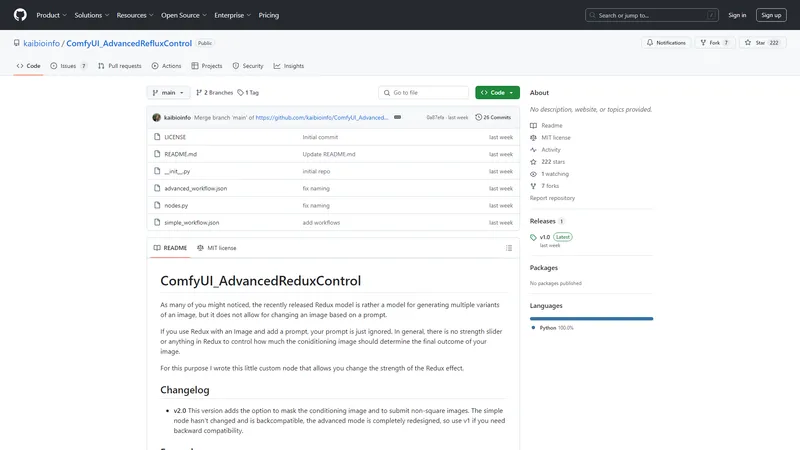
ComfyUI_AdvancedRefluxControl is a custom node designed to enhance the control over the Redux effect in image generation workflows. The Redux model, while effective for generating multiple variants of an image, lacks the capability to modify an image based on a prompt. This node allows users to adjust the strength of the Redux effect, enabling more precise control over the final outcome. With features like masking and support for non-square images, this tool provides advanced customization options for users looking to fine-tune their image generation processes.
Top Features
Adjustable Redux effect strength
Masking for selective conditioning
Support for non-square images
Advanced workflow customization
Detailed documentation and examples
Simple Definition of Usecases
Generating comic-style images from photographs
Creating anime-style illustrations from real-world images
Transforming images into marble statues or sculptures
Mixing multiple images to create hybrid styles
Fine-tuning image generation for specific artistic or research purposes
Frequently Asked Questions
Q:
How do I adjust the strength of the Redux effect?
A:
You can adjust the strength using the 'downsampling_factor' parameter in the advanced workflow. Lower values increase the influence of the Redux effect.
Q:
Can I use non-square images with this tool?
A:
Yes, the tool supports non-square images by adding padding to maintain the aspect ratio. This ensures that the original image dimensions are preserved in the generated output.
Q:
How does masking work in this context?
A:
Masking allows you to apply the Redux effect only to specific areas of the image. This is useful for fine-tuning the conditioning process and ensuring that certain features are preserved or enhanced.
Q:
What are the different downsampling functions available?
A:
The available downsampling functions include 'area', 'bicubic', and 'nearest_exact'. Each function can produce different results, so it's worth experimenting to find the best fit for your needs.
Q:
Can I combine multiple images in a single workflow?
A:
Yes, you can combine multiple images by using the masking feature to selectively apply the Redux effect to different parts of the image. This allows for creating hybrid styles and effects.
Image to Prompt is a tool that leverages AI technology to quickly convert images into prompts. Users simply upload an image, and the system generates corresponding prompts within seconds, which can be used for generating images with other AI models. This tool is suitable for various AI platforms and tools, such as Flux1, Stable Diffusion, and Midjourney. Image to Prompt prioritizes user privacy; uploaded images are immediately deleted after the prompt is generated and are not stored or shared. Additionally, users can manually edit and adjust the generated prompts to achieve more desirable results.
ChatGPT Image Generator is an innovative platform that uses artificial intelligence to transform textual descriptions into visual images. This tool is ideal for beginners and creatives who want to explore new forms of artistic expression without the need for advanced technical skills. The platform offers step-by-step tutorials, tips for boosting efficiency, and a guide to earning money, making it a comprehensive resource for anyone looking to learn, create, and grow. With a wide range of styles available, from photorealistic scenes to whimsical cartoons, ChatGPT Image Generator allows users to customize images to fit their needs. Additionally, the platform offers a generous free plan to allow users to experience the magic of AI without any upfront cost. With an active community and a series of helpful resources, ChatGPT Image Generator is the ideal choice for anyone looking to maximize their creative potential.
Image to Image AI is a powerful, ready-to-use online platform that harnesses artificial intelligence to transform, stylize, and recreate any image with remarkable efficiency. It offers a streamlined workflow for designers, marketers, and creative enthusiasts to generate professional-quality image variations. The platform is designed to be intuitive and automated, allowing users to upload a source image, describe desired changes via text prompts, and receive multiple transformed outputs in seconds. Its core technology maintains the original composition of your image while applying diverse artistic styles, environmental changes, or element modifications. This tool is ideal for creating campaign assets, visualizing concepts, or exploring artistic directions without requiring advanced design skills. With support for multiple image formats, flexible aspect ratios, and a credit-based system, it provides a practical and efficient solution for modern visual content creation.
Hume AI is a cutting-edge technology company specializing in empathic AI solutions for voice and text interactions. Their flagship product, OCTAVE (Omni-Capable Text and Voice Engine), is a next-generation speech-language model that combines advanced capabilities in voice generation, personality creation, and real-time interaction. OCTAVE can generate voices and personalities from descriptive prompts or brief recordings, enabling rich and authentic communication. It is designed to power AI systems that interact with humans in a nuanced and emotionally intelligent manner. Hume AI also offers the Empathic Voice Interface (EVI), which provides real-time, customizable voice intelligence for various applications. With a focus on emotional intelligence, Hume AI's solutions are ideal for industries such as healthcare, customer service, and consumer applications. The company is committed to advancing AI research and providing tools that enhance human-AI interactions.
Image to Video AI เป็นเครื่องมือที่ปฏิวัติวงการการสร้างวิดีโอ ด้วยเทคโนโลยี AI ที่ล้ำสมัย คุณสามารถเปลี่ยนรูปภาพของคุณเป็นวิดีโอคุณภาพสูงได้อย่างง่ายดาย ไม่ว่าจะเป็นผู้ที่ชอบสร้างสรรค์ผลงานใหม่ ๆ หรือมืออาชีพที่ต้องการเพิ่มประสิทธิภาพในการทำงาน Image to Video AI พร้อมช่วยให้คุณบรรลุเป้าหมาย ด้วยความสามารถในการสร้างการเปลี่ยนผ่านที่ราบรื่นและภาพที่สวยงาม เครื่องมือนี้เปรียบเสมือนโปรแกรมตัดต่อวิดีโอระดับมืออาชีพที่อยู่ปลายนิ้วของคุณ พร้อมที่จะทำให้รูปภาพของคุณมีชีวิตขึ้นมา สัมผัสประสบการณ์การใช้งานที่ง่ายดายและมีประสิทธิภาพกับ Image to Video AI วันนี้!
Gemini 2.5 Flash Image เป็นเครื่องมือสร้างภาพด้วย AI ที่พัฒนาโดย Google DeepMind ซึ่งใช้เทคโนโลยีขั้นสูงในการสร้างภาพระดับมืออาชีพจากข้อความหรือรูปภาพที่คุณป้อน ด้วยความสามารถในการรักษาความสม่ำเสมอของตัวละคร การรวมภาพหลายภาพเข้าด้วยกัน และการแก้ไขภาพด้วยภาษาธรรมชาติ Gemini 2.5 Flash Image จึงเป็นเครื่องมือที่เหมาะสำหรับนักออกแบบกราฟิก, นักสร้างเนื้อหา, และผู้เชี่ยวชาญด้านการตลาดที่ต้องการสร้างภาพคุณภาพสูงอย่างรวดเร็วและมีประสิทธิภาพ เครื่องมือนี้ไม่เพียงแต่ช่วยประหยัดเวลา แต่ยังเปิดโอกาสให้คุณได้สร้างสรรค์ผลงานที่โดดเด่นและเป็นเอกลักษณ์ด้วยเทคโนโลยี AI ที่ล้ำสมัย
เครื่องกำเนิดภาพและภาพถ่าย AI
Subscription
Frequently Asked Questions
What is MaoMaoYu Top4 AI Tools Directory?
Top 4 AI — '4' means 'For', MaoMaoYu Top For AI Tools Directory - top4ai.com is building an ai tools directory that helps you get your favorite ai tools, free ai tools list. It can get best ai writing tools, best free ai tools for writing articles, content at scale ai detector, best ai email marketing tools, ai paraphrasing tools, best ai seo tools, ai study tools, 'pearson' and 'ai' and 'study tools', ai generator tools, ai hashtags generator tools, best ai tools for research, ai art tools, ai music tools, ai video editing tools, ai pair coding tools, ai photo tools, ai tools for detecting photoshopped imagers, best ai tools for start up companies who are researching their market and more here.
How to found your ai tools in MaoMaoYu Top4 AI tools directory?
1. Open top4ai.com.
2. Explore the ai tools in the MaoMaoYu Top4 AI tools directory.
3. Click the ai tools that you need to get the detail and visit it.
What are the main features of MaoMaoYu Top4 AI Tools Directory?
1. Explore a simple definition of AI tools and discover how to fast find the perfect one for your needs. Streamline your workflow with the right AI solution.
2. Intelligent Search Engine: Thinking of what you think, saving you time, saving you trouble
Is it free to submit ai tools to MaoMaoYu Top4 AI Tools Directory?
Yes, it's free currently.
What's the categories list of AI Tools that MaoMaoYu Top4 AI Tools Directory support?
We will support all kinds of AI Tools later. Please wait for a few days.
What's the frequency for the up of AI tools in MaoMaoYu Top4 AI Directory?
The list of AI tools will be updated daily.
Is it support QuillBot, GPT-4o or Sora AI here?
You can get the QuillBot, GPT-4o or Sora AI tool here. Here is the introduction of GPT-4o and Sora video, and you can visit the website of the tools.
Troubleshooting
If the content aren't appearing, try a different browser, clear your cache. If issues persist, contact us at support@top4ai.com | support@maomaoyu.coffee.
What are the usage rights of the AI tools?
MaoMaoYu Top4 AI Tools Directory is just the AI Directory for AI tools. The usage rights of the AI tools are based on the AI tools' website.
