Links
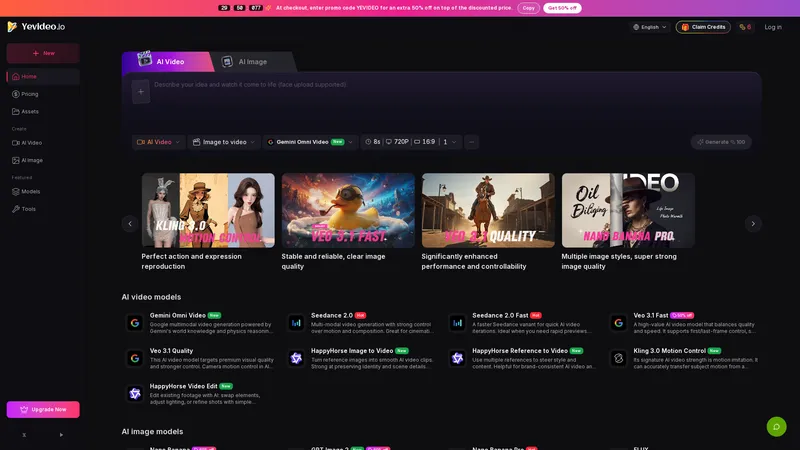
Yevideo is an all-in-one AI video and AI image creation platform that aggregates multiple state-of-the-art generative AI models into a single, cohesive studio. Designed for creatives, marketers, and developers, the platform provides a streamlined and intuitive workflow for transforming text prompts, images, and reference videos into high-quality visual content. Yevideo distinguishes itself by not just exposing raw AI models, but by curating them with clear use-case recommendations, estimated credit costs, and an integrated workspace that simplifies the creative process. The platform supports an extensive range of tasks including text-to-image, image-to-image, text-to-video, image-to-video, video-to-video, and AI video editing. Users can generate content using models like Google's Veo 3.1 and Gemini Omni Video, ByteDance's Seedance 2.0, Kuaishou's Kling 3.0, and image models like Google's Nano Banana Pro and OpenAI's GPT Image 2. The introduction of a 'Gemini Omni Video' model, which leverages Gemini's world knowledge and physics reasoning, underscores Yevideo's commitment to integrating the most advanced capabilities. A key feature for new users is the welcome bonus of free credits, allowing them to test the platform without immediate financial commitment. For professional users, Yevideo offers a practical and efficient alternative to using multiple, disparate AI tools, centralizing project management, credit tracking, and output history. The platform's pricing operates on a credit-based system, where each generation (image or video) consumes a specific amount of credits based on the complexity and model chosen. This credits system provides a pay-per-use feel, ensuring users only pay for what they generate. Yevideo also explicitly grants commercial usage rights to paid subscribers, making it a viable tool for businesses creating marketing assets, social media content, and product visuals. The platform's user interface is designed to be intuitive, with clear model cards that outline each model's strengths, such as 'Best for motion imitation' or 'Best for text rendering in images'. This guided approach helps users select the right tool for their specific task, reducing the learning curve typically associated with advanced AI generation. Furthermore, Yevideo includes a 'daily check-in' feature and feedback rewards, encouraging community engagement and providing ongoing value to its user base. The platform actively seeks user feedback to refine its offerings and has a visible roadmap for future features like an invite program. By aggregating diverse AI models under one roof and providing a seamless, integrated user experience, Yevideo positions itself as the definitive solution for anyone looking to harness the power of AI for visual content creation.
Top Features
- Aggregation of multiple top AI video models (Veo, Kling, Seedance, Gemini) in one interface.
- Aggregation of multiple top AI image models (Nano Banana, GPT Image, FLUX) in one interface.
- Supports text-to-image, image-to-image, text-to-video, image-to-video, video-to-video, and AI video editing workflows.
- First/last-frame control for video generation to maintain style and content consistency.
- Camera motion control (push, pull, pan, tilt, Hitchcock zoom) in premium video models like Veo 3.1.
- Motion imitation feature in Kling 3.0 to transfer movements from a reference video.
- Instruction-based AI video editing to replace or remove elements in existing footage.
- Design-grade image generation with strong multilingual text rendering in Nano Banana Pro.
- A credit-based pricing system with transparent estimated costs before each generation.
- Commercial usage rights for all paid plan subscribers.
Simple Definition of Usecases
- A social media manager uses the 'Image to Video' feature with Veo 3.1 Fast to quickly turn a product photo into a short promotional video for Instagram Reels, saving time on manual animation.
- A video editor uses Kling 3.0's 'Motion Control' to accurately transfer a dancer's movements from a reference clip onto a different character in a new scene, creating a complex video effect in minutes.
- A graphic designer uses Nano Banana Pro's 'Text to Image' to create a series of posters with precise, highly readable typography, eliminating the need for manual text overlay in a separate design tool.
- An e-commerce store owner uses the 'Reference to Video' feature with HappyHorse to maintain brand-consistent style across multiple product videos, ensuring all outputs share a similar aesthetic.
- A filmmaker uses Veo 3.1 Quality's camera motion controls to create a Hitchcock zoom effect for a dramatic scene in a short film, achieving a cinematic look without complex equipment.
- A course creator uses the 'AI Video Editor' with Wan 2.7 to replace a distracting background in an existing lecture recording, changing a cluttered office to a clean, branded virtual classroom.
User Reviews
Aisha Khan
Freelance Video Creator
"I've been using a handful of different AI tools for months, and Yevideo is a breath of fresh air. The main selling point for me isn't just the quality of the models—though Veo 3.1 is incredible—it's the workflow. Being able to generate an image with Nano Banana Pro and then directly feed it into the image-to-video pipeline without switching tabs is a huge time saver. The credit system is transparent; I know exactly what a generation will cost before I hit the button. I recently used the Kling 3.0 motion control to create a complex video for a client where a character had to mimic a specific dance routine, and the result was spot-on. The commercial license is a big plus for my freelance work. I highly recommend Yevideo to anyone serious about AI content creation."
Aisha Khan
Freelance Video Creator
"I've been using a handful of different AI tools for months, and Yevideo is a breath of fresh air. The main selling point for me isn't just the quality of the models—though Veo 3.1 is incredible—it's the workflow. Being able to generate an image with Nano Banana Pro and then directly feed it into the image-to-video pipeline without switching tabs is a huge time saver. The credit system is transparent; I know exactly what a generation will cost before I hit the button. I recently used the Kling 3.0 motion control to create a complex video for a client where a character had to mimic a specific dance routine, and the result was spot-on. The commercial license is a big plus for my freelance work. I highly recommend Yevideo to anyone serious about AI content creation."
Ben Carter
Digital Marketing Manager
"Yevideo is a powerful platform that consolidates pretty much every major AI video and image model you'd want to use. As a digital marketer, I love the variety. For instance, the GPT Image 2 model is fantastic for generating concepts with strong prompt adherence, while FLUX is my go-to for quick iterations due to its speed and affordability. The platform's design is clean and logical, but there is a learning curve if you're not familiar with the different terminologies of each model. My only gripe is that I wish you could send a freshly generated image directly into the image-to-video workspace. Currently, you have to download and re-upload. It's a minor step, but it breaks the flow a bit when you're doing high-volume work. Overall, it's a very solid tool that has become essential for my daily workflow."
Clara Rossi
Visual Artist & Illustrator
"I am a visual artist who was initially skeptical of AI tools, but Yevideo won me over. It's not about replacing creativity; it's about augmenting it with amazing efficiency. The Nano Banana Pro model is a game-changer for artists. I used it to generate a series of concept art pieces for a graphic novel, specifically because of its excellent text rendering—I could place titles and captions right into the art itself. The quality is genuinely design-grade. I also appreciate the 'Inspiration' section on the homepage, which shows examples of what others have created. It's a great way to learn what's possible and find new techniques. The daily check-in for free credits is a nice touch that keeps me coming back. This platform is practical and honestly quite fun to use."
David Okonkwo
Small Business Owner
"For someone running a small e-commerce business, video content is crucial but expensive to produce. Yevideo has lowered that barrier significantly. I use the 'Image to Video' feature to turn my product photos into short, engaging ads. The Veo 3.1 Fast model gives me a good balance of speed and quality without burning through all my credits. The camera motion controls, like the pan and tilt, add a dynamic feel that I used to have to pay a videographer for. The pricing is straightforward, and I appreciate the occasional promo codes. I did have a question about credit usage for a complex video, but their FAQ was helpful, and the estimated cost indicator before generation gives you confidence. I wish they had a bulk-generation feature for creating multiple video variations at once, but the current setup is already incredibly useful."
Elena Fischer
Creative Team Lead
"I lead a small creative team, and Yevideo has been a fantastic collaborative platform for early-stage ideation. We use it to rapidly visualize concepts for advertising campaigns. The variety of models means we can explore different aesthetics quickly. One designer might use FLUX for a quick mood board, while another uses Seedance 2.0 for a more cinematic feel. The integration of video editing via the 'HappyHorse Video Edit' model is also brilliant. We were able to take an existing rough footage, and with simple text instructions, adjust the lighting and swap out an element in the background, saving us from a full reshoot. The user interface, while packed with options, is well-organized. Being able to see all our generated assets in one place is a huge organizational win. It's made our prototyping process much more efficient."
Frequently Asked Questions
What is Yevideo?
Yevideo is an all-in-one AI video and AI image creation platform that integrates multiple leading AI models into a single studio. It allows users to generate, edit, and transform visual content using text prompts, images, and reference videos, all from one unified interface.
What does the credit system mean on Yevideo?
Yevideo uses a credit-based payment system. Each generation (image or video) costs a specific number of credits, which is determined by the complexity of the model and the settings you choose (like resolution and video duration). You can see the estimated cost before you generate, and your credit balance is displayed in your account.
How to use a generated image to create a video on Yevideo?
Currently, the process is a two-step workflow. First, generate your image using a model like Nano Banana Pro in the 'AI Image' tab. Then, download that image to your device. Next, navigate to the 'AI Video' tab, select 'Image to Video', and upload the image you just downloaded. The platform will then use it as the starting frame for your video generation.
How to fast create a video with a specific motion using Yevideo?
For fast creation with specific motion, select the 'Kling 3.0 Motion Control' model. Upload a reference video that contains the motion you want to imitate. The model is designed to accurately transfer that motion to a new subject or scene you describe in your text prompt, allowing you to recreate specific actions like a dance or walk cycle quickly.
Can I use the images and videos I create on Yevideo for commercial purposes?
Yes. If you are a paid plan subscriber, you have full commercial usage rights to all content you generate on Yevideo. This includes using the outputs for advertisements, marketing materials, product videos, and other business-related content.
What AI models are available on Yevideo?
Yevideo offers a wide range of models. For video, it includes Google's Veo 3.1 (Fast and Quality), Gemini Omni Video, ByteDance's Seedance 2.0, Kuaishou's Kling 3.0, and models from Alibaba's Wan series. For images, it includes Google's Nano Banana and Nano Banana Pro, OpenAI's GPT Image 2, and Black Forest Labs' FLUX.
Related AI Tools

Frequently Asked Questions
What is MaoMaoYu Top4 AI Tools Directory?
Top 4 AI — '4' means 'For', MaoMaoYu Top For AI Tools Directory - top4ai.com is building an ai tools directory that helps you get your favorite ai tools, free ai tools list. It can get best ai writing tools, best free ai tools for writing articles, content at scale ai detector, best ai email marketing tools, ai paraphrasing tools, best ai seo tools, ai study tools, 'pearson' and 'ai' and 'study tools', ai generator tools, ai hashtags generator tools, best ai tools for research, ai art tools, ai music tools, ai video editing tools, ai pair coding tools, ai photo tools, ai tools for detecting photoshopped imagers, best ai tools for start up companies who are researching their market and more here.
How to found your ai tools in MaoMaoYu Top4 AI tools directory?
1. Open top4ai.com.
2. Explore the ai tools in the MaoMaoYu Top4 AI tools directory.
3. Click the ai tools that you need to get the detail and visit it.
What are the main features of MaoMaoYu Top4 AI Tools Directory?
1. Explore a simple definition of AI tools and discover how to fast find the perfect one for your needs. Streamline your workflow with the right AI solution.
2. Intelligent Search Engine: Thinking of what you think, saving you time, saving you trouble
Is it free to submit ai tools to MaoMaoYu Top4 AI Tools Directory?
Yes, it's free currently.
What's the categories list of AI Tools that MaoMaoYu Top4 AI Tools Directory support?
We will support all kinds of AI Tools later. Please wait for a few days.
What's the frequency for the up of AI tools in MaoMaoYu Top4 AI Directory?
The list of AI tools will be updated daily.
Is it support QuillBot, GPT-4o or Sora AI here?
You can get the QuillBot, GPT-4o or Sora AI tool here. Here is the introduction of GPT-4o and Sora video, and you can visit the website of the tools.
Troubleshooting
If the content aren't appearing, try a different browser, clear your cache. If issues persist, contact us at support@top4ai.com | support@maomaoyu.coffee.
What are the usage rights of the AI tools?
MaoMaoYu Top4 AI Tools Directory is just the AI Directory for AI tools. The usage rights of the AI tools are based on the AI tools' website.