2024-12-03 07:58:55
Cap
Categories
การบันทึกการบันทึกวิดีโอ AIเครื่องมือผลิตภาพ AI
Users of this tool
Developers looking for an open-source screen recording toolEducators and trainers who need to create instructional videosContent creators and influencers who require high-quality screen recordingsTech support teams needing to record and share troubleshooting sessionsRemote workers and teams who need to share their screen for collaboration
PricingType
Freemium

Links

  1. Documentation: https://cap.so/docs
  2. Pricing: https://cap.so/pricing

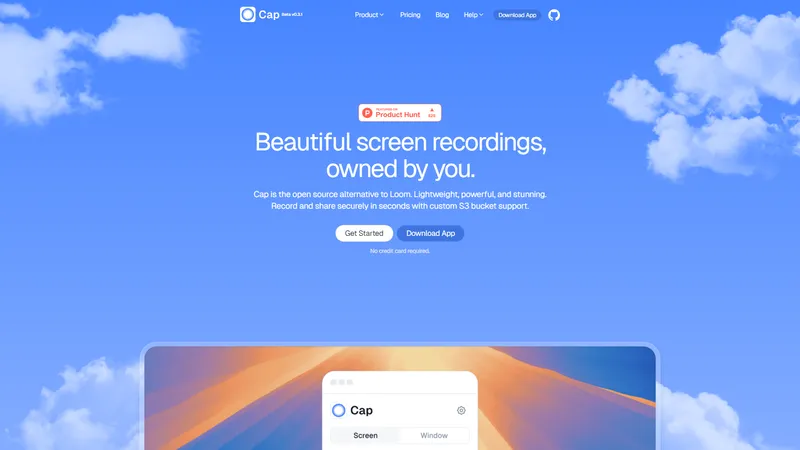
Cap is an open-source screen recording tool designed to provide a lightweight, powerful, and stunning alternative to Loom. It allows users to record and share their screen securely with custom S3 bucket support. Cap is crafted for simplicity, aiming to streamline the workflow by making the process of recording, editing, and sharing as seamless as possible. Whether you're a developer, educator, or content creator, Cap offers a user-friendly experience that ensures your screen recordings are beautiful and owned by you.

Top Features

  1. Open-source screen recording with custom S3 bucket support
  2. Lightweight and powerful recording capabilities
  3. Stunning and high-quality screen recordings
  4. Streamlined workflow for recording, editing, and sharing
  5. User-friendly interface designed for simplicity

Simple Definition of Usecases

  1. A developer needs to record a bug demonstration and share it securely with their team using a custom S3 bucket.
  2. An educator wants to create a tutorial video for their students, using Cap's high-quality recording features to ensure clarity.
  3. A content creator records a screen-sharing session for their YouTube channel, leveraging Cap's stunning visuals to enhance the video quality.
  4. A tech support team member records a troubleshooting session to share with a client, ensuring the recording is secure and easy to share.
  5. A remote worker records a presentation to share with their team, using Cap's streamlined workflow to quickly edit and distribute the video.

Frequently Asked Questions

Q:

Is Cap an open-source tool?

A:

Yes, Cap is an open-source screen recording tool.

Q:

Can I use my own S3 bucket for storing recordings?

A:

Yes, Cap supports custom S3 bucket storage for your recordings.

Q:

Is Cap available for free?

A:

Cap offers a free version with basic features, and a paid version with additional capabilities.

Q:

How do I get started with Cap?

A:

You can get started by visiting the pricing page and choosing a plan that suits your needs.

Q:

Does Cap offer customer support?

A:

Yes, Cap offers email and chat support, as well as a community on Discord.

Related AI Tools

AI Facefy | Top 4 AI Tool loading
AI Facefy เป็นเว็บไซต์ที่ให้บริการการแปลงใบหน้าด้วยเทคโนโลยี AI ฟรีและปลอดภัย ผู้ใช้สามารถเปลี่ยนใบหน้าในรูปภาพหรือวิดีโอได้อย่างราบรื่นและสมจริง โดยไม่มีรอยแก้ไขที่มองเห็นได้ เว็บไซต์นี้มีคุณสมบัติหลัก เช่น การแทนที่ใบหน้าอย่างราบรื่น ความเป็นไปได้ทางสร้างสรรค์ที่หลากหลาย การรองรับการแปลงใบหน้าในรูปภาพและวิดีโอ การปกป้องความเป็นส่วนตัว การประมวลผลอย่างรวดเร็ว และผลลัพธ์ที่มีคุณภาพสูง นอกจากนี้ AI Facefy ยังมีบทความและคำแนะนำเกี่ยวกับการใช้งานและเทคนิคต่างๆ เพื่อเพิ่มประสบการณ์การใช้งานของผู้ใช้
เครื่องกำเนิดการแลกเปลี่ยนใบหน้า AI
Freemium
Open WebUI - สำรวจจักรวาลได้ทุกที่ทุกเวลา | Top 4 AI Tool loading
Open WebUI เป็นอินเทอร์เฟซ AI ที่สามารถปรับเปลี่ยนได้และโฮสต์เอง ซึ่งปรับให้เข้ากับเวิร์กโฟลว์ของคุณ โดยทำงานทั้งหมดแบบออฟไลน์ Open WebUI ช่วยให้คุณสามารถเข้าถึงและใช้งานโมเดล AI ที่หลากหลายได้อย่างสะดวกสบาย ไม่ว่าคุณจะอยู่ที่ไหนก็ตาม ด้วยความสามารถในการทำงานแบบออฟไลน์ ทำให้คุณไม่ต้องกังวลเรื่องการเชื่อมต่ออินเทอร์เน็ต Open WebUI ยังมีชุมชนที่ใหญ่และแข็งแกร่งที่มีผู้ใช้มากกว่า 175,000 คนที่ได้ปลดล็อกศักยภาพของ AI ไปแล้ว คุณสามารถเข้าร่วมชุมชนได้ฟรีและเริ่มต้นใช้งาน Open WebUI ได้ทันที นอกจากนี้ Open WebUI ยังมีแผนสำหรับองค์กรที่ต้องการความสามารถขั้นสูงและการสนับสนุนเฉพาะทาง เพื่อให้คุณสามารถนำ AI ไปใช้ในธุรกิจของคุณได้อย่างเต็มประสิทธิภาพ
บอทแชท AI
Freemium
Craft Docs | Top 4 AI Tool loading
Craft Docs is a powerful and beautifully designed documentation tool built for Mac and iOS. It offers instant sync across devices, Apple Intelligence, and GPT 4o integration, making it a top choice for users looking to organize their digital content seamlessly. Craft Docs has won multiple awards, including the Apple Design Award and The Webby Award, for its innovative features and user-friendly interface. Whether you're planning your days, summarizing content with AI, or collaborating in real-time, Craft Docs provides a comprehensive solution for all your documentation needs. Download Craft for free and experience the difference.
ผู้ช่วยเอกสาร AI
Freemium
Editaimg - โปรแกรมแก้ไขรูปภาพด้วย AI ที่ง่ายที่สุด | Top 4 AI Tool loading
editaimg คือโปรแกรมแก้ไขรูปภาพด้วย AI ที่ออกแบบมาเพื่อให้ทุกคนสามารถสร้างผลงานระดับมืออาชีพได้อย่าง **ง่ายดาย** และ **มีประสิทธิภาพ** โดยไม่ต้องมีทักษะด้านการออกแบบมาก่อน เพียงอัปโหลดรูปภาพและพิมพ์คำอธิบายสิ่งที่คุณต้องการลงในช่องคำสั่ง AI ของเราจะจัดการส่วนที่เหลือให้คุณทันที ไม่ว่าจะเป็นการลบพื้นหลัง การลบวัตถุที่ไม่ต้องการ การปรับขนาดความละเอียด การเปลี่ยนสไตล์ หรือการเพิ่มบุคคลลงในรูปภาพ editaimg มอบเครื่องมือที่ครบครันในที่เดียว เว็บไซต์นี้มุ่งเน้นการทำให้การทำงานกับรูปภาพ **Streamline** มากที่สุด โดยมีฟีเจอร์ที่ **Practical** และ **Concise** เช่น การลบลายน้ำ Gemini, การแปลข้อความในรูปภาพเป็นกว่า 130 ภาษา, การสร้างภาพจูบด้วย AI (AI Kiss Generator), การเพิ่มหิมะเสมือนจริง และการแทนที่ข้อความในภาพโดยคงรูปแบบดั้งเดิมไว้ จุดเด่นของ editaimg คือความ **Simple** ที่ไม่ต้องสมัครสมาชิก สามารถซื้อเครดิตแบบครั้งเดียว (One-time Payment) และใช้ได้ตลอดไปโดยเครดิตไม่มีวันหมดอายุ ซึ่งเหมาะอย่างยิ่งสำหรับผู้ที่ต้องการเครื่องมือที่ **Ready to use** ได้ทันที **การวางตำแหน่งเว็บไซต์:** editaimg วางตำแหน่งตัวเองเป็นเครื่องมือ AI สำหรับมวลชน (Mass-market AI tool) ที่เน้นการใช้งานที่สะดวก รวดเร็ว และไม่ซับซ้อน แตกต่างจากโปรแกรมแก้ไขภาพแบบดั้งเดิม (เช่น Photoshop) ที่มีขั้นตอนมากมาย editaimg เน้นการเปลี่ยนคำสั่งภาษาให้เป็นภาพจริงในไม่กี่วินาที **กลุ่มเป้าหมาย:** กลุ่มเป้าหมายหลักคือ ผู้สร้างเนื้อหา (Content Creator), นักการตลาดออนไลน์, เจ้าของธุรกิจ E-commerce, นักเรียนนักศึกษา, และผู้ใช้ทั่วไปที่ต้องการแก้ไขรูปภาพอย่างรวดเร็วโดยไม่ต้องเรียนรู้ซอฟต์แวร์ที่ซับซ้อน **ฟีเจอร์หลัก:** * **AI Image Editor หลัก:** แก้ไขรูปภาพด้วยคำสั่งภาษา (Prompt-based editing) * **ลบพื้นหลัง:** ลบพื้นหลังออกและเปลี่ยนเป็นสีขาวหรือพื้นหลังอื่นๆ ได้อัตโนมัติ * **ลบวัตถุ/คน:** ลบวัตถุหรือบุคคลที่ไม่ต้องการออกจากภาพอย่างชาญฉลาด * **ปรับขนาดความละเอียด (Upscale):** เพิ่มความละเอียดของภาพให้คมชัดยิ่งขึ้น * **เปลี่ยนสไตล์ (Style Transform):** เปลี่ยนรูปแบบภาพ เช่น การ์ตูน, สีน้ำมัน, หรือภาพยนตร์ * **เครื่องมือพิเศษ:** AI Kiss Generator, Gemini Watermark Remover, Image Text Editor, AI Image Translator, AI Snow, Add Someone to Photo **ลักษณะเนื้อหา:** เนื้อหาบนเว็บไซต์เน้นการสาธิตการใช้งานทีละขั้นตอน (Tutorial) อย่างชัดเจน และมีตัวอย่าง Before/After ที่เห็นผลชัดเจน เพื่อให้ผู้ใช้เข้าใจถึงความสามารถของเครื่องมือได้ทันที นอกจากนี้ยังมีบล็อกที่ให้ **Tips and Tricks** และคำแนะนำเพิ่มเติมเพื่อให้ได้ผลลัพธ์ที่ดีที่สุด **ประสบการณ์ผู้ใช้ (UX):** หน้าเว็บออกแบบให้ใช้งานง่าย เน้นพื้นที่สำหรับอัปโหลดภาพและช่องคำสั่งเป็นหลัก ผู้ใช้สามารถลากและวาง (Drag & Drop) รูปภาพลงในพื้นที่ที่กำหนด หรือคลิกเพื่อเลือกไฟล์ ขั้นตอนการทำงานมีเพียง 4 ขั้นตอน: อัปโหลดภาพ -> พิมพ์คำสั่ง -> เลือกการตั้งค่า -> กดปุ่ม 'Edit' เพื่อรับผลลัพธ์ ซึ่งออกแบบมาเพื่อ **Optimize** เวลาในการทำงานของผู้ใช้ให้มากที่สุด **ลักษณะทางเทคนิค:** editaimg ทำงานผ่านเบราว์เซอร์ (Cloud-based) โดยไม่ต้องติดตั้งซอฟต์แวร์ใดๆ รองรับการอัปโหลดภาพครั้งละสูงสุด 8 รูป โดยแต่ละรูปมีขนาดไม่เกิน 50MB ระบบใช้เครดิตในการประมวลผลแต่ละครั้ง โดยเครดิตไม่มีวันหมดอายุ ซึ่งเป็นรูปแบบที่ **Convenient** และยืดหยุ่นสำหรับผู้ใช้ที่ไม่ต้องการผูกมัดกับค่าสมัครรายเดือน สรุปแล้ว editaimg คือโซลูชันที่ **Effective** สำหรับทุกคนที่ต้องการ **Simplify** กระบวนการแก้ไขรูปภาพ ด้วยเทคโนโลยี AI ที่ทรงพลังแต่ใช้งานง่าย ราคาจับต้องได้ และไม่มีค่าธรรมเนียมแอบแฝง
โปรแกรมแก้ไขภาพและภาพถ่าย
One-time purchase
Goblin Tools - เครื่องมือเล็กๆ สำหรับปัญหาที่ใหญ่เกินไป | Top 4 AI Tool loading
Goblin Tools เป็นชุดเครื่องมือที่ออกแบบมาเพื่อช่วยให้คุณจัดการกับงานที่ดูใหญ่และซับซ้อนได้อย่างง่ายดายและมีประสิทธิภาพ ด้วยเครื่องมือที่หลากหลาย เช่น Magic ToDo สำหรับการแบ่งงานย่อย, Formalizer สำหรับการปรับโทนเสียงของข้อความ, และ Judge สำหรับการวิเคราะห์อารมณ์จากข้อความ คุณจะพบว่าการทำงานและชีวิตประจำวันของคุณเป็นเรื่องที่ง่ายและสะดวกมากขึ้น ไม่ว่าคุณจะเป็นนักศึกษา ครู หรือผู้ที่ต้องการความช่วยเหลือในการตัดสินใจ Goblin Tools มีเครื่องมือที่พร้อมใช้งานและเหมาะกับทุกสถานการณ์
การจัดการงาน AI
Freemium
Simple Video Tools - เครื่องมือตัดต่อวิดีโอที่เรียบง่ายและมีประสิทธิภาพ | Top 4 AI Tool loading
Simple Video Tools เป็นแพลตฟอร์มที่ออกแบบมาเพื่อให้ผู้ใช้สามารถตัดต่อและจัดการวิดีโอได้อย่างง่ายดายและรวดเร็ว ด้วยเครื่องมือที่หลากหลาย เช่น การตัดเฟรม การสร้างคลิป การแปลงรูปแบบวิดีโอ การแยกเสียง การลบเสียง การปรับความเร็ว และการบีบอัดขนาดวิดีโอ ผู้ใช้สามารถทำงานกับวิดีโอได้อย่างมีประสิทธิภาพโดยไม่จำเป็นต้องมีความรู้ทางเทคนิคขั้นสูง แพลตฟอร์มนี้รองรับไฟล์วิดีโอขนาดสูงสุด 150MB และไม่มีการเก็บข้อมูลของผู้ใช้ ทำให้มั่นใจได้ถึงความเป็นส่วนตัวและความปลอดภัย Simple Video Tools เหมาะสำหรับทั้งผู้ใช้ทั่วไปและมืออาชีพที่ต้องการเครื่องมือตัดต่อวิดีโอที่ใช้งานง่ายและมีประสิทธิภาพ
โปรแกรมแก้ไขวิดีโอ AI
Freemium
Yevideo AI - Perfect AI Video & Image Studio, Ready to Use | Top 4 AI Tool loading
Yevideo is an all-in-one AI video and AI image creation platform that aggregates multiple state-of-the-art generative AI models into a single, cohesive studio. Designed for creatives, marketers, and developers, the platform provides a streamlined and intuitive workflow for transforming text prompts, images, and reference videos into high-quality visual content. Yevideo distinguishes itself by not just exposing raw AI models, but by curating them with clear use-case recommendations, estimated credit costs, and an integrated workspace that simplifies the creative process. The platform supports an extensive range of tasks including text-to-image, image-to-image, text-to-video, image-to-video, video-to-video, and AI video editing. Users can generate content using models like Google's Veo 3.1 and Gemini Omni Video, ByteDance's Seedance 2.0, Kuaishou's Kling 3.0, and image models like Google's Nano Banana Pro and OpenAI's GPT Image 2. The introduction of a 'Gemini Omni Video' model, which leverages Gemini's world knowledge and physics reasoning, underscores Yevideo's commitment to integrating the most advanced capabilities. A key feature for new users is the welcome bonus of free credits, allowing them to test the platform without immediate financial commitment. For professional users, Yevideo offers a practical and efficient alternative to using multiple, disparate AI tools, centralizing project management, credit tracking, and output history. The platform's pricing operates on a credit-based system, where each generation (image or video) consumes a specific amount of credits based on the complexity and model chosen. This credits system provides a pay-per-use feel, ensuring users only pay for what they generate. Yevideo also explicitly grants commercial usage rights to paid subscribers, making it a viable tool for businesses creating marketing assets, social media content, and product visuals. The platform's user interface is designed to be intuitive, with clear model cards that outline each model's strengths, such as 'Best for motion imitation' or 'Best for text rendering in images'. This guided approach helps users select the right tool for their specific task, reducing the learning curve typically associated with advanced AI generation. Furthermore, Yevideo includes a 'daily check-in' feature and feedback rewards, encouraging community engagement and providing ongoing value to its user base. The platform actively seeks user feedback to refine its offerings and has a visible roadmap for future features like an invite program. By aggregating diverse AI models under one roof and providing a seamless, integrated user experience, Yevideo positions itself as the definitive solution for anyone looking to harness the power of AI for visual content creation.
เครื่องกำเนิดวิดีโอ AI
Freemium
Craft Drill Clicker - Craft Drill Clicker: การผจญภัยการสร้างสุดท้ายของคุณ! | Top 4 AI Tool loading
Craft Drill Clicker เป็นเกมคลิกเกอร์ที่ผสมผสานกลไกการสร้างเข้ากับการจัดการทรัพยากร ผู้เล่นจะรับบทเป็นคนขุดแร่และช่างฝีมือ ที่ต้องรวบรวมทรัพยากร สร้างไอเท็ม อัพเกรดเครื่องมือ และสร้างอาณาจักรการขุดของตัวเองผ่านการคลิกเชิงกลยุทธ์และการรวบรวมทรัพยากร เกมนี้มีกลไกการคลิกที่น่าพอใจ พร้อมด้วยระบบการสร้างที่ลึกซึ้ง และเส้นทางการอัพเกรดที่ก้าวหน้า ทำให้เหมาะสำหรับทั้งผู้เล่นที่ชอบเล่นเกมแบบสบายๆ และผู้ที่ชอบความท้าทายเชิงกลยุทธ์
เกม
Free

Frequently Asked Questions

What is MaoMaoYu Top4 AI Tools Directory?

Top 4 AI — '4' means 'For', MaoMaoYu Top For AI Tools Directory - top4ai.com is building an ai tools directory that helps you get your favorite ai tools, free ai tools list. It can get best ai writing tools, best free ai tools for writing articles, content at scale ai detector, best ai email marketing tools, ai paraphrasing tools, best ai seo tools, ai study tools, 'pearson' and 'ai' and 'study tools', ai generator tools, ai hashtags generator tools, best ai tools for research, ai art tools, ai music tools, ai video editing tools, ai pair coding tools, ai photo tools, ai tools for detecting photoshopped imagers, best ai tools for start up companies who are researching their market and more here.

How to found your ai tools in MaoMaoYu Top4 AI tools directory?

1. Open top4ai.com.

2. Explore the ai tools in the MaoMaoYu Top4 AI tools directory.

3. Click the ai tools that you need to get the detail and visit it.

What are the main features of MaoMaoYu Top4 AI Tools Directory?

1. Explore a simple definition of AI tools and discover how to fast find the perfect one for your needs. Streamline your workflow with the right AI solution.

2. Intelligent Search Engine: Thinking of what you think, saving you time, saving you trouble

Is it free to submit ai tools to MaoMaoYu Top4 AI Tools Directory?

Yes, it's free currently.

What's the categories list of AI Tools that MaoMaoYu Top4 AI Tools Directory support?

We will support all kinds of AI Tools later. Please wait for a few days.

What's the frequency for the up of AI tools in MaoMaoYu Top4 AI Directory?

The list of AI tools will be updated daily.

Is it support QuillBot, GPT-4o or Sora AI here?

You can get the QuillBot, GPT-4o or Sora AI tool here. Here is the introduction of GPT-4o and Sora video, and you can visit the website of the tools.

Troubleshooting

If the content aren't appearing, try a different browser, clear your cache. If issues persist, contact us at support@top4ai.com | support@maomaoyu.coffee.

What are the usage rights of the AI tools?

MaoMaoYu Top4 AI Tools Directory is just the AI Directory for AI tools. The usage rights of the AI tools are based on the AI tools' website.