ผู้ช่วยวิเคราะห์ AIผู้ช่วย SEO AIผู้ช่วยโซเชียลมีเดีย AIเครื่องมือผลิตภาพ AI
Users of this tool
Content CreatorsSocial Media MarketersBluesky EnthusiastsDigital StrategistsBusiness Owners
PricingType
Free
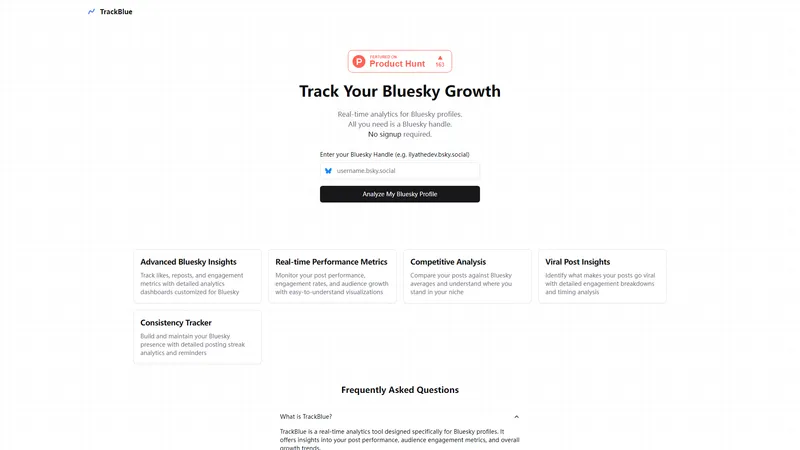
TrackBlue is a cutting-edge real-time analytics tool designed specifically for Bluesky profiles. It empowers users to monitor their post performance, engagement rates, and audience growth with easy-to-understand visualizations. TrackBlue offers advanced insights such as competitive analysis, viral post insights, and consistency tracking, all without requiring a signup. Whether you're a content creator, marketer, or social media enthusiast, TrackBlue provides the data you need to optimize your Bluesky presence and achieve your goals.
Top Features
Real-time Performance Metrics
Competitive Analysis
Viral Post Insights
Consistency Tracker
Detailed Analytics Dashboards
Simple Definition of Usecases
A content creator wants to understand which types of posts resonate most with their audience. By using TrackBlue's Viral Post Insights, they can analyze engagement metrics and identify patterns that lead to higher interaction rates.
A social media marketer needs to track the performance of a campaign across multiple Bluesky profiles. TrackBlue's Competitive Analysis feature allows them to compare metrics against industry averages and adjust strategies accordingly.
A digital strategist is tasked with maintaining a consistent posting schedule. The Consistency Tracker feature in TrackBlue helps them monitor their posting streaks and set reminders to ensure regular content updates.
A business owner wants to gauge the effectiveness of their Bluesky presence. TrackBlue's detailed analytics dashboards provide insights into audience growth, engagement rates, and post performance, helping them make data-driven decisions.
A Bluesky enthusiast is curious about the performance of their posts compared to others in their niche. TrackBlue's Competitive Analysis tool allows them to see how their metrics stack up against the Bluesky average, providing valuable insights.
Frequently Asked Questions
Q:
What is TrackBlue?
A:
TrackBlue is a real-time analytics tool designed specifically for Bluesky profiles. It offers insights into your post performance, audience engagement metrics, and overall growth trends.
Q:
Why should I choose TrackBlue?
A:
TrackBlue provides advanced analytics features tailored for Bluesky, including real-time performance metrics, competitive analysis, and viral post insights. It's designed to help you optimize your Bluesky presence without requiring a signup.
Q:
What features are included with TrackBlue?
A:
TrackBlue includes features such as real-time performance metrics, competitive analysis, viral post insights, consistency tracking, and detailed analytics dashboards.
Q:
Do I need to sign up to use TrackBlue?
A:
No, TrackBlue does not require a signup. You can start analyzing your Bluesky profile immediately by entering your Bluesky handle.
Q:
Is TrackBlue free to use?
A:
Yes, TrackBlue is currently free to use. There are no charges for accessing its analytics features.
AI STL Generator เป็นเว็บแพลตฟอร์มที่ให้บริการสร้างไฟล์ STL ด้วยปัญญาประดิษฐ์สำหรับการพิมพ์ 3D โดยเฉพาะ จุดยืนของเว็บไซต์คือการเป็นเครื่องมือที่ทำให้การเปลี่ยนจินตนาการจากภาพสองมิติหรือข้อความสั้น ๆ ให้กลายเป็นโมเดลสามมิติที่พร้อมใช้งาน (Ready to use) เป็นเรื่องที่รวดเร็วและมีประสิทธิภาพมากขึ้น (more efficient) สำหรับทั้งมือใหม่และมืออาชีพ ผู้ใช้ไม่จำเป็นต้องมีพื้นฐานการเขียนแบบ CAD ไม่ต้องติดตั้งซอฟต์แวร์ราคาแพง และไม่ต้องผ่านขั้นตอนซับซ้อนแบบเดิม เพียงอัปโหลดภาพหรือพิมพ์คำอธิบาย ระบบจะวิเคราะห์ สร้าง geometry และซ่อม topology ให้อัตโนมัติ (Automated) จากนั้นผู้ใช้สามารถดาวน์โหลดไฟล์ STL หรือ 3MF ไปสไลด์ในโปรแกรมที่คุ้นเคยได้ทันที แพลตฟอร์มจึงตอบโจทย์คนที่ต้องการความสะดวก (Convenient) และต้องการเคล็ดลับและเทคนิค (tips and tricks) ในการพิมพ์ 3D ที่มีประสิทธิภาพที่สุด
เว็บไซต์นี้วางตำแหน่ง (Website Positioning) เป็นผู้ช่วยสร้างโมเดล 3D ด้วย AI สำหรับงานพิมพ์ 3D โดยเฉพาะ ไม่ใช่เพียงเครื่องมือสร้างโมเดลทั่วไปที่ได้ไฟล์ GLB หรือ OBJ สำหรับเกมเท่านั้น แต่ให้ความสำคัญกับความพร้อมพิมพ์ ความสมบูรณ์ของ mesh และความเข้ากันได้กับ slicer ยอดนิยม เช่น Bambu Studio, Cura, PrusaSlicer, OrcaSlicer, Creality Print และ IdeaMaker จุดขายสำคัญคือการรับประกันว่าโมเดลที่ได้มีผนังปิดสนิท ไม่มี non-manifold edges ไม่มี inverted normals และไม่มี zero-thickness walls ซึ่งเป็นปัญหาที่พบบ่อยในโมเดลจาก AI ทั่วไป การที่ระบบมี printability check และ STL repair ในตัวช่วยลดภาระของผู้ใช้ในการแก้ไขไฟล์ด้วย Meshmixer หรือ Blender ทำให้ขั้นตอนจากไอเดียถึงเครื่องพิมพ์สั้นลงอย่างมาก
กลุ่มเป้าหมาย (Target Audience) ของ AI STL Generator ครอบคลุมหลายกลุ่ม เริ่มจากนักออกแบบโมเดล 3D และศิลปินดิจิทัลที่ต้องการเปลี่ยนภาพร่างหรือภาพอาร์ตให้เป็นโมเดลพิมพ์จริง ผู้ที่ชื่นชอบการพิมพ์ 3D ทั้งเครื่อง FDM และ Resin ที่ต้องการไฟล์ STL คุณภาพสูงโดยไม่ต้องมีทักษะ CAD นักเล่นเกมวางแผนบนโต๊ะ D&D และผู้สร้างมินิเจอร์ที่ต้องการสร้างตัวละครหรือมอนสเตอร์จากภาพ Midjourney เจ้าของร้าน Etsy และ Print Farm ที่รับผลิตงานตามสั่ง ครูอาจารย์และผู้จัดกิจกรรม STEM ที่ต้องการสอนการพิมพ์ 3D โดยไม่ต้องใช้ซอฟต์แวร์ซับซ้อน วิศวกรและนักออกแบบผลิตภัณฑ์ที่ต้องการสร้างต้นแบบอย่างรวดเร็ว รวมถึงผู้เริ่มต้นที่ไม่มีพื้นฐานการออกแบบ 3D แต่ต้องการสร้างของใช้ส่วนตัวหรือของขวัญเฉพาะบุคคล กลุ่มเหล่านี้ล้วนได้รับประโยชน์จากการลดกำแพงทางเทคนิคและเวลา
คุณสมบัติหลัก (Core Features) ของ AI STL Generator มีหลายอย่างที่ออกแบบมาเพื่อตอบโจทย์การพิมพ์ 3D โดยตรง อย่างแรกคือ AI Image to STL ซึ่งแปลงภาพ JPG หรือ PNG ไม่ว่าจะเป็นภาพถ่าย ภาพสเก็ตช์ โลโก้ หรือ line art ให้เป็นโมเดลสามมิติที่มีความลึก ปริมาตร และ topology ที่เหมาะสม ระบบรองรับการอัปโหลดหลายภาพ (Multi-Image Support) เพื่อใช้หลายมุมในการสร้างโมเดลให้แม่นยำขึ้น อย่างที่สองคือ AI Text to STL ที่ให้ผู้ใช้พิมพ์คำอธิบาย เช่น รูปทรง ลักษณะ พื้นผิว และขนาด แล้ว AI จะสร้าง mesh ที่มีรายละเอียดตามต้องการ อย่างที่สามคือ Printability Check และ STL Repair ซึ่งตรวจหาปัญหาเช่น non-manifold edges, inverted normals, zero-thickness walls และซ่อมให้เป็น watertight โดยอัตโนมัติ อย่างที่สี่คือ 3D Model Preview ที่ให้ผู้ใช้หมุน ดู และตรวจสอบโมเดลก่อนดาวน์โหลด อย่างที่ห้าคือ Built-in Remesh & Repair Editor ที่ช่วยปรับความหนาแน่นของ mesh ลดจำนวน polygon และ flatten base เพื่อการยึดเกาะกับแท่นพิมพ์ อย่างที่หกคือการส่งออกไฟล์ STL และ 3MF รวมถึง OBJ และ GLB ในบางบริบท อย่างที่เจ็ดคือความเข้ากันได้กับ slicer ชั้นนำโดยไม่ต้องซ่อมเพิ่ม อย่างที่แปดคือระบบเครดิตฟรีรายวันจากการเช็คอิน 5 เครดิต ทำให้ผู้ใช้ทดลองได้จริง อย่างที่เก้าคือการเลือก AI Model ระหว่าง Basic และ Pro/Ultra detail เพื่อปรับสมดุลระหว่างความเร็วและรายละเอียด และอย่างที่สิบคือตัวเลือก Character Pose เช่น None, A-Pose, T-Pose และ Real-world size ที่ช่วยกำหนดขนาดจริงโดยให้จุดกำเนิดอยู่ที่ฐาน
คุณสมบัติด้านเนื้อหา (Content Features) ของเว็บไซต์ได้รับการออกแบบให้ทั้งให้ความรู้และสร้างแรงบันดาลใจ มีส่วน Featured Creations ที่แสดงผลงานจริงจาก AI เช่น มินิเจอร์บนโต๊ะ ชิ้นส่วนเครื่องกล รูปปั้นครึ่งตัว และของเล่นดีไซเนอร์ ผู้ใช้สามารถคลิกเพื่อตรวจสอบ geometry ใน 3D ดูจำนวน triangles และดาวน์โหลด STL ฟรี หรือโหลด prompt เข้า workbench เพื่อดัดแปลงต่อ เนื้อหาส่วนนี้ช่วยให้ผู้ใช้เห็นความเป็นไปได้และคุณภาพของเอาต์พุตก่อนตัดสินใจใช้งานจริง นอกจากนี้ยังมีหน้าอธิบายฟีเจอร์เฉพาะ เช่น AI Image to STL, AI Text to STL, Printability Check & STL Repair และหน้าสำหรับ 3D Viewer, 3D Converter, STL Viewer, 3MF Viewer, AI Miniature Generator รวมถึง Blog, Changelog, Pricing และนโยบายต่าง ๆ การจัดวางเนื้อหาชัดเจน เป็นขั้นตอน และให้ข้อมูลที่จำเป็นสำหรับผู้ใช้ที่ต้องการประเมินว่าเครื่องมือเหมาะกับงานของตนหรือไม่
ประสบการณ์ผู้ใช้ (User Experience) ถูกออกแบบให้เรียบง่ายและเป็นมิตร กระบวนการทำงานมี 3 ขั้นตอนหลัก ขั้นที่หนึ่ง Input Your Idea ผู้ใช้เลือกว่าจะใช้ข้อความหรือภาพ จากนั้นเลือก AI Model, Output format, Character pose และ Real-world size ขั้นที่สอง AI Mesh Generation & Auto-Watertight ระบบสร้าง geometry และซ่อม topology อัตโนมัติ ขั้นที่สาม Download STL & Slice to Print ผู้ใช้ดาวน์โหลดไฟล์และนำเข้า slicer ได้ทันที โดยไม่ต้องแก้ไขภายนอก หน้าเว็บใช้ภาษาที่เข้าใจง่าย มีปุ่ม Start Free และ Sign in ที่ชัดเจน มีการแสดงจำนวนเครดิตและค่าใช้จ่ายต่อการสร้าง เช่น 5 เครดิตสำหรับโมเดล Basic และ Pro/Ultra detail ที่ใช้เครดิตเพิ่ม ระบบเช็คอินรายวันให้เครดิตฟรี 5 เครดิต ช่วยลดแรงกดดันเรื่องค่าใช้จ่ายและเปิดโอกาสให้ผู้ใช้ทดลองหลายครั้งก่อนตัดสินใจซื้อแพ็กหรือสมัครสมาชิก
คุณสมบัติทางเทคนิค (Technical Features) ที่อยู่เบื้องหลังคือโครงข่ายประสาทเทียม (neural networks) ขั้นสูงที่วิเคราะห์ภาพและข้อความเพื่อสร้าง 3D geometry ระบบมีการประมาณความลึก การปิด mesh การซ่อม topology และการปรับ manifold อัตโนมัติ ทำให้ได้โมเดลที่เป็นของแข็ง (solid mesh) มากกว่าเปลือกบาง ๆ การรองรับหลายภาพช่วยเพิ่มความแม่นยำในการสร้างรูปร่างจากหลายมุมมอง การส่งออก STL และ 3MF เป็นรูปแบบที่ slicer ใช้กันทั่วไป ส่วนการปรับ mesh density และ flatten base ช่วยให้โมเดลเกาะแท่นพิมพ์ได้ดีขึ้นและลดความจำเป็นในการใช้ support โดยไม่จำเป็น จุดนี้สำคัญมากสำหรับเครื่อง FDM เพราะปัญหาการบิดงอ (warping) และการหลุดจากแท่นพิมพ์มักเกิดจากฐานไม่เรียบหรือพื้นที่ยึดเกาะน้อย การที่ระบบออกแบบให้มี flat bottom geometry จึงช่วยเพิ่มอัตราความสำเร็จในการพิมพ์
ด้านโมเดลธุรกิจ (Business Model) เว็บไซต์ใช้รูปแบบ Freemium ผสมกับ pay-as-you-go และ subscription ผู้ใช้สามารถเริ่มต้นฟรีด้วยการเช็คอินรายวันรับ 5 เครดิต จากนั้นหากต้องการสร้างโมเดลจำนวนมากหรือใช้โมเดล Pro/Ultra detail ก็สามารถซื้อแพ็กเครดิตแบบจ่ายตามการใช้งาน หรือสมัครแผนรายเดือนสำหรับผู้ใช้ประจำ ระบบคิดเครดิตตามความซับซ้อน เช่น โมเดล Basic ใช้ 5 เครดิต ส่วน Pro/Ultra detail อาจใช้เครดิตเพิ่ม ตัวเลือก Output format, Character pose, Real-world size และ Printability Check/STL Repair ล้วนเป็นฟีเจอร์ที่ช่วยเพิ่มมูลค่าให้บริการโดยไม่ทำให้ผู้ใช้ต้องจ่ายค่าซอฟต์แวร์รายปีแบบ CAD ดั้งเดิม การวางราคาแบบนี้เหมาะกับทั้งมือใหม่ที่อยากลองและมืออาชีพที่ต้องการผลิตงานเชิงพาณิชย์
ในเชิงการตลาด เว็บไซต์สื่อสารจุดขายชัดเจนว่าเป็น AI STL Generator อันดับหนึ่งสำหรับการพิมพ์ 3D และนักสร้างสรรค์ ใช้คำที่กระชับ เช่น fastest free AI STL maker, watertight, slicing-ready, compatible with Bambu Studio, Cura, PrusaSlicer เนื้อหาหน้าแรกมีทั้งตัวอย่างผลงานจริง คำรับรองจากผู้ใช้กลุ่มต่าง ๆ และคำถามที่พบบ่อยซึ่งตอบข้อกังวลเรื่องความพร้อมพิมพ์ ความฟรี และความสามารถในการแก้ไขโมเดล การมีตัวอย่างมินิเจอร์ ชิ้นส่วนเครื่องกล รูปปั้น และของเล่นดีไซเนอร์ช่วยให้ผู้ใช้เห็นว่าผลิตภัณฑ์ไม่จำกัดอยู่แค่ของเล่น แต่ใช้ได้กับงานวิศวกรรม ศิลปะ และการศึกษาด้วย การใช้คำว่า Ready to use, more efficient, tips and tricks, Automated และ Convenient สะท้อนภาพลักษณ์ของเครื่องมือที่ลดความยุ่งยากและเพิ่ม Productivity
สำหรับผู้ใช้ในประเทศไทย AI STL Generator มีศักยภาพสูงเพราะฐานผู้ที่สนใจการพิมพ์ 3D กำลังเติบโต ทั้งกลุ่ม Maker ที่มีเครื่องพิมพ์ส่วนตัว กลุ่มร้านรับพิมพ์ที่ให้บริการตามสั่ง กลุ่มครูและสถานศึกษาที่มี FabLab กลุ่มนักเล่นเกมกระดานและมินิเจอร์ และกลุ่มวิศวกรที่ต้องการ Prototype อย่างรวดเร็ว การมีระบบภาษาเว็บที่เรียบง่าย ใช้งานผ่านเบราว์เซอร์ได้โดยไม่ต้องติดตั้งโปรแกรม และมีเครดิตฟรีรายวัน ช่วยลด Barrier ด้านต้นทุนและทักษะ ทำให้ผู้ใช้ชาวไทยสามารถทดลองสร้าง STL จากภาพหรือข้อความได้ทันที แม้จะไม่มีประสบการณ์ CAD มาก่อน สิ่งที่ต้องคำนึงถึงคือคุณภาพของภาพต้นทางและคำอธิบายที่ชัดเจน ยิ่งภาพมีแสงดี ฉากหลังเรียบ และตัวแบบชัด ยิ่งได้ผลลัพธ์ที่ดี ขณะเดียวกันการระบุขนาดจริง ลักษณะ pose และรายละเอียดพื้นผิวก็ช่วยให้ AI สร้างโมเดลตรงใจมากขึ้น
แนวทางใช้งานให้ได้ผลดีที่สุดมีเคล็ดลับและเทคนิค (tips and tricks) หลายประการ เริ่มจากเลือกภาพที่มีความละเอียดสูง หลีกเลี่ยงภาพเบลอหรือภาพที่มีองค์ประกอบซับซ้อนเกินไป ถ้าใช้ text to STL ควรเขียนคำอธิบายเป็นภาษาอังกฤษหรือภาษาไทยที่ชัดเจน ระบุรูปทรง ขนาด สี และสไตล์ เช่น มินิเจอร์ 32mm, ฐานแบน, รายละเอียดเกราะ หลังสร้างโมเดลแล้วให้ตรวจใน 3D Preview ทุกครั้ง ตรวจสอบว่ามีรูหรือผนังบางหรือไม่ ถ้าพบปัญหาให้ใช้ Printability Check และ STL Repair ก่อนดาวน์โหลด สำหรับงาน FDM ควรเลือกโหมดที่ให้ flat base และปรับ mesh density ไม่สูงเกินไปเพื่อลดเวลา slicer ส่วนงาน Resin สามารถใช้ Ultra detail เพื่อเก็บรายละเอียดเล็ก ๆ แต่ควรตรวจเรื่อง support และ orientation ใน slicer อีกครั้ง การทดลองหลายรอบโดยใช้เครดิตฟรีรายวันจะช่วยให้ผู้ใช้เข้าใจว่า prompt หรือภาพแบบใดให้ผลลัพธ์ที่ดีที่สุด
โดยสรุป AI STL Generator เป็นเครื่องมือที่ผสาน AI, การซ่อม mesh อัตโนมัติ และเวิร์กโฟลว์ที่เข้าใจง่ายสำหรับการพิมพ์ 3D โดยเฉพาะ ทำให้การสร้าง STL จากภาพหรือข้อความเป็นเรื่องที่พร้อมใช้งาน (Ready to use) และมีประสิทธิภาพมากขึ้น (more efficient) สำหรับทั้งมือสมัครเล่นและมืออาชีพ จุดแข็งคือการรับประกัน watertight, manifold, flat base และเข้ากันได้กับ slicer ยอดนิยม จุดที่ต้องพิจารณาคือคุณภาพของอินพุตและความต้องการรายละเอียดที่อาจต้องใช้เครดิตมากขึ้น แต่ด้วยระบบ Freemium, เครดิตฟรีรายวัน, pay-as-you-go และ subscription ทำให้ผู้ใช้สามารถเลือกใช้ตามงบประมาณและความถี่ได้อย่างยืดหยุ่น หากคุณกำลังมองหาเครื่องมือที่ช่วยเปลี่ยนจินตนาการให้เป็นชิ้นงานพิมพ์จริง โดยไม่ต้องผ่านกำแพง CAD และการซ่อม mesh ที่น่าเบื่อ AI STL Generator เป็นตัวเลือกที่ควรลองอย่างยิ่ง
รูปภาพเป็นโมเดล 3D
Freemium
Frequently Asked Questions
What is MaoMaoYu Top4 AI Tools Directory?
Top 4 AI — '4' means 'For', MaoMaoYu Top For AI Tools Directory - top4ai.com is building an ai tools directory that helps you get your favorite ai tools, free ai tools list. It can get best ai writing tools, best free ai tools for writing articles, content at scale ai detector, best ai email marketing tools, ai paraphrasing tools, best ai seo tools, ai study tools, 'pearson' and 'ai' and 'study tools', ai generator tools, ai hashtags generator tools, best ai tools for research, ai art tools, ai music tools, ai video editing tools, ai pair coding tools, ai photo tools, ai tools for detecting photoshopped imagers, best ai tools for start up companies who are researching their market and more here.
How to found your ai tools in MaoMaoYu Top4 AI tools directory?
1. Open top4ai.com.
2. Explore the ai tools in the MaoMaoYu Top4 AI tools directory.
3. Click the ai tools that you need to get the detail and visit it.
What are the main features of MaoMaoYu Top4 AI Tools Directory?
1. Explore a simple definition of AI tools and discover how to fast find the perfect one for your needs. Streamline your workflow with the right AI solution.
2. Intelligent Search Engine: Thinking of what you think, saving you time, saving you trouble
Is it free to submit ai tools to MaoMaoYu Top4 AI Tools Directory?
Yes, it's free currently.
What's the categories list of AI Tools that MaoMaoYu Top4 AI Tools Directory support?
We will support all kinds of AI Tools later. Please wait for a few days.
What's the frequency for the up of AI tools in MaoMaoYu Top4 AI Directory?
The list of AI tools will be updated daily.
Is it support QuillBot, GPT-4o or Sora AI here?
You can get the QuillBot, GPT-4o or Sora AI tool here. Here is the introduction of GPT-4o and Sora video, and you can visit the website of the tools.
Troubleshooting
If the content aren't appearing, try a different browser, clear your cache. If issues persist, contact us at [email protected] | [email protected].
What are the usage rights of the AI tools?
MaoMaoYu Top4 AI Tools Directory is just the AI Directory for AI tools. The usage rights of the AI tools are based on the AI tools' website.