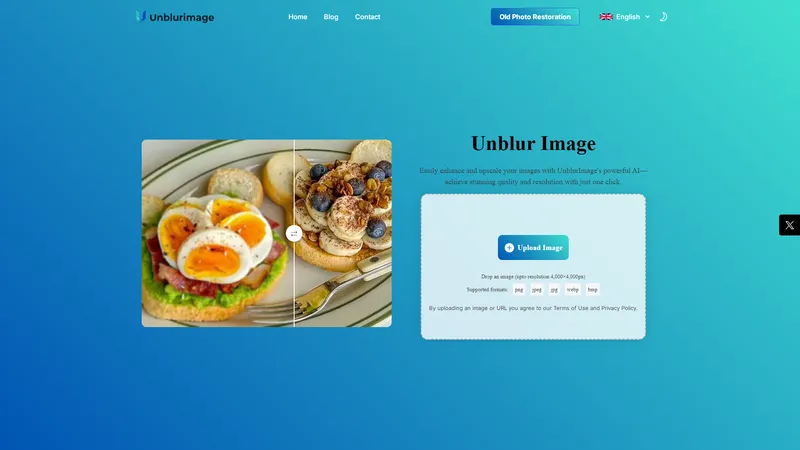
UnblurImage AI is a cutting-edge, AI-powered tool designed to transform blurry images into crystal-clear visuals effortlessly. Whether you're dealing with motion blur, poor focus, or low-resolution images, UnblurImage AI delivers professional-quality results in just a few clicks. The platform is 100% free, requires no sign-up, and is completely ad-free, making it accessible to everyone. With support for multiple image formats and high-resolution processing, UnblurImage AI is ideal for a wide range of use cases, including e-commerce, social media, design projects, and photo printing. Its intuitive interface and advanced AI algorithms ensure that even users with no technical expertise can achieve stunning results. UnblurImage AI is committed to enhancing your visual content, making it sharper, more vibrant, and ready for any application.
Top Features
- AI-Powered Image Unblurring
- High-Resolution Support
- Multi-Format Compatibility
- Flexible Upscaling Options
- Instant One-Click Enhancement
- No Ads or Sign-Up Required
- Old Photo Restoration
- Image Quality Enhancement
Simple Definition of Usecases
- E-commerce Product and Marketing: Unblur product images to showcase details, colors, and textures, enhancing customer trust and sales.
- Image Printing and Enlargements: Ensure printed photos and large-format prints appear sharp and precise, perfect for photo books and posters.
- Design and Visual Projects: Sharpen fine details in graphic designs, digital artwork, and visual presentations for professional results.
- Social Media: Create high-quality, attention-grabbing posts by unblurring and sharpening images for platforms like Instagram and Facebook.
- Personal Photo Enhancement: Restore clarity to blurry vacation photos, family portraits, and other personal images for cherished memories.
User Reviews
Michael Johnson
Photographer
"UnblurImage AI has completely transformed the way I edit my photos. This image enhancement tool is incredibly easy to use, and it delivers fantastic results in just a few clicks. I've recommended it to all my colleagues!"
Michael Johnson
Photographer
"UnblurImage AI has completely transformed the way I edit my photos. This image enhancement tool is incredibly easy to use, and it delivers fantastic results in just a few clicks. I've recommended it to all my colleagues!"
Sarah Lee
Graphic Designer
"As a graphic designer, I often deal with images that need enhancement. UnblurImage AI is my go-to tool for unblurring photos. It saves me so much time and always improves the quality of my work!"
David Smith
Social Media Manager
"I can't believe how effective UnblurImage AI is! It made my blurry vacation photos clear and vibrant. Now my social media posts stand out! Highly recommended for anyone looking to enhance their images quickly."
Emily Garcia
Content Creator
"UnblurImage AI is genuinely a lifesaver! I had several important images that were too blurry to use, and this tool fixed them effortlessly. It's user-friendly and produces amazing results!"
James Wong
Artist
"Being an artist, I often need to retouch photographs of my work. UnblurImage AI has been a fantastic addition to my toolkit. It quickly rescues those images and allows my artwork to shine!"
Frequently Asked Questions
What is UnblurImage AI?
UnblurImage AI is a free, AI-powered tool that unblurs and sharpens images, enhancing their clarity and quality without requiring sign-up or displaying ads.
What does UnblurImage AI do?
UnblurImage AI uses advanced AI algorithms to unblur images, improve details, and enhance overall image quality, making them sharper and more vibrant.
What to expect from UnblurImage AI?
Expect professional-quality image enhancement, support for multiple formats, high-resolution processing, and an ad-free, no-sign-up experience.
How to unblur an image with UnblurImage AI?
Upload your image, choose enhancement options, and download the unblurred image in high quality—all in just a few clicks.
Is UnblurImage AI really free?
Yes, UnblurImage AI is completely free to use, with no hidden costs or subscriptions.
Can I unblur images taken with my smartphone?
Absolutely. UnblurImage AI works with images from any device, including smartphones.
Does UnblurImage AI store my photos?
No, UnblurImage AI processes images instantly without storing any data, ensuring your privacy.
What image formats are supported?
UnblurImage AI supports PNG, JPG, JPEG, WEBP, and HEIC formats.
Can UnblurImage AI handle high-resolution images?
Yes, UnblurImage AI supports high-res photos, ensuring quality at any resolution.
Is there a file size limit?
UnblurImage AI can handle most file sizes, though very large files may take slightly longer to process.
Related AI Tools
Frequently Asked Questions
What is MaoMaoYu Top4 AI Tools Directory?
Top 4 AI — '4' means 'For', MaoMaoYu Top For AI Tools Directory - top4ai.com is building an ai tools directory that helps you get your favorite ai tools, free ai tools list. It can get best ai writing tools, best free ai tools for writing articles, content at scale ai detector, best ai email marketing tools, ai paraphrasing tools, best ai seo tools, ai study tools, 'pearson' and 'ai' and 'study tools', ai generator tools, ai hashtags generator tools, best ai tools for research, ai art tools, ai music tools, ai video editing tools, ai pair coding tools, ai photo tools, ai tools for detecting photoshopped imagers, best ai tools for start up companies who are researching their market and more here.
How to found your ai tools in MaoMaoYu Top4 AI tools directory?
1. Open top4ai.com.
2. Explore the ai tools in the MaoMaoYu Top4 AI tools directory.
3. Click the ai tools that you need to get the detail and visit it.
What are the main features of MaoMaoYu Top4 AI Tools Directory?
1. Explore a simple definition of AI tools and discover how to fast find the perfect one for your needs. Streamline your workflow with the right AI solution.
2. Intelligent Search Engine: Thinking of what you think, saving you time, saving you trouble
Is it free to submit ai tools to MaoMaoYu Top4 AI Tools Directory?
Yes, it's free currently.
What's the categories list of AI Tools that MaoMaoYu Top4 AI Tools Directory support?
We will support all kinds of AI Tools later. Please wait for a few days.
What's the frequency for the up of AI tools in MaoMaoYu Top4 AI Directory?
The list of AI tools will be updated daily.
Is it support QuillBot, GPT-4o or Sora AI here?
You can get the QuillBot, GPT-4o or Sora AI tool here. Here is the introduction of GPT-4o and Sora video, and you can visit the website of the tools.
Troubleshooting
If the content aren't appearing, try a different browser, clear your cache. If issues persist, contact us at [email protected] | [email protected].
What are the usage rights of the AI tools?
MaoMaoYu Top4 AI Tools Directory is just the AI Directory for AI tools. The usage rights of the AI tools are based on the AI tools' website.