ผู้ช่วย CRM AIผู้ช่วยชีวิตการจัดการงาน AIเครื่องมือผลิตภาพ AIการทำงานร่วมกันของทีม AI
Users of this tool
Students looking to manage their academic and extracurricular networks.Professionals seeking to enhance their personal and professional relationships.Entrepreneurs aiming to expand their business networks.Recruiters managing candidate relationships.Event organizers tracking attendees and speakers.
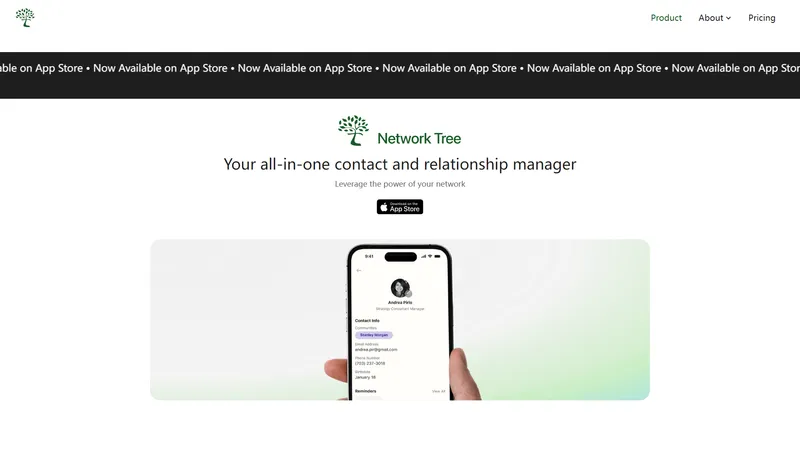
Network Tree is your all-in-one contact and relationship manager designed to help you leverage the power of your network. Whether you're a student, professional, or entrepreneur, Network Tree offers features to organize your contacts, take detailed notes, set reminders, and strategize your outreach. With customizable groups, personalized reminders, and AI-powered suggestions, Network Tree ensures you stay connected and engaged with your network. Available now on the App Store, Network Tree offers pricing plans to meet your needs, from a free Basic plan to Premium and Enterprise options.
Top Features
Organize Contacts: Tag and categorize your contacts into customized groups.
Take Notes: Store detailed records of every interaction for tailored follow-ups.
Set Reminders: Stay connected with reminders for important dates and events.
Strategize Outreach: Craft personalized messages with AI-powered suggestions.
Visualize Communities: Group contacts to visualize and manage your network.
Simple Definition of Usecases
A student attending a networking fair uses Network Tree to tag and categorize new contacts, set reminders for follow-up emails, and take notes on initial conversations.
A professional uses the app to organize industry contacts, set reminders for important meetings, and strategize outreach messages for potential collaborations.
An entrepreneur uses Network Tree to manage business contacts, track interaction history, and set personalized reminders for follow-ups with potential investors.
A recruiter organizes candidate contacts by job role, sets reminders for interview follow-ups, and takes detailed notes on each interaction to tailor future communications.
An event organizer uses the app to manage attendee lists, set reminders for post-event follow-ups, and categorize contacts by event type for future engagement.
Frequently Asked Questions
Q:
What is Network Tree?
A:
Network Tree is a personal networking productivity platform that helps individuals manage their personal relationships and networks.
Q:
How do I import contacts into Network Tree?
A:
You can import contacts by logging in with either Google or Apple ID.
Q:
Is my data secure within Network Tree?
A:
Ensuring the privacy and security of your data is our top priority. We employ advanced encryption methods for data storage and transfer.
Q:
How can I set reminders for follow-ups with contacts?
A:
To set a reminder, go to the contact's profile, select 'Add Reminder,' and choose the date and type of reminder you wish to set.
Q:
How do I customize the grouping of my contacts?
A:
You can customize your contact communities by going to the Communities page.
Pixal3D คือแพลตฟอร์ม AI สำหรับสร้างโมเดล 3D จากภาพ 2D ที่มาพร้อมแนวคิดปฏิวัติวงการอย่าง Pixel Back-Projection หรือการย้อนคืนพิกเซลจากภาพต้นทางเข้าสู่ปริภูมิสามมิติโดยตรง หัวใจสำคัญของเครื่องมือนี้คือการลดช่องว่างระหว่างภาพ 2D กับโมเดล 3D ที่เคยเป็นปัญหาใหญ่ของเครื่องมือ Image-to-3D รุ่นก่อนหน้า นักพัฒนาและ 3D Artist จำนวนมากต้องเผชิญกับผลลัพธ์ที่ดูเหมือนโมเดล แต่รายละเอียดบนใบหน้า ลวดลาย หรือสัดส่วนของวัตถุกลับเพี้ยนไปจากภาพคอนเซปต์อย่างน่าผิดหวัง Pixal3D เข้ามาแก้ pain point นี้ด้วยการสร้างความสัมพันธ์โดยตรงระหว่างทุกพิกเซลบนภาพกับจุดในโมเดลสามมิติ ทำให้ผู้ใช้งานได้รับความเที่ยงตรงในระดับ reconstruction-level fidelity ซึ่งหมายความว่าโมเดลที่สร้างออกมานั้นตรงกับภาพต้นฉบับมากจนแทบไม่มีการจัดแต่งหรือเติมแต่งจาก AI แบบสุ่ม
จุดเด่นที่ทำให้ Pixal3D แตกต่างจากเครื่องมืออื่น ๆ ในตลาดคือความสามารถในการรักษารายละเอียดของภาพต้นทางไว้ได้ครบถ้วน ไม่ว่าจะเป็นสัดส่วนของตัวละคร ซิลูเอตของพร็อพ หรือพื้นผิวที่มีลวดลายซับซ้อน ระบบจะสร้างเรขาคณิตความละเอียดสูงพร้อมกับ PBR Textures ที่ประกอบด้วย Base Color, Normal Map และ Roughness Map ซึ่งพร้อมใช้งานแบบ Ready to use ในเอนจินเกมหลัก ๆ เช่น Unity, Unreal Engine และ Blender เมื่อผู้ใช้งานดาวน์โหลดไฟล์ออกมาเป็นรูปแบบ GLB ก็สามารถนำเข้าไปใช้ในโปรเจกต์ได้ทันที โดยไม่ต้องเสียเวลาทำ Retopology หรือทา UV ใหม่ ลักษณะนี้ทำให้เวิร์กโฟลว์การสร้าง 3D Asset เป็น more efficient ขึ้นอย่างเห็นได้ชัด เพราะลดขั้นตอนที่ต้องใช้ทักษะสูงและเวลามหาศาลลงได้เกือบทั้งหมด
จากมุมมองด้านการวางตำแหน่งเว็บไซต์ Pixal3D ถูกพัฒนาขึ้นโดยนักวิจัยจากมหาวิทยาลัยชิงหัวและ TencentARC และได้รับการตอบรับให้ตีพิมพ์ในงานประชุมวิชาการระดับโลกอย่าง SIGGRAPH 2026 ทำให้จุดยืนของเว็บไซต์ไม่ได้เป็นเพียงเครื่องมือ AI ทั่วไป แต่เป็นงานวิจัยเชิงลึกที่ผ่านการพิสูจน์ทางวิชาการ ตัวโมเดลยังเป็นโอเพนซอร์ส บน GitHub และ Hugging Face ทำให้นักวิจัยหรือนักพัฒนาที่ต้องการปรับแต่งระบบสามารถเข้าถึงโค้ด น้ำหนักโมเดล และสคริปต์สำหรับการทดลองได้อย่างอิสระ ขณะเดียวกันก็มี Gradio Web Demo ที่เปิดให้ทุกคนทดลองใช้งานผ่านเบราว์เซอร์ได้ทันทีโดยไม่ต้องติดตั้งอะไร จึงเหมาะทั้งกับมืออาชีพที่ต้องการควบคุมไปป์ไลน์ด้วยตัวเอง และบุคคลทั่วไปที่อยากลองสร้างโมเดล 3D จากภาพเพียงไม่กี่ภาพ
กลุ่มเป้าหมายหลักของ Pixal3D คือ 3D Artist, Technical Artist, นักพัฒนาเกม, นักพัฒนาแอปพลิเคชัน AR/VR หรือ Spatial Computing รวมถึงนักวิจัยด้าน Computer Vision สตูดิโอเกมขนาดเล็กถึงกลางจะได้รับประโยชน์จากความเร็วในการสร้างต้นแบบ 3D Asset เพราะสามารถเปลี่ยนคอนเซปต์อาร์ตหลายสิบภาพให้กลายเป็นโมเดลต้นแบบได้ภายในไม่กี่นาที ขณะที่สตูดิโอขนาดใหญ่สามารถใช้ Pixal3D เป็นเครื่องมือช่วยผลิตสินทรัพย์จำนวนมากได้ เพราะระบบรองรับทั้งการป้อนภาพเดียวและภาพหลายมุมมอง หากผู้ใช้งานมี character turnaround หรือภาพถ่ายวัตถุจากหลายด้าน Pixal3D จะรวมข้อมูลจากทุกมุมเพื่อสร้างโมเดลที่มีความถูกต้องรอบด้านมากยิ่งขึ้น ลดปัญหาส่วนที่มองไม่เห็นในภาพหลัก และช่วยเติมเต็มรายละเอียดที่ถูกบดบังได้อย่างชาญฉลาด
ในแง่ของประสบการณ์ผู้ใช้หรือ User Experience Pixal3D ถูกออกแบบให้เข้าถึงง่ายและไม่ซับซ้อน หน้าแรกของเว็บไซต์สื่อสารด้วยภาษาที่ตรงไปตรงมา อธิบายว่าผู้ใช้จะได้อะไรจากเครื่องมือนี้บ้าง ตั้งแต่การอัปโหลดภาพอ้างอิง การสร้างเรขาคณิตและพื้นผิว ไปจนถึงการดาวน์โหลด GLB Asset ขั้นตอนทั้ง 4 ขั้นตอนถูกนำเสนออย่างกระชับ ทำให้ผู้ที่ไม่เคยใช้ AI สร้างโมเดล 3D มาก่อนเข้าใจได้ในครั้งเดียว เว็บไซต์ยังมีลิงก์ไปยัง Playground ให้ทดลองได้ฟรีทันที ไม่ต้องสมัครสมาชิกหรือจ่ายเงินก่อน จึงเป็น Practical อย่างมากสำหรับนักออกแบบที่ต้องการตรวจสอบคุณภาพของเครื่องมือก่อนนำไปใช้ในโปรเจกต์จริง
ระบบการสร้างโมเดลของ Pixal3D ทำงานด้วยสถาปัตยกรรม Trellis.2 Backbone ซึ่งเป็นเวอร์ชันปรับปรุงล่าสุดที่เปิดเป็นโอเพนซอร์ส มีประสิทธิภาพด้านความเร็วและคุณภาพสูงกว่าสถาปัตยกรรมรุ่นก่อน โดยกระบวนการสำคัญคือการสร้าง 3D Feature Volume จากภาพ 2D ผ่าน Explicit Back-Projection ซึ่งทำให้โมเดลถูกสร้างในมุมมองที่ตรงกับภาพต้นทาง ไม่ใช่การคาดเดารูปร่างใน Canonical Space แบบเครื่องมือทั่วไป ผลลัพธ์คือพื้นผิวด้านหน้าที่มองเห็นตรงกับภาพ 1:1 และยังให้มิติความลึกที่สมจริง ขจัดปัญหาพื้นผิวบิดเบี้ยวหรือการวางตำแหน่งผิดพลาดซึ่งพบได้บ่อยใน AI Image-to-3D รุ่นก่อนหน้า
การออกแบบให้รองรับ Multi-View Aggregation ถือเป็นอีกหนึ่งความสามารถที่เหนือกว่า เพราะ Pixal3D ไม่ได้จำกัดอยู่ที่การป้อนภาพเดียวเท่านั้น หากมีภาพหลายมุม ระบบจะรวม Feature Volume ที่ผ่าน Back-Projection จากแต่ละมุมเข้าด้วยกัน ช่วยเพิ่มความแม่นยำของรูปทรง 360 องศา และเติมเต็มบริเวณที่ถูกบดบังได้อย่างเป็นธรรมชาติ สำหรับงานที่ต้องการความสมบูรณ์รอบด้าน เช่น การสร้างตัวละครสำหรับเกมหรือแอนิเมชัน การใช้ภาพหลายมุมจะช่วยลดเวลาในการแก้ไขโมเดลในซอฟต์แวร์ 3D ลงได้มาก
จุดเด่นด้านการใช้งานจริงอีกประการหนึ่งคือความสามารถในการสังเคราะห์ฉากหรือ Scene Synthesis ระบบมีโมดูลที่สามารถแยกโครงสร้างของภาพที่ซับซ้อนออกเป็นวัตถุแต่ละชิ้น แล้วสร้างเป็นฉาก 3D ที่มีการแยกวัตถุออกจากกันอย่างเป็นระเบียบ ไม่ใช่เพียงโมเดลชิ้นเดียวรวมกันเป็นก้อน จึงเหมาะสำหรับการทำ Environment Prototyping หรือการสร้างฉากต้นแบบอย่างรวดเร็ว นักออกแบบสามารถป้อนภาพอาคาร ห้อง หรือฉากที่มีองค์ประกอบหลายอย่างแล้วให้ AI จัดเรียงเป็นฉาก 3D เบื้องต้นซึ่งช่วยประหยัดเวลาได้มหาศาล
สำหรับนักพัฒนาและนักวิจัย Pixal3D ยังมีระบบนิเวศที่เปิดกว้าง ทั้งโค้ดต้นฉบับที่เผยแพร่บน GitHub โมเดลที่โฮสต์บน Hugging Face และเอกสารประกอบคำแนะนำ พร้อมสคริปต์สำหรับ Inference ซึ่งทำให้การนำเครื่องมือนี้ไปผูกกับไปป์ไลน์ของทีมนั้นสามารถทำได้อย่าง Seamless ไร้รอยต่อ นักพัฒนาสามารถเรียกใช้โมเดลผ่าน API หรือสคริปต์ในสภาพแวดล้อมของตนเอง ทำให้ไม่จำเป็นต้องพึ่งพาเว็บอินเทอร์เฟซเสมอไป และยังสามารถปรับแต่งหรือฝึกต่อยอดเพื่อให้ตรงกับความต้องการเฉพาะของโปรเจกต์ได้อีกด้วย
ในภาพรวม Pixal3D คือคำตอบสำหรับคนที่ต้องการความ Efficient และแม่นยำในการเปลี่ยนภาพ 2D ให้เป็นสินทรัพย์ 3D คุณภาพสูง ตัวเครื่องมือช่วยลดขั้นตอนที่ซับซ้อนและใช้เวลานาน เช่น การสร้าง Mesh การทำ UV การ Bake Texture และการปรับ材质ต่าง ๆ ให้เหลือเพียงการอัปโหลดภาพ รอ AI ประมวลผล แล้วดาวน์โหลดไฟล์พร้อมใช้ บนหน้าเว็บยังมีการแสดงความคิดเห็นจากผู้ใช้จริงในสามกลุ่มอาชีพ ได้แก่ Senior Tech Artist จากสตูดิโอพัฒนาเกม, Indie Developer ที่ใช้เครื่องมือนี้ในงานเดี่ยว และ AI Researcher ที่ศึกษาการสร้างภาพสามมิติ ซึ่งต่างยืนยันตรงกันว่าคุณภาพของการรักษารายละเอียดของ Pixal3D เหนือกว่าเครื่องมืออื่นที่เคยใช้ บริบทเหล่านี้ทำให้ Pixal3D เป็นมากกว่าเครื่องมือ AI ทั่วไป แต่เป็นโครงสร้างพื้นฐานสำคัญสำหรับยุคที่เนื้อหา 3D กำลังขยายตัวอย่างรวดเร็ว
สำหรับผู้ที่ต้องการเริ่มต้นใช้งาน ไม่จำเป็นต้องมีความรู้เชิงเทคนิคลึกซึ้ง เพียงเข้าไปที่หน้า Playground ของ Pixal3D แล้วอัปโหลดภาพคอนเซปต์หรือภาพถ่ายที่ต้องการแปลงเป็นโมเดล ระบบจะแสดงตัวอย่างผลลัพธ์ภายในระยะเวลาอันสั้น ผู้ใช้สามารถปรับแต่งมุมมอง และดาวน์โหลดไฟล์ GLB ที่มี PBR Material ครบถ้วนได้ทันที ความง่ายและความรวดเร็วของกระบวนการนี้ทำให้ Pixal3D เหมาะสำหรับนักออกแบบที่ต้องการตรวจสอบไอเดียก่อนผลิตงานจริง รวมถึงทีมผลิตที่ต้องการสร้าง Asset จำนวนมากในเวลาจำกัด การใช้ Pixal3D จึงไม่เพียงช่วยลดเวลา แต่ยังช่วยให้ทีมสามารถโฟกัสกับงานที่ต้องใช้ความคิดสร้างสรรค์และวิจารณญาณของมนุษย์ได้มากขึ้น นับเป็นก้าวสำคัญของการนำ AI มาเสริมพลังให้กับอุตสาหกรรมคอนเทนต์สามมิติอย่างแท้จริง
รูปภาพเป็นโมเดล 3D
Free
Frequently Asked Questions
What is MaoMaoYu Top4 AI Tools Directory?
Top 4 AI — '4' means 'For', MaoMaoYu Top For AI Tools Directory - top4ai.com is building an ai tools directory that helps you get your favorite ai tools, free ai tools list. It can get best ai writing tools, best free ai tools for writing articles, content at scale ai detector, best ai email marketing tools, ai paraphrasing tools, best ai seo tools, ai study tools, 'pearson' and 'ai' and 'study tools', ai generator tools, ai hashtags generator tools, best ai tools for research, ai art tools, ai music tools, ai video editing tools, ai pair coding tools, ai photo tools, ai tools for detecting photoshopped imagers, best ai tools for start up companies who are researching their market and more here.
How to found your ai tools in MaoMaoYu Top4 AI tools directory?
1. Open top4ai.com.
2. Explore the ai tools in the MaoMaoYu Top4 AI tools directory.
3. Click the ai tools that you need to get the detail and visit it.
What are the main features of MaoMaoYu Top4 AI Tools Directory?
1. Explore a simple definition of AI tools and discover how to fast find the perfect one for your needs. Streamline your workflow with the right AI solution.
2. Intelligent Search Engine: Thinking of what you think, saving you time, saving you trouble
Is it free to submit ai tools to MaoMaoYu Top4 AI Tools Directory?
Yes, it's free currently.
What's the categories list of AI Tools that MaoMaoYu Top4 AI Tools Directory support?
We will support all kinds of AI Tools later. Please wait for a few days.
What's the frequency for the up of AI tools in MaoMaoYu Top4 AI Directory?
The list of AI tools will be updated daily.
Is it support QuillBot, GPT-4o or Sora AI here?
You can get the QuillBot, GPT-4o or Sora AI tool here. Here is the introduction of GPT-4o and Sora video, and you can visit the website of the tools.
Troubleshooting
If the content aren't appearing, try a different browser, clear your cache. If issues persist, contact us at [email protected] | [email protected].
What are the usage rights of the AI tools?
MaoMaoYu Top4 AI Tools Directory is just the AI Directory for AI tools. The usage rights of the AI tools are based on the AI tools' website.